I have read all the prior posts, but I cannot find “Server” under Settings. I believe I am connected to my “server” which is my laptop. HELP?
What Information are you looking for and also are using Plex.tv or a Plex client. I have my Plex server running on macOS I am just not clear what you are doing just yet to help more.
The menu structure has changed again.
Once you click on the Settings link (or the ‘tools’ icon at the top), you’ll see all settings together on the left side menu. The server-relevant settings are further down, under a heading which calls out the ‘friendly name’ of your server.
If you have still trouble finding the server settings, please post a screenshot of what you see, after having clicked on Settings.
1 Like
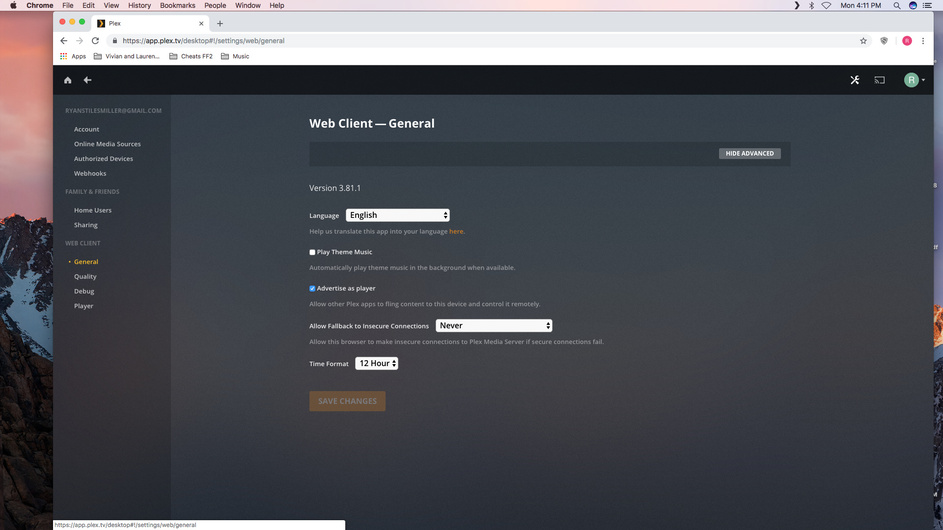

In your case, I’d say you either don’t have setup a server at all
or
you used to use a different plex account. So that your Plex server is still using a different account than what your web browser is logged into.
If it is the latter, this procedure should be able to rectify this and bring your server into your currently used account:
https://support.plex.tv/articles/204281528-why-am-i-locked-out-of-server-settings-and-how-do-i-get-in/
1 Like
[screenshot removed]
Don’t know what to do here?
I am no Mac expert, but I assume you really need to use a different editor.
I was told this one can be used for this task: https://www.barebones.com/products/textwrangler/
I was also told that you can achieve the same by doing this:
- stop plex
- make a backup copy of the plist file
- enter these 4 commands in a terminal window: (press Enter after each line)
defaults delete com.plexapp.plexmediaserver PlexOnlineHome
defaults delete com.plexapp.plexmediaserver PlexOnlineMail
defaults delete com.plexapp.plexmediaserver PlexOnlineToken
defaults delete com.plexapp.plexmediaserver PlexOnlineUsername
Afterwards, reboot the machine. (not necessary with this method)
Works Great! I just copied and pasted everything into terminal and here are my results. Also could be copied one line at a time. Thank you! Thank you!

I did need to reboot. After the above process I got an error can’t locate libraries. Still cannot find server settings.
How would I know if I don’t have a server set up at all? The instruction link below is for being “locked out.” I do not have that error. Thank you in advance.

that screen shot the sever settings below the server name. the unavailable one is just likely an old install.
go to https://app.plex.tv/desktop#!/settings/devices/pms and you will see the two servers with the same name. the one that is older is likely the unavailable on you can remove by clicking the red X on the block
Thank you!!!
This topic was automatically closed 90 days after the last reply. New replies are no longer allowed.
