Can’t sort library Randomly in iOS

Server Version#: 1.31
Player Version#: 8.15 (via TestFlight)

You can’t access the sort Randomly option in Library mode on iOS. You can pull the list up and see it but it bounces back down and you can’t tap on it.

This was reported in November but that topic closed after 90 days.

Also reported on Reddit by other users. (Not me)

What build number are you on? I’d like to try and reproduce.

Version 8.15 (5092)

iPhone 12 Pro Max, iOS 16.3

Ok I’m now using 8.16 (5285) I actually got it to work for a moment but only when the tiny viewer appeared at the bottom of the screen.

I sorted it by Randomly in both directions.

However once I closed that tiny viewer I can’t scroll to the bottom of the list it just bounces back down before you can tap it.

If it’s not random, is it sorting some other way? Can you provide a screenshot?

When I am able to tap “Randomly” it is definitely sorting randomly. The issue is that you can’t scroll down the sort list to be able to tap on “Randomly”. I can sort it any other way from Bitrate on up the list.

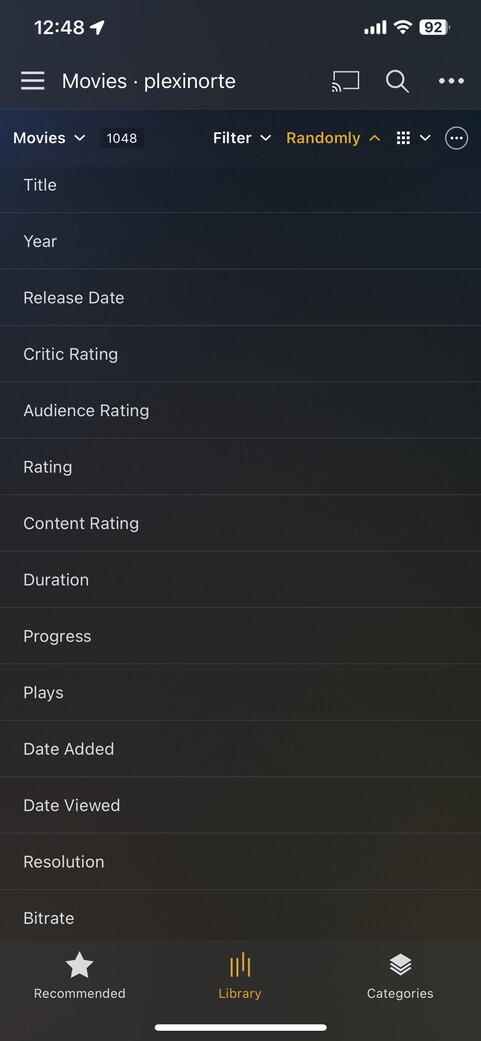
When the tiny viewer isn’t there you pull the sort menu up and it bounces back. (So this screenshot doesn’t show the Randomly option cause it won’t stay on the screen)

When the tiny viewer is there and you pull the sort menu up it stays and I can tap Randomly. (So in this screenshot the Randomly appears since it stays when I pull it up)
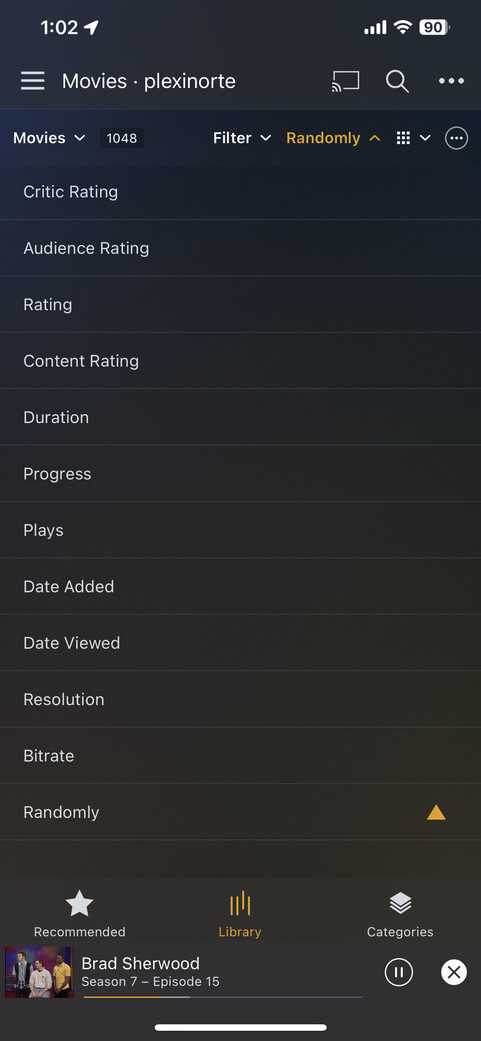
Note: I don’t know if that little player is called the tiny viewer. But you see it there at the bottom of the screenshot.

Ah ok, that makes more sense. Thanks.

This topic was automatically closed 90 days after the last reply. New replies are no longer allowed.
