So, @ChuckPa helped me get to the bottom of this in a number of DMs. i’ll summarize here so anyone else can find it later, if it is of any use to others.
- so the DNS settings turned out to be nothing. eventually found that things were failing with any combination of DNS settings, so this was just a distraction.
- i figured i’d try to access my home plex server directly, without going through plex.tv. just to see what happens.
**type in http://mypublicip:32400 into address bar of internet browser. it works just fine, brings me to the main page of plex server, though chrome complains that the connection is not secure. so, it works, but this isn’t how this is supposed to work.
** from the web client debug logs, it said it was connecting to https://dashed-ip.hash.plex.direct:32400/media/providers.
so, i try to connect to this from chrome, without the /media/providers portion. get a site not found error… wierd. nslookup of dashed-ip.hash.plex.direct returns the proper public IP, so its curious this did not work.
** next, try https://dashed-ip.hash.plex.direct (without the 32400 port) … and look at this…
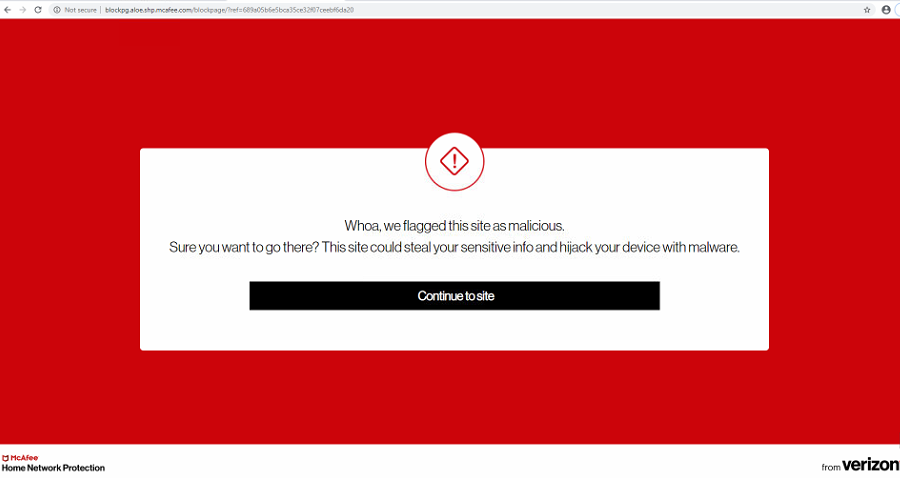
wtf is this???
turns out, this is something called McAfee Home Network Protection. Some kind of BS security thing you can turn on that “protects” your network. there is something in there that it finds plex to be malicious and blocks it.
clicking the ‘continue to site’ button allows it through (though this is not a valid URL, so it leads to a 404). BUT, the rest of Plex now works correctly… it seems like it was added to a whitelist or something like that.
i wasn’t sure if this would be permanent or not, so i looked into disabling this thing entirely. It seems this is only done via the My Fios app from Verizon. Which is weird, because my parents didn’t have this app installed, so i’m not sure how this ‘feature’ got turned on in the first place.
the search led me here:
there are lots of posts about this being finicky to disable. but, following these instructions, i was able to get it disabled.
“into the My Fios app and go back to Account & Settings> Security Settings> Home Network Protection. It is normal to see the spinner for a few seconds. Click the toggle & then ok the message. Now HNP should be turned off.”
Plex is now working great on all devices at my parents house!
thanks again to @ChuckPa for helping me track this down!
