Server Version#: 1.18.5.2309
Player Version#: not relevant, issue on server, player works fine
<If providing server logs please do NOT turn on verbose logging, only debug logging should be enabled>
since a few weeks i cannot add any movie files to the libraries, it sync but it does show empty library. i tried to create new libraries and same effect. also another issue is that i cannot modify or add any poster movie on existing ones. had a look at the logs and it looks that there are a few errors. also tried to recover, rebuild the db, but the issues persists. i can give remote access to my OSX (Mac) Plex server. any help or tips is greatly appreciated!
Plex Media Server Logs_2025-05-12_19-46-15.zip (5.1 MB)
May 12, 2025 18:09:02.159 [0x700004e4c000] ERROR - Failed to commit transaction (../Library/MetadataItem.cpp:1002) (tries=1): Cannot commit transaction. SQL logic error
May 12, 2025 18:09:02.574 [0x700004e4c000] ERROR - SQLITE3:(nil), 1, statement aborts at 1: [COMMIT] cannot commit - no transaction is active
May 12, 2025 18:09:02.574 [0x700004e4c000] ERROR - Failed to commit transaction (../Library/MetadataItem.cpp:1002) (tries=2): Cannot commit transaction. cannot commit - no transaction is active
May 12, 2025 18:09:03.408 [0x700004e4c000] ERROR - SQLITE3:(nil), 1, statement aborts at 1: [COMMIT] cannot commit - no transaction is active
May 12, 2025 18:09:03.408 [0x700004e4c000] ERROR - Failed to commit transaction (../Library/MetadataItem.cpp:1002) (tries=3): Cannot commit transaction. cannot commit - no transaction is active
May 12, 2025 18:09:04.068 [0x700004e4c000] ERROR - SQLITE3:(nil), 1, statement aborts at 1: [COMMIT] cannot commit - no transaction is active
May 12, 2025 18:09:04.068 [0x700004e4c000] ERROR - Failed to commit transaction (../Library/MetadataItem.cpp:1002) (tries=4): Cannot commit transaction. cannot commit - no transaction is active
May 12, 2025 18:09:04.398 [0x700004e4c000] ERROR - SQLITE3:(nil), 1, statement aborts at 1: [COMMIT] cannot commit - no transaction is active
May 12, 2025 18:09:04.398 [0x700004e4c000] ERROR - Failed to commit transaction (../Library/MetadataItem.cpp:1002) (tries=5): Cannot commit transaction. cannot commit - no transaction is active
May 12, 2025 18:09:05.056 [0x700004e4c000] ERROR - SQLITE3:(nil), 1, statement aborts at 1: [COMMIT] cannot commit - no transaction is active
May 12, 2025 18:09:05.056 [0x700004e4c000] ERROR - Failed to commit transaction (../Library/MetadataItem.cpp:1002) (tries=6): Cannot commit transaction. cannot commit - no transaction is active
There are multiple items to address.
First, you are running a five year old version of Plex Media Server, from January 2020. Be aware that it will not work with the current mobile apps or the AppleTV beta app. In the future, it will not work with additional apps as they are updated by Plex.
To work with the new mobile apps, the minimum version of Plex Media Server is 1.41.2.
Second, your system is running MacOS 10.12.6. Plex dropped support for MacOS 10.12 in March 2023.
The minimum supported version of MacOS is 10.13 High Sierra.
Third, your Plex Media Server has database problems (error messages above). That is why you cannot add, modify, etc. media.
Question: Can your system be updated to MacOS 10.13 or later?
If it cannot, you should start making plans to update your hardware. As mentioned above, the new Plex clients will not work with old versions of Plex Media Server.
Suggested Initial Steps:
1. Disable verbose logging.
Verbose adds too much information to the log files. It can cause them to wrap very quickly, losing desired information.
Settings → Server_Name → General + Show Advanced
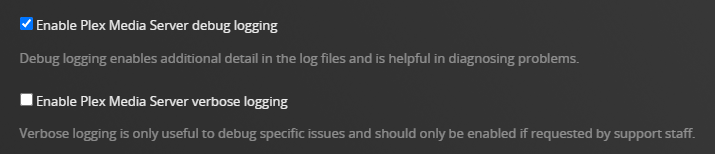
2. Reboot your Mac.
3. If possible, restore a backup copy of the Plex Database
See these support articles: Restore a Database Backed Up via ‘Scheduled Tasks’ and Where is the Plex Media Server data directory located?.
Do you have a database backup that pre-dates your problems?
If so, restore the database using the procedure in the support article.
Then start Plex Media Server and see if you can add media, modify posters, etc.
4. Write back, Pull new log files
Report back with an update - could you restore the db, is Plex working, etc. Also, attach a new set of server log files.
Hello,
thanks a lot for your great support and detailed answers. Actually yes, I am fully aware that I am running a very old version of all the elements, but I just wanted to keep alive the running installation before building my new home cinema system, which is still under construction, so I thought I am going to survive a few months with the old one; but it looks like it came to his end.. I will try to restore an old DB and let’s se what happens. Thanks a lot again!
