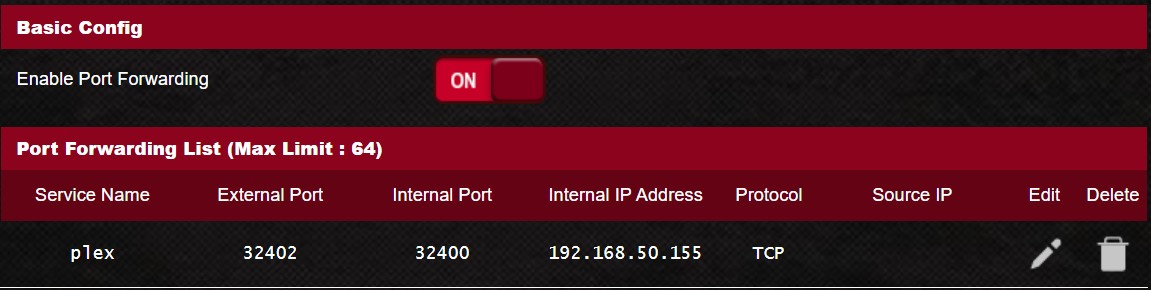
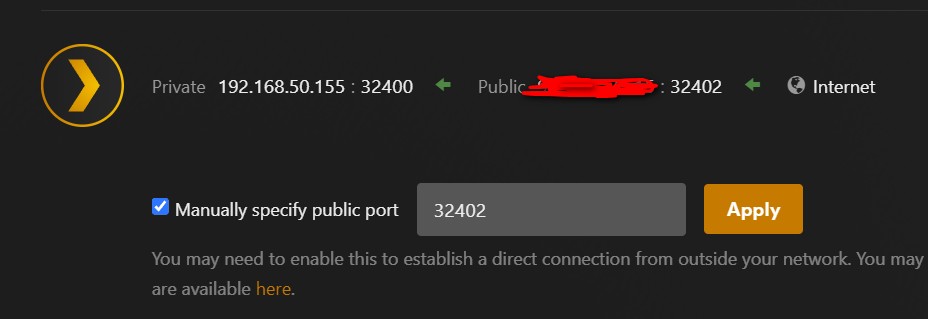
I have static DHCP for my server IP, when I change Plex to use another port, say 32402 and open that port in the router I am not accessible.
I wanted to use another port other then the default since Malwarebytes is constantly alerting me about blocked IPs, I guess port scanners scanning the default 32400 port?
What you are doing under Settings - Server - Remote access
is to change the port number which is communicated to remote Plex clients.
It is your own responsibility to change the port forwarding in your router settings so that the different port number is used on the WAN interface of the router.
(you cannot change the internal port number 32400 in the local network)
SO when I change the port it changes both WAN and LAN I guess. I just wanted to use something else for the WAN since so much activity on 32400.
Plex does say:
“WAN/External Port: Port 32400 (TCP) is default, but you can generally use any available port in the 20,000 to 50,000 range” but when I change it in Plex and my router I get not accessible.
Then please consult the manual of your router again or check some websites for guides on how to create portforwardings with your particular router model.
There are even router models which don’t make it clear in thier user interface which is the WAN and which is the LAN port number. Maybe you such a router.
Make absolutely sure to create a port forwarding rule which goes from WAN:[public port number] --> IP_Of_Server:32400
with [public port number] being the same number that you put into the Plex settings.
The internal port number must always be 32400. You cannot change it.
I went through this as well and after talking with MWB and other security providers, changing port is pointless.
If a hacker finds a vulnerability in Plex/your security, they can easily scan all available ports.
For the effort you spent, you achieve nothing.
Remember, attackers may be looking for Plex servers on Port 32400, but moving it to another port will buy you, at most, a few minutes as they scan open ports.