Hello all,
I’m having some trouble with the porting forwarding rules: I change the default port from 32400 to XXXX for my server. On my router, I then open the firewall port XXXX and forward it to my NAS.
The issue is that when I do only this, the Plex says it can’t be reached from the outside. It only works when I also open port 32400 on my router…
So the question is: what is the point of declaring a new port if I also have to open 32400 on the router?
Thanks in advance for your help,
Best regards,
Marc
You need to tell Plex which port number you have used.
It cannot sense that on its own.
Instead, it will continue to try and establish a port forwarding of its own automatically. If the router refuses to do that (because UPnP has been disabled), Plex will tell you that remote access is not operational.
https://support.plex.tv/articles/200289506-remote-access/
Manually specify port
If the automatic port configuration for connecting to plex.tv fails (or if you otherwise simply prefer to set up your port forward manually), you can manually specify the port using this setting. Our “Troubleshooting” article (linked below) has more details about how to set up a manual port forward.
Hello and thanks for your reply.
I don’t think I was clear in my question.
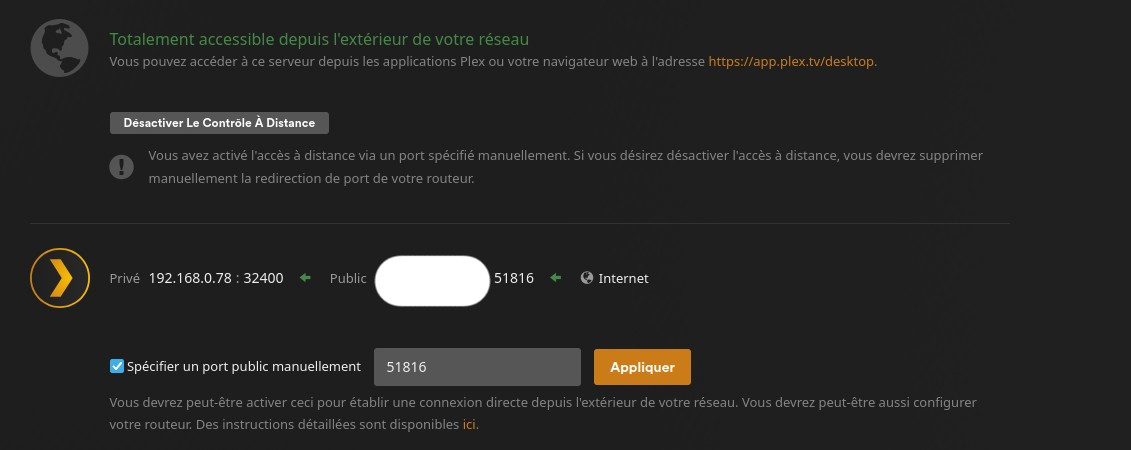
I did follow up the guide you linked, and I did went to Settings > Server > Remote Access and I specified a new port, let’s say port 5555. Then I went to my router and I forwarded port 5555 to my Synology, where my server is actually running (UPnP disabled).
The problem is that it didn’t work, I had a red cross icon and the message “Not available outside your network”.
As the article says, I then enabled UPnP and it all works. I had the green arrow and the message “Fully accessible outside your network”. At this time I wanted to know why UPnP worked and not my manual port forwarding, which works on all my other services…
I went to my router to see what UPnP had done, and it opens both 5555 and 32400 ports. I then disabled UPnP, went to my router and manually opened both ports 5555 and 32400, and Plex was able to connect (green arrow and the message “Fully accessible outside your network”).
That’s the goal of my question: why open the 32400 port is mandatory, even if I specified another port on Settings > Server > Remote Access?
My goal when changing the 32400 was to try to gain some security by using a “non common” port for Plex (to avoid possible port scanning tools), but if I have to open the 32400 port anyway, what’s the point?
I hope I could explain better my question…
Thanks again for the help,
Best regards,
Marc
There’s no need to open port 32400 on the WAN interface of the router.
But the port forwarding must go from 5555 on the WAN interface to 32400 on the LAN interface.
NOT from 5555 WAN to 5555 LAN.
@muaddibii
Edit: If enabled, check the Synology firewall to ensure it passes TCP/32400. For testing purposes, you can temporarily disable it.
Edit: It is not necessary to disable UPnP in your router. You may wish to do so for security or other reasons, but it is not necessary to do so for Plex remote access. Checking the box to manually specify the port in Settings → Remote Access tells PMS to use that specific port instead of UPnP.
Here’s an example that may help.
Port Forward in Asus router
- Service Name: Can be anything.
- External Port: Must match port in PMS Settings → Remote Access
- Internal Port: ALWAYS 32400
- Internal IP Address: The IP address of the Plex server.
- Protocol: TCP
Plex Media Server: Settings → Remote Access
- Must check box to manually specify public port.
- Port number must match External Port in router port forwarding statement.

Hello and thanks all for the replies.
I just did a test, it simply doesn’t work without open the port 32400 on my firewall. Here are my settings:
On my router I have 2 settings:
-
port forwarding, that I do what you say: wan 51816 to lan 32400
-
firewall: if I open only 51816 on my firewall, my Plex can’t connect:
-
Plex result:
But if I leave the same port forwarding rule, but opens my firewall to allow both ports, Plex connect:
Does your router have this firewall setting? As I said, when enabling UPnP, Plex demands both ports to be opened on the firewall, even if the port forwarding setting is set to only the custom one…
Which device’s firewall do you actually mean when you say “my firewall”?
There are several:
- your router’s
- your NAS’s
- your desktop computer’s
For the purpose of port forwarding, we are only concerned with the router’s firewall.
Your NAS’s firewall should have been opened automatically by installing Plex server. As proper operation of all Plex features requires quite a few more ports to get opened (on the local network).
One thing to keep in mind:
Changing the public port number involves the plex.tv backend and its databases.
It is possible that your test results are only reliably valid after a certain amount of time has passed, so that all caches of the ionvolved systems have been flushed.
You need to account for this a give it plenty of time after changing one of the settings.
When I say firewall I’m referring to my router’s firewall. On my NAS the 32400 port is opened.
But what I don’t understand is that my Plex has been using port 51816 for a while now, so this change should already be effective on your backend and databases, non?
The change must be communicated to all the plex apps which are trying to access your server. They will not fetch that kind of information from plex.tv every 5 seconds. That would overwhelm the systems.
The best way to trigger such an update is
- Refresh the web app in your browser
- all other plex client types: Either “Switch User” or sign Out and back In to your plex account.