Channel icons does not show in guide

Hi,

I use tvhProxy to interface Raspberry Pi TV HAT and Tvheadend to Plex.

I don’t update constantly, so maybe the issue I’m reporting raised from some previous version, not necessary the latest.

Problem is that channel icons are now empty after update, for several days, and I cannot recognize which channel is which.

In xmltv file reported by Tvheadend these images are accessible in the browser and elsewhere.

For example TVHClient on Android, shows channel icons fine:

While in Plex channel icons are blank:

It is the same for Plex media player and newest Plex app, both on Windows and OSX.

I browsed server logs, but there doesn’t seem to be anything related to channel icons.

Please let me know how to remedy

Thanks

1 Like

Ok, in a lack of response, I’d suggest:

If icons cannot be read, just write the name of the channel with letters, which is what is happening if tuner does not provide icons. That way at least we can see which channel is which.

You know that tvh is something which is not officially supported by Plex? You might try to reach out to other users in thread of the plug-in you use for accessing your tvh host

Edit: Second thought, the issue might lie within your xmltv file and how Plex treats it. While I was fiddling with xmltv guide data, I also had the impression that this is not something which is well supported within Plex. It works, but issues are often not addressed.

Do you feed the xmltv file manually into Plex or is this somehow provided by tvh plugin?

Yes, I’m aware that thvProxy approach in not officially supported.

Basically, tvhProxy exposes several endpoints through flask app to mimic hdhomerun tuner.

It works nicely, but my issue is that icons stopped showing after the update.

For completeness I wanted to post about the solution, which I found today accidentally.

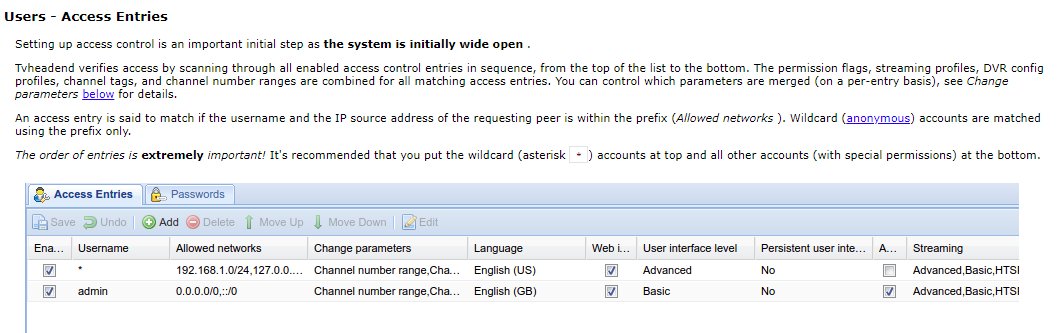
The problem turned out to be that my users table was empty and I didn’t had defined anonymous user:

After adding anonymous (and admin) user, channel icons automatically showed, which suggests that the problem was with permissions.

Hi, I’ve gone down the road installing tvhProxy, but when getting to:

pip install setuptools --upgrade
pip install wheel
pip install -r requirements.txt

I hit a wall stating that python2.7 is no longer supported

pip install -r requirements.txt

will not install.

Is there an update i’m missing?
Thanks

Maybe install python3 instead?

This topic was automatically closed 90 days after the last reply. New replies are no longer allowed.