I’m having the same issue as well now, previously working fine before updating.
Now I get error h4 for most of my Blu-ray’s.
Contemplating on switching to a competitor if this isn’t fixed.
I’m having the same issue as well now, previously working fine before updating.
Now I get error h4 for most of my Blu-ray’s.
Contemplating on switching to a competitor if this isn’t fixed.
Well, this keeps getting better… I’ve now lost the ability to stop chromecasting - playback stops on the Plex Android app when I disconnect from Chromecast but the TV / device just keeps on playing no matter what I do on the app: reconnect, disconnect again, close app, force stop, nothing stops playback except using the Home app to directly stop casting on the Chromecast device. Seems like the Plex app is not sending the disconnect signal (because the Home app has no trouble disconnecting Plex, so it’s not the Chromecast).
More regressions on a regression-filled app…
I too have been getting this error for a month or 2, I forget how long. It only happens when starting to stream to chromecast, and doesn’t always happen, but when it does, I cancel it, press to play it again and it works, never needed a 3rd try. Looking at past posts, I don’t expect a fix. Thought of getting a plex pass, but I think I’ll hold off now.
Same here. I’m on Android 8.7.0.20568-beta but it also appears to happen with Android 8.6.0 at least. Everything connects fine and plays/pauses fine, but if I try to disconnect, it just stays on the screen. I’m also using Gen2 Chromecasts. Like you, going to Home allows me to disconnect. Likewise, connecting with something like Netflix will override Plex and then I can disconnect Netflix. Plex is buggered again and will not release casting.
Registering a similar experience.
Specifically
Launch Plex, cast (connects), play media - “sorry!”. Have to force quit Plex app, start the media on phone, then cast. Phone Plex app disconnects after a bit. But playback can be controlled via voice on a Google home and via Google home app… just not Plex app. Have to force quit Plex app to regain from-Plex-app cast connection but wait first be sure to start the media so I won’t have to force quit again.
Still getting this issue with Android 8.7.0.20692-beta. Can still load file if I disconnect and reattempt. It doesn’t happen every time.
For anybody having an h4 or other playback or transcoder errors, in the info or XML for your media, does the audio stream have a bitrate value?
For example, here’s one that does:

<Stream id="772572" streamType="2" selected="1" default="1" codec="aac" index="1" channels="6" bitrate="231" language="English" languageCode="eng" audioChannelLayout="5.1" profile="lc" samplingRate="48000" streamIdentifier="2" displayTitle="English (AAC 5.1)" extendedDisplayTitle="English (AAC 5.1)"/>
Here’s one that doesn’t:
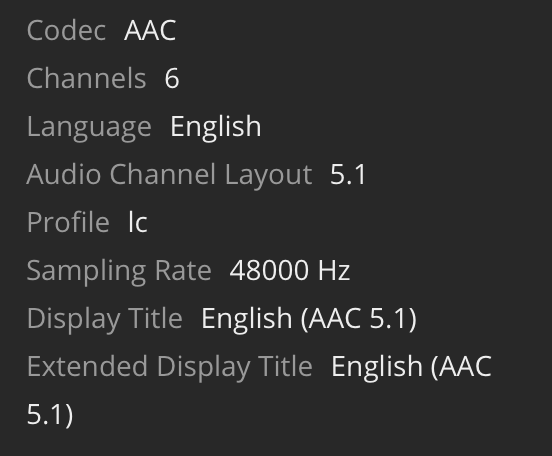
<Stream id="772542" streamType="2" selected="1" default="1" codec="aac" index="1" channels="6" language="English" languageCode="eng" audioChannelLayout="5.1" profile="lc" samplingRate="48000" displayTitle="English (AAC 5.1)" extendedDisplayTitle="English (AAC 5.1)"/>
Mine have bitrate info. My issue isn’t it shows error and won’t play. It’s randomly showing the error, and then 2nd try at it, it plays. This problem is relatively recent, and with media I’ve had for years on the same chromecast device (2nd gen).
That’s probably not related, then. Was a wild hunch anyway. Sorry. :-/
Don’t be sorry. You seem to be doing more to troubleshoot than Plex employees are.
I’m not suggesting other people don’t have legit issues, from what I’ve read, they’re not the same as mine. I can at least play my media, so your theory might be correct for everyone else.
Still a problem using Android app 8.7.0.20853.
Still a problem with Android app 8.7.1.20931.
Can confirm.
Just picked up the new Chromecast with Google TV to test. This is still an issue, and makes Chromecasts + Plex a huge pain in the ass.
I bought an nvidia shield pro 2 weeks ago. Havent gotten an error since.
I’m specifically referring to the Cast function, not the native app. Also, the Shield TV is an entirely different device - it runs a modified Android TV (or maybe Google TV now?), not the simplified Google Cast interface.
I’ve had this issue for a few months, trying to cast live TV to both my Chromecast 2gen, and to my Nest Home Mini, but I eventually figured it out.
What has fixed this issue for me, was to go into the server settings, and uncheck the following two options…
Use hardware acceleration when available
Use hardware-accelerated video encoding
Now, instead of getting an error, I can cast live TV to these devices. However, I have since noticed that these devices are playing a transcoded stream, instead of directly playing/streaming it from my server.
I’m also noting that since there is no hardware acceleration support for my server, (no Intel GPU) I don’t understand why the server would rather give an error, instead of gracefully falling into a mode that the Chromecast can support. I think it’s either a developer oversight on Plex’s end, or a Chromecast device issue.
I must disclose, that my server version is still at 1.19.4.2935 as I’ve had issues with 1.20.1.3252 crashing on me, when trying to transcode video from remote. That was before I figured out my issue with casting to Chromecast devices. (is it related somehow?) I’ll try upgrading my server again tomorrow, leaving those hardware acceleration settings off, and seeing what happens.
You can cast to the shield pro fyi or use the app on it. I tested it and didnt get the error on either. I think its pretty clear plex doesnt give a flying F about this error and its not going to be fixed.
Bumping for visibility. I definitely have this error and it is making my chromecast unusable.
