While every category has the ability to create some sort of collection or playlist, there’s no unified method for accessing them or even how they can be created. For example, music can be added to a playlist or smart playlist which now has an entire category on the left hand side of the screen. If I create a playlist with a movie or TV show however, I have to hope and pray that I can find it again later (especially in the TV show category). And collections only appear to work for movies; however, several TV shows have crossover events that could benefit from being grouped together automatically. For example, there’s several Chicago [insert show name here] episodes that cross from series to series in one arching storyline. It would be nice to have a collection that just encompassed the entirety of all of the series in the correct order for the binge watchers in our lives. I also think they could benefit from a unified name, but we can’t win them all.
Is there something specific you’re having trouble with? As far as I know, you can accomplish everything you’ve described here with Plex’s existing advanced filters and smart playlist/collection features. For example, you can create a playlist or collection which will gather TV episodes and play them in the order of their airing using filters something like this (I added the “last played” filter so they’ll fall off after viewing):
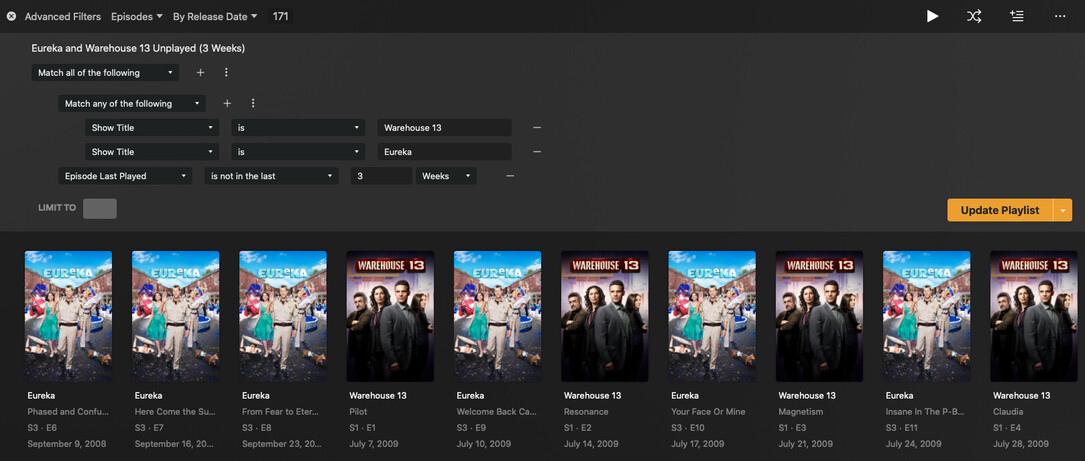
The resulting filter can be used to create either a smart playlist or smart collection. The playlist will show in the “Playlists” tab on the left if you select videos from within; or, you could make the smart collection visible as a hub on your (or your users’) home screen if it would be easier to consume that way.
Smart playlists/collections are pretty powerful in their current forms. Your example of creating an easily accessible collection of the various “Chicago” episodes could be easily accomplished, unless there are other constraints you’ve not mentioned.
Adding to @pshanew‘s response:
What you’re describing seems to me is the exact behavior you should already get when using Plex…
Playlists can contain content from different librariesof the same media kind (music, video). All those playlists are listed in the Playlists section in your sidebar — with a tab for each media kind (music, video). Inside each library you should see a tab for playlists that contain media from that library… this tab will only show if there are any playlists that contain media from this library.
Collections are limited to a single library. Plex will however show same-named collections in different libraries as related media (e.g. if you have a Star Wars or Marvel collection in your movie, tv show or even a music/soundtrack library).
That is interesting. I guess there’s something wrong with my stuff then. As in the example, my wife has gotten us into the various Chicago shows. I created the playlist last night through the Android mobile app, and, unless I specifically go to TV shows tab, I am unable to see the playlist in the playlist tab. Also, I was unaware that the collections could be added to media beyond movies. I will have to look at it again, as I only saw the playlist option yesterday.
Jesus, I’m clearly blind. Disregard the bit about the playlist not showing in the playlist tab. There’s a switcher thing at the bottom of the screen. Oops.
