So, any more ideas? Like MovieFan.Plex has said, my server logs show that commercial analysis worked but nothing got added to my xml file. Where in my server logs do you find that the commercial analysis was done? And what should my xml file have in it if everything worked properly? How does the process work going from analysis to adding tags to the xml file? Where else can I look for what’s glitching? Is there some cache I can clear that might help but won’t wreck my Plex installation?
Initially we could look at the various diagnostic files created by the Plex Commercial Skipper - after that it may be necessary to also have one of the actual recording .ts files to try and repro the problem
To get the the diagnostic file, please add this setting
Regedit,
Go to
HKEY_CURRENT_USER\SOFTWARE\Plex, Inc.\Plex Media Server
Right click on “Plex Media Server” in the left pane and select:
New → DWORD (32-bit) value
name the new entry: DvrComskipRemoveIntermediates
and ensure it has a value of 0
When Plex Commercial Skipper runs and completes, it will leave a number of diagnostic files alongside the recording .ts file. They will all have the same filename but different filename extensions
So to start with - just provide zip of these files and the debug server logs zip captured after completion of the post processing of the recording
Thanks I’ll do that this evening.
OK I recorded The Voice tonight.
The Voice (2011) - S22E25 - Live Cutdown Show.zip (34.8 KB)
Plex Media Server Logs_2022-12-13_21-36-09.zip (3.2 MB)
XML.zip (1.7 KB)
Thanks for the files. They are showing successful removal of commercials for this recording
R:\TV\Miscellaneous\The Voice (2011)\Season 22\The Voice (2011) - S22E25 - Live Cutdown Show.ts
Are the commercials still there in the file at these offsets ?
| start-time | end-time | action |
|---|---|---|
| 0.00 | 2.14 | 0 |
| 334.77 | 395.90 | 0 |
| 875.94 | 1124.86 | 0 |
| 1614.31 | 1862.99 | 0 |
| 2339.64 | 2598.26 | 0 |
| 3092.82 | 3333.86 | 0 |
time-offsets are in seconds and action 0 means the commercials were cut
Dec 13, 2022 20:00:00.611 [26532] DEBUG - [Grabber/00b9a5bd194f97a85cf702d4b7586f14f571c42a/AdDetector/JobRunner] Job running: set "FFMPEG_EXTERNAL_LIBS=\\\\?\\C\:\\Users\\rob\\AppData\\Local\\Plex\ Media\ Server\\Codecs\\583b3e4-4441-windows-x86_64\\" & "C:\Program Files (x86)\Plex\Plex Media Server\Plex Commercial Skipper.exe" "--ini=C:\Program Files (x86)\Plex\Plex Media Server\Resources\comskip.ini" "--output=R:\TV\Miscellaneous\The Voice (2011)\Season 22" -t --quiet "R:\TV\Miscellaneous\The Voice (2011)\Season 22\The Voice (2011) - S22E25 - Live Cutdown Show.ts"

Dec 13, 2022 20:02:32.560 [19940] DEBUG - Jobs: 'C:\Program Files (x86)\Plex\Plex Media Server\Plex Commercial Skipper.exe' exit code for process 1596 is 1 (Commercials found)
Adding offsets in hh:mm:ss.000 format
| start-time | end-time |
|---|---|
| 00:00:00.000 | 00:00:02.140 |
| 00:05:34.770 | 00:06:35.900 |
| 00:14:35.940 | 00:18:44.860 |
| 00:26:54.310 | 00:31:02.990 |
| 00:38:59.640 | 00:43:18.260 |
| 00:51:32.820 | 00:55:33.860 |
Yes the commercials are still there. I have Plex set to mark commercials, not to remove them. Even though, as you noted, the commercials get detected, no skip button appears when viewing the show. What happens after the commercials get detected? What causes Plex to insert the skip button? As one guy noted previously, my xml file doesn’t show the commercials. What should it look like? If I knew the process between detecting the commercials and seeing a button while playing the video file, I could probably see what is going wrong. Thanks for your help with this.
Update: I recorded a show tonight and set it to remove the commercials. It worked! So what’s the difference between removing and marking commercials? Removing works. Marking does not.
The markers would be held in the database and client apps would get the offsets when requesting the metadata
I will try and reproduce the issue and see what happens when we use markers as opposed to deletion of commercials
@rcrang could you download the Plex Media Server zip and send to me in a private message - it will probably be too big to attach, so please upload to google drive / dropbox etc and send me a link in a message
I have tried to repro but i do see the markers in my media info xml
@rcrang Thanks for sending me the database
Could you try the following change to see if it circumvents the problem.
In Plex Web, edit the TV Shows Library settings and select Advanced and scroll down until you get to the Ad Markers feature - click on the dropdown and select “For recorded items” and save the changes
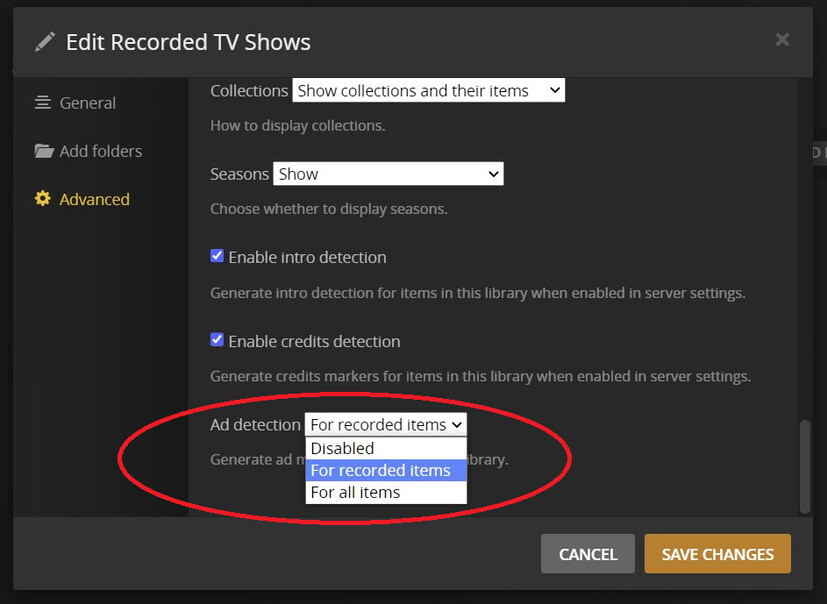
Please let me know the outcome and if the offsets for the commercials become visible in the media info xml.
I will continue to look into the issue and try to reproduce and refer to the development team if the action is confirmed as incorrect
Looked further into the database and I can see commercial markers in the database for this media file
R:\TV\Miscellaneous\The Voice (2011)\Season 22\The Voice (2011) - S22E25 - Live Cutdown Show.ts
Could you try to get the media info xml again for it - may be they got added later when scheduled tasks ran
Also you could try to get the media info this way - to compare
On the server directly
http://127.0.0.1:32400/library/metadata/155301?includeMarkers=1&X-Plex-Token=xxxxxxxxxxxxx
where xxxxxxxxxxx is a Plex Media Server access token - eg the admin token held in the registry in PlexOnlineToken - or one acquired through following the steps here Finding an authentication token / X-Plex-Token | Plex Support
No idea how this happened but my Ad Markers was set to “Disabled”. Thanks so much to everyone (especially @sa2000)for their help!
Thanks for confirming that editing the library setting resolved the issue
I am looking into if DVR recordings settings should override the library setting for Ad Markers
