Continuous buffering and lag as of late

Thanks for that screenshot.

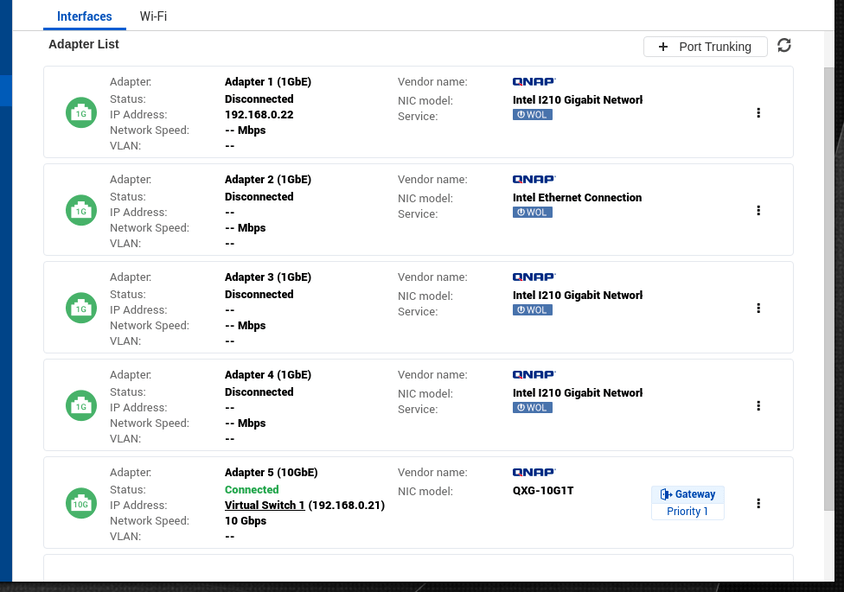
It’s showing that your bonded exists, without a virtual switch while you have adapter 3 connected to the virtual switch.

Which IP should be the NAS default?

It appears 192.168.2.120 is but the configuration has your bonded adapter at 192.168.2.100.

I do see a virtual switch

But the only thing that makes me wonder is why i dont have a Intel210… on my Adapter 1
192.168.2.100 is also my default address and gateway as its shown below.

Anything i should change or look into perhaps?

Which version of QTS is this? Doesn’t look like 4.4 or even 4.3 from what I have seen.

I am using the TVS-1282. It will likely have different NICs than what you have.

I suspect you’ll need to tear down the switch structure as you have it and redefine it

The address isn’t defined out at the end, it’s defined at the switch.

I’m using the latest 4.4.1
image

I removed the trunking

And created again and it looks exactly the same:

Maybe its the new interface? ( i use general switch, you?)

It’s not quite the same is it? Your new pictures don’t show this listed to the right of Adapter 3.

Gateway
Priority 2

Also, as I’m still trying to keep up with you guys, ChuckPA asked,

Which IP should be the NAS default?

May I ask again what are your intentions for routing?

Plex does have a Settings - Show Advanced - Network for Preferred Network Interface to use. I haven’t tested it here. I’ve heard mixed anecdotes about it. Who knows they probably forgot to hit Save and restart PMS.

Priority 2 ?

Until the correct playback is obtained, I wonder if unplugging the other adapters might be beneficial.

It would allow default gateway and priority (favored adapter) to be properly set.

@nibbles my default ip is 192.168.2.100 i believe
And i didnt know i could select interface so thanks for the tips, I have now selected the right one (bond0 -->192.168.2.100).
image

@ChuckPa I actually removed the priority2 so i only have the gateway on adapter1+2 (which are trunked).

Will try with the new setup tomorrow. Maybe by selecting the interface manually in plex it will help a bit.

Still the problem is there. Tried lion king and as soon as i selected PGS subtitle it started to lag.
Plex Media Server Logs_2019-10-20_14-44-41.zip (4.2 MB)

PGS subtitles is a different problem entirely.

Image based subtitles must be burned by the CPU. They cannot be done with the ASIC which transcodes.

I fully expect Image-based subtitles to buffer/lag on anything but an i7-class QNAP.
The Intel J3455 CPU is not strong enough to burn image-based subtitles in real time

I thought since i dont get to full CPU usuage it should be able to handle the load.

My CPU is a quadcore but maybe not enough still.
So if you say with this CPU it cant be done then there is not much else to do. I have to settle with a AppleTV. Might not be a bad idea anyway. The picture actually looks much better when i play it using AppleTV for some reason.

Please provide more details? May I see the full XML of what you’re trying to transcode?

I am beginning to suspect it’s HEVC source. The i5-4590s in your unit is more than capable of a single PGS subtitle.

HEVC is another matter.

Which xml file? where is it located?

To be honest i have been playing plenty of HEVC before and havent had issue but maybe never with PGS subtitle.

I just checked the movies and the first one (The Art of Self-Defense) was 720p (H.264). Suits and lion king were both HEVC. I reported the issue with the first movie.

When you’re playing the video in question, you use the Get Info feature in Plex to pop up the dialog box, and in the lower left hand corner is the XML Media link that you click.

https://support.plex.tv/articles/201998867-investigate-media-information-and-formats/

Unlike what the article describes, please get the info when the video is playing.
Thank you sir

The XML is available:

  1. Hover over the item to expose the Ellipsis ...
  2. Click it
  3. Get Info
  4. In the lower left corner is View XML
  5. Only the <media> portion is needed. You will see where Genre and cast begins. stop there.

Thanks allot, here is the file, hope its the right one.
10013.7z (2.8 KB)

Thanks.

To show how you can do it here, (saves the zip time)
```
XML
```

Shows up as

XML

Makes it really easy

Your XML shows:

<Media id="24752" duration="6259174" bitrate="3248" width="1280" height="688" aspectRatio="1.85" audioChannels="6" audioCodec="ac3" videoCodec="h264" videoResolution="720" container="mkv" videoFrameRate="24p" videoProfile="high">
<Part accessible="1" exists="1" id="28383" key="/library/parts/28383/1570711929/file.mkv" duration="6259174" file="/share/external/DEV3302_2/MOVIES/The.Art.of.Self-Defense.2019.720p.BRRip.X264.AC3-EVO/The Art of Self-Defense.2019.720p.BRRip.X264.AC3-EVO.mkv" size="2544168301" container="mkv" deepAnalysisVersion="4" requiredBandwidths="9825,6643,6643,6643,6643,6643,6643,6643" videoProfile="high">
<Stream id="62831" streamType="1" default="1" codec="h264" index="0" bitrate="2764" bitDepth="8" chromaLocation="left" chromaSubsampling="4:2:0" colorPrimaries="bt709" colorRange="tv" colorSpace="bt709" colorTrc="bt709" frameRate="23.976" hasScalingMatrix="0" height="688" level="41" profile="high" refFrames="4" requiredBandwidths="9377,6512,6512,6512,6512,6512,6512,6512" scanType="progressive" width="1280" displayTitle="720p (H.264)" />
<Stream id="62832" streamType="2" selected="1" default="1" codec="ac3" index="1" channels="6" bitrate="448" language="English" languageCode="eng" audioChannelLayout="5.1(side)" requiredBandwidths="448,448,448,448,448,448,448,448" samplingRate="48000" title="Surround" displayTitle="English (AC3 5.1)" />
<Stream id="62833" streamType="3" selected="1" codec="pgs" index="2" bitrate="36" language="English" languageCode="eng" requiredBandwidths="50,50,50,50,50,50,50,50" displayTitle="English (PGS)" />
</Part>
</Media>

I notice it’s external (not a factor unless the USB needs to spin up unless there is other activity / a slow drive???

Most importantly, it’s PGS subtitles. These are Image subtitles which the CPU must do. Hardware can’t do them (yet – waiting on Intel).

H.264 so not dealing with HEVC (which the HW ASIC doesn’t support in a -4xxx processor)

What else is going on with the NAS? I don’t see anything in the logs.
1 Like

Thanks for the interpretation.
Yes i play from external drive which uses a 3,5 2TB WD greed. I have tried to play directly from the NAS which is pretty fast and it did not help.
And the NAS is not doing anything in particular during the play. Yes i do run 1 VM but its not taking much CPU. I see the CPU hovering around 25% or so.

I should maybe just simply avoid pgs subtitles :frowning:
But why does it work so much better on appletv? doesnt the server handle all the work on both cases? i never see the issue on AppleTV ?

This topic was automatically closed 90 days after the last reply. New replies are no longer allowed.
