As a matter of fact, I just tested in a brand new Windows VM with my GPU passed through to it and I’m having the same issue. I also tested on bare metal with the same issues.
Please let me parse this and be pedantic?
Is it not transcoding because the Plex/web default settings (Settings - Web - Quality) are set to Original ?
Changing the quality will force a transcode. If not, your PMS is completely broken in several ways and should be taken into a new thread for us to resolve.
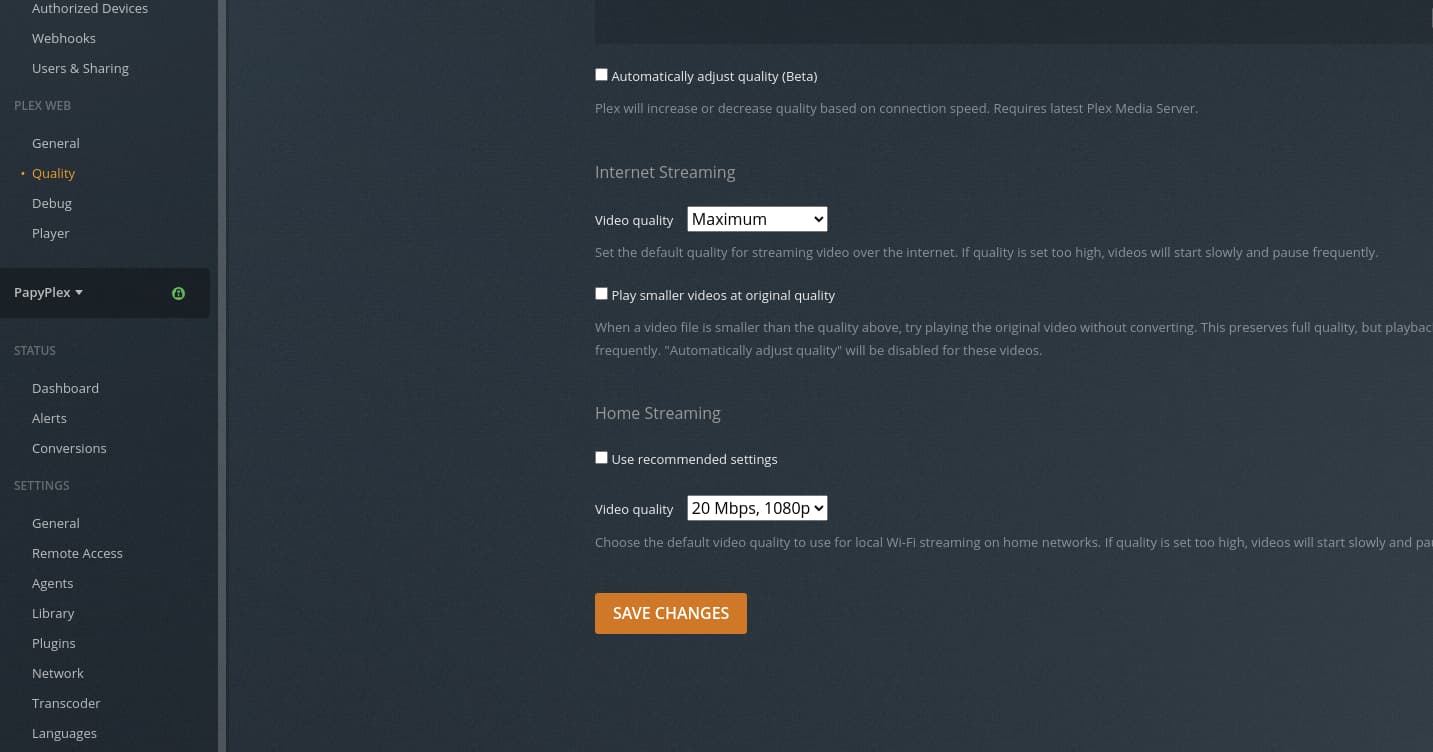
This screenshot shows Internet (remote) at Max (allows the server admin to set the limits) and my local web browser at 20 Mbps.
Please let me know how this works out for you?


setting lower quality. (20 Mbps) in plex/web itself.

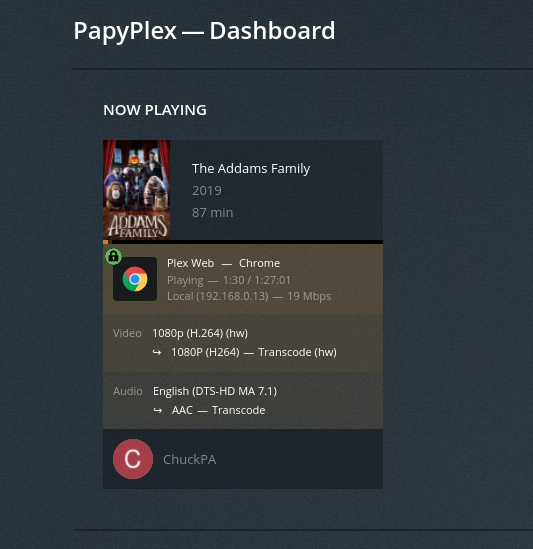
If this isn’t what’s working, I need to see the debug logs which capture this.
@ChuckPa please refer to this as you seem to have missed it
Would you please turn on the Transcoder debug?
Here are two scripts. DEBUG (so we can see more) and ERROR (to put it back when done).
run these on the server.
Adjust the path to the APPLICATION_SUPPORT_DIR if appropriate.
It will get the token for you automatically.
[chuck@lizum bin.2031]$ cat set-transcoder-debug
#!/bin/sh
Token="$(cat "/var/lib/plexmediaserver/Library/Application Support/Plex Media Server/Preferences.xml" | tail -1 | sed -e 's/.*PlexOnlineToken="//' | sed -e 's/".*//')"
curl http://127.0.0.1:32400/:/prefs/set\?TranscoderLogLevel=debug\&X-Plex-Token=$Token
echo Token=$Token
[chuck@lizum bin.2032]$ cat set-transcoder-error
#!/bin/sh
Token="$(cat "/var/lib/plexmediaserver/Library/Application Support/Plex Media Server/Preferences.xml" | tail -1 | sed -e 's/.*PlexOnlineToken="//' | sed -e 's/".*//')"
curl http://127.0.0.1:32400/:/prefs/set\?TranscoderLogLevel=error\&X-Plex-Token=$Token
[chuck@lizum bin.2033]$
What I am seeing is where the CPU can talk to the Nvidia card.
Feb 13, 2022 00:12:37.159 [0x7fa7c112ab38] DEBUG - [Transcode] Stripes - video.width limitation applies: 1920 > 1280
Feb 13, 2022 00:12:37.159 [0x7fa7c112ab38] DEBUG - [Transcode] MDE: Stripes (1981): Direct Streaming is disabled, so video stream will be transcoded
Feb 13, 2022 00:12:37.159 [0x7fa7c112ab38] DEBUG - [Transcode] MDE: Stripes (1981): no remuxable profile found, so video stream will be transcoded
Feb 13, 2022 00:12:37.159 [0x7fa7c112ab38] DEBUG - [Transcode] Codecs: testing h264_nvenc (encoder)
Feb 13, 2022 00:12:37.160 [0x7fa7c112ab38] DEBUG - [Transcode] Codecs: hardware transcoding: testing API nvenc
Feb 13, 2022 00:12:37.160 [0x7fa7c112ab38] DEBUG - [Transcode] [FFMPEG] - Loaded lib: libcuda.so.1
Feb 13, 2022 00:12:37.160 [0x7fa7c112ab38] DEBUG - [Transcode] [FFMPEG] - Loaded sym: cuInit
Feb 13, 2022 00:12:37.160 [0x7fa7c112ab38] DEBUG - [Transcode] [FFMPEG] - Loaded sym: cuDeviceGetCount
Feb 13, 2022 00:12:37.160 [0x7fa7c112ab38] DEBUG - [Transcode] [FFMPEG] - Loaded sym: cuDeviceGet
Feb 13, 2022 00:12:37.160 [0x7fa7c112ab38] DEBUG - [Transcode] [FFMPEG] - Loaded sym: cuDeviceGetAttribute
Feb 13, 2022 00:12:37.160 [0x7fa7c112ab38] DEBUG - [Transcode] [FFMPEG] - Loaded sym: cuDeviceGetName
Feb 13, 2022 00:12:37.160 [0x7fa7c112ab38] DEBUG - [Transcode] [FFMPEG] - Loaded sym: cuDeviceComputeCapability
Feb 13, 2022 00:12:37.160 [0x7fa7c112ab38] DEBUG - [Transcode] [FFMPEG] - Loaded sym: cuCtxCreate_v2
Feb 13, 2022 00:12:37.160 [0x7fa7c112ab38] DEBUG - [Transcode] [FFMPEG] - Loaded sym: cuCtxSetLimit
Feb 13, 2022 00:12:37.160 [0x7fa7c112ab38] DEBUG - [Transcode] [FFMPEG] - Loaded sym: cuCtxPushCurrent_v2
Feb 13, 2022 00:12:37.160 [0x7fa7c112ab38] DEBUG - [Transcode] [FFMPEG] - Loaded sym: cuCtxPopCurrent_v2
Feb 13, 2022 00:12:37.160 [0x7fa7c112ab38] DEBUG - [Transcode] [FFMPEG] - Loaded sym: cuCtxDestroy_v2
Feb 13, 2022 00:12:37.160 [0x7fa7c112ab38] DEBUG - [Transcode] [FFMPEG] - Loaded sym: cuMemAlloc_v2
Feb 13, 2022 00:12:37.160 [0x7fa7c112ab38] DEBUG - [Transcode] [FFMPEG] - Loaded sym: cuMemAllocPitch_v2
Feb 13, 2022 00:12:37.160 [0x7fa7c112ab38] DEBUG - [Transcode] [FFMPEG] - Loaded sym: cuMemsetD8Async
Feb 13, 2022 00:12:37.160 [0x7fa7c112ab38] DEBUG - [Transcode] [FFMPEG] - Loaded sym: cuMemFree_v2
Feb 13, 2022 00:12:37.160 [0x7fa7c112ab38] DEBUG - [Transcode] [FFMPEG] - Loaded sym: cuMemcpy2D_v2
Feb 13, 2022 00:12:37.160 [0x7fa7c112ab38] DEBUG - [Transcode] [FFMPEG] - Loaded sym: cuMemcpy2DAsync_v2
Feb 13, 2022 00:12:37.160 [0x7fa7c112ab38] DEBUG - [Transcode] [FFMPEG] - Loaded sym: cuGetErrorName
Feb 13, 2022 00:12:37.160 [0x7fa7c112ab38] DEBUG - [Transcode] [FFMPEG] - Loaded sym: cuGetErrorString
Feb 13, 2022 00:12:37.160 [0x7fa7c112ab38] DEBUG - [Transcode] [FFMPEG] - Loaded sym: cuCtxGetDevice
Feb 13, 2022 00:12:37.160 [0x7fa7c112ab38] DEBUG - [Transcode] [FFMPEG] - Loaded sym: cuDevicePrimaryCtxRetain
Feb 13, 2022 00:12:37.160 [0x7fa7c112ab38] DEBUG - [Transcode] [FFMPEG] - Loaded sym: cuDevicePrimaryCtxRelease
Feb 13, 2022 00:12:37.160 [0x7fa7c112ab38] DEBUG - [Transcode] [FFMPEG] - Loaded sym: cuDevicePrimaryCtxSetFlags
Feb 13, 2022 00:12:37.160 [0x7fa7c112ab38] DEBUG - [Transcode] [FFMPEG] - Loaded sym: cuDevicePrimaryCtxGetState
Feb 13, 2022 00:12:37.160 [0x7fa7c112ab38] DEBUG - [Transcode] [FFMPEG] - Loaded sym: cuDevicePrimaryCtxReset
Feb 13, 2022 00:12:37.160 [0x7fa7c112ab38] DEBUG - [Transcode] [FFMPEG] - Loaded sym: cuStreamCreate
Feb 13, 2022 00:12:37.160 [0x7fa7c112ab38] DEBUG - [Transcode] [FFMPEG] - Loaded sym: cuStreamQuery
Feb 13, 2022 00:12:37.160 [0x7fa7c112ab38] DEBUG - [Transcode] [FFMPEG] - Loaded sym: cuStreamSynchronize
Feb 13, 2022 00:12:37.160 [0x7fa7c112ab38] DEBUG - [Transcode] [FFMPEG] - Loaded sym: cuStreamDestroy_v2
Feb 13, 2022 00:12:37.160 [0x7fa7c112ab38] DEBUG - [Transcode] [FFMPEG] - Loaded sym: cuStreamAddCallback
Feb 13, 2022 00:12:37.160 [0x7fa7c112ab38] DEBUG - [Transcode] [FFMPEG] - Loaded sym: cuEventCreate
Feb 13, 2022 00:12:37.160 [0x7fa7c112ab38] DEBUG - [Transcode] [FFMPEG] - Loaded sym: cuEventDestroy_v2
Feb 13, 2022 00:12:37.160 [0x7fa7c112ab38] DEBUG - [Transcode] [FFMPEG] - Loaded sym: cuEventSynchronize
Feb 13, 2022 00:12:37.160 [0x7fa7c112ab38] DEBUG - [Transcode] [FFMPEG] - Loaded sym: cuEventQuery
Feb 13, 2022 00:12:37.160 [0x7fa7c112ab38] DEBUG - [Transcode] [FFMPEG] - Loaded sym: cuEventRecord
Feb 13, 2022 00:12:37.160 [0x7fa7c112ab38] DEBUG - [Transcode] [FFMPEG] - Loaded sym: cuLaunchKernel
Feb 13, 2022 00:12:37.160 [0x7fa7c112ab38] DEBUG - [Transcode] [FFMPEG] - Loaded sym: cuLinkCreate
Feb 13, 2022 00:12:37.160 [0x7fa7c112ab38] DEBUG - [Transcode] [FFMPEG] - Loaded sym: cuLinkAddData
Feb 13, 2022 00:12:37.160 [0x7fa7c112ab38] DEBUG - [Transcode] [FFMPEG] - Loaded sym: cuLinkComplete
Feb 13, 2022 00:12:37.160 [0x7fa7c112ab38] DEBUG - [Transcode] [FFMPEG] - Loaded sym: cuLinkDestroy
Feb 13, 2022 00:12:37.160 [0x7fa7c112ab38] DEBUG - [Transcode] [FFMPEG] - Loaded sym: cuModuleLoadData
Feb 13, 2022 00:12:37.160 [0x7fa7c112ab38] DEBUG - [Transcode] [FFMPEG] - Loaded sym: cuModuleUnload
Feb 13, 2022 00:12:37.160 [0x7fa7c112ab38] DEBUG - [Transcode] [FFMPEG] - Loaded sym: cuModuleGetFunction
Feb 13, 2022 00:12:37.160 [0x7fa7c112ab38] DEBUG - [Transcode] [FFMPEG] - Loaded sym: cuTexObjectCreate
Feb 13, 2022 00:12:37.160 [0x7fa7c112ab38] DEBUG - [Transcode] [FFMPEG] - Loaded sym: cuTexObjectDestroy
Feb 13, 2022 00:12:37.160 [0x7fa7c112ab38] DEBUG - [Transcode] [FFMPEG] - Loaded sym: cuGLGetDevices_v2
Feb 13, 2022 00:12:37.160 [0x7fa7c112ab38] DEBUG - [Transcode] [FFMPEG] - Loaded sym: cuGraphicsGLRegisterImage
Feb 13, 2022 00:12:37.160 [0x7fa7c112ab38] DEBUG - [Transcode] [FFMPEG] - Loaded sym: cuGraphicsUnregisterResource
Feb 13, 2022 00:12:37.160 [0x7fa7c112ab38] DEBUG - [Transcode] [FFMPEG] - Loaded sym: cuGraphicsMapResources
Feb 13, 2022 00:12:37.160 [0x7fa7c112ab38] DEBUG - [Transcode] [FFMPEG] - Loaded sym: cuGraphicsUnmapResources
Feb 13, 2022 00:12:37.160 [0x7fa7c112ab38] DEBUG - [Transcode] [FFMPEG] - Loaded sym: cuGraphicsSubResourceGetMappedArray
Feb 13, 2022 00:12:37.160 [0x7fa7c112ab38] DEBUG - [Transcode] [FFMPEG] - Loaded sym: cuDeviceGetUuid
Feb 13, 2022 00:12:37.160 [0x7fa7c112ab38] DEBUG - [Transcode] [FFMPEG] - Loaded sym: cuImportExternalMemory
Feb 13, 2022 00:12:37.160 [0x7fa7c112ab38] DEBUG - [Transcode] [FFMPEG] - Loaded sym: cuDestroyExternalMemory
Feb 13, 2022 00:12:37.160 [0x7fa7c112ab38] DEBUG - [Transcode] [FFMPEG] - Loaded sym: cuExternalMemoryGetMappedBuffer
Feb 13, 2022 00:12:37.160 [0x7fa7c112ab38] DEBUG - [Transcode] [FFMPEG] - Loaded sym: cuExternalMemoryGetMappedMipmappedArray
Feb 13, 2022 00:12:37.160 [0x7fa7c112ab38] DEBUG - [Transcode] [FFMPEG] - Loaded sym: cuMipmappedArrayGetLevel
Feb 13, 2022 00:12:37.160 [0x7fa7c112ab38] DEBUG - [Transcode] [FFMPEG] - Loaded sym: cuMipmappedArrayDestroy
Feb 13, 2022 00:12:37.160 [0x7fa7c112ab38] DEBUG - [Transcode] [FFMPEG] - Loaded sym: cuImportExternalSemaphore
Feb 13, 2022 00:12:37.160 [0x7fa7c112ab38] DEBUG - [Transcode] [FFMPEG] - Loaded sym: cuDestroyExternalSemaphore
Feb 13, 2022 00:12:37.160 [0x7fa7c112ab38] DEBUG - [Transcode] [FFMPEG] - Loaded sym: cuSignalExternalSemaphoresAsync
Feb 13, 2022 00:12:37.160 [0x7fa7c112ab38] DEBUG - [Transcode] [FFMPEG] - Loaded sym: cuWaitExternalSemaphoresAsync
Feb 13, 2022 00:12:37.182 [0x7fa7c1f47b38] DEBUG - [HttpClient] HTTP/2.0 (0.1s) 200 response from GET https://plex.tv/api/v2/server/users?auth_token=xxxxxxxxxxxxxxxxxxxx (reused)
Feb 13, 2022 00:12:37.183 [0x7fa7c1cf7b38] DEBUG - HTTP requesting GET https://plex.tv/api/v2/server/users/subscriptions?auth_token=xxxxxxxxxxxxxxxxxxxx
Feb 13, 2022 00:12:37.195 [0x7fa7c1f47b38] DEBUG - [HttpClient] HTTP/2.0 (0.1s) 200 response from GET https://plex.tv/media/providers?X-Plex-Token=xxxxxxxxxxxxxxxxxxxx (reused)
Feb 13, 2022 00:12:37.195 [0x7fa7c11c9b38] DEBUG - [MediaProviderManager] HTTP requesting GET https://plex.tv/media/providers?X-Plex-Token=xxxxxxxxxxxxxxxxxxxx
I do not see where FFMPEG is asserting the testing passed and it will use it.
Setting transcoder debug on will show us more . If it’s being found and used, we will see it there
OK here it is with transcoder debug on, this time plex web didnt error (maybe because i updated & restarted it) but it does fail to start playing/transcoding as expected. Hopefully this gives you a bit more info!
Just want to echo this, cr4zyb4st4rd and I are both having the exact same problem on two different platforms, so the issue is not platform dependent. Please, ChuckPa, keep letting us know what you need and we’ll give it right to you. Hell, I’ll do a remote session anytime you would like.
Thanks for that log. VERY clear now.
Feb 15, 2022 00:02:50.525 [0x7fd268244b38] DEBUG - [Transcode] Starting a transcode session r4pzsgrgumlwyrtvpxfsyp8m at offset -1.0 (state=3)
Feb 15, 2022 00:02:50.525 [0x7fd268244b38] DEBUG - [Transcode] TPU: hardware transcoding: enabled, but no hardware decode accelerator found
Feb 15, 2022 00:02:50.525 [0x7fd268244b38] INFO - [Transcode] CodecManager: starting EAE at "/tmp/pms-1aa50c5d-5638-4032-864d-3e10f41be106/EasyAudioEncoder"
Feb 15, 2022 00:02:50.526 [0x7fd268244b38] DEBUG - [Transcode/JobRunner] Job running: '/var/lib/plexmediaserver/Library/Application Support/Plex Media Server/Codecs/EasyAudioEncoder-1714-linux-x86_64/EasyAudioEncoder/EasyAudioEncoder'
Feb 15, 2022 00:02:50.526 [0x7fd268244b38] DEBUG - [Transcode/JobRunner] Jobs: Starting child process with pid 24191
Feb 15, 2022 00:02:50.527 [0x7fd268244b38] DEBUG - [Transcode] [Universal] Using local file path instead of URL: /home/scott/storage1/Movies/Stripes (1981)/Stripes.1981.Theatrical.Cut.1080p.AMZN.WEB-DL.DD+5.1.H.264-alfaHD.mkv
Feb 15, 2022 00:02:50.527 [0x7fd268244b38] DEBUG - [Transcode] TPU: hardware transcoding: final decoder: , final encoder:
Feb 15, 2022 00:02:50.528 [0x7fd268244b38] DEBUG - [Transcode/JobRunner] Job running: EAE_ROOT='/tmp/pms-1aa50c5d-5638-4032-864d-3e10f41be106/EasyAudioEncoder' FFMPEG_EXTERNAL_LIBS='/var/lib/plexmediaserver/Library/Application\ Support/Plex\ Media\ Server/Codecs/62cc2bc-4226-linux-x86_64/' X_PLEX_TOKEN='xxxxxxxxxxxxxxxxxxxx' '/usr/lib/plexmediaserver/Plex Transcoder' '-codec:0' 'h264' '-codec:1' 'eac3_eae' '-eae_prefix:1' 'r4pzsgrgumlwyrtvpxfsyp8m_' '-noaccurate_seek' '-analyzeduration' '20000000' '-probesize' '20000000' '-i' '/home/scott/storage1/Movies/Stripes (1981)/Stripes.1981.Theatrical.Cut.1080p.AMZN.WEB-DL.DD+5.1.H.264-alfaHD.mkv' '-map' '0:0' '-codec:0' 'copy' '-filter_complex' '[0:1] aresample=async=1:ocl='\''stereo'\'':rematrix_maxval=60.000000dB:osr=48000[0]' '-map' '[0]' '-metadata:s:1' 'language=eng' '-codec:1' 'aac' '-b:1' '256k' '-f' 'dash' '-seg_duration' '5' '-dash_segment_type' 'mp4' '-init_seg_name' 'init-stream$RepresentationID$.m4s' '-media_seg_name' 'chunk-stream$RepresentationID$-$Number%05d$.m4s' '-window_size' '5' '-delete_removed' 'false' '-skip_to_segment' '1' '-time_delta' '0.0625' '-manifest_name' 'http://127.0.0.1:32400/video/:/transcode/session/r4pzsgrgumlwyrtvpxfsyp8m/38a66f53-f741-43e3-8b28-baa333649ac6/manifest?X-Plex-Http-Pipeline=infinite' '-avoid_negative_ts' 'disabled' '-map_metadata' '-1' '-map_chapters' '-1' 'dash' '-start_at_zero' '-copyts' '-vsync' 'cfr' '-y' '-nostats' '-loglevel' 'quiet' '-loglevel_plex' 'debug' '-progressurl' 'http://127.0.0.1:32400/video/:/transcode/session/r4pzsgrgumlwyrtvpxfsyp8m/38a66f53-f741-43e3-8b28-baa333649ac6/progress'
Feb 15, 2022 00:02:50.529 [0x7fd268244b38] DEBUG - [Transcode/JobRunner] Jobs: Starting child process with pid 24192
It does not see it.
ls -la /dev/dri- Do you see
renderD128?
I know the Atom won’t have QSV but if the drivers are seen, it will show up.
At the bash shell, as root:
# echo /sys/module/nvidia/drivers/pci:nvidia/*:*:*.*
What is the output?
STUPID QUESTION  Did you install the 32 bit or 64 bit server package ?
How do you differentiate between 32 bit and 64 bit? When I go to download it for Windows, I get one download.

It does infact see renderD128
and shell output is

This a 64bit install
That tells me the card is seen properly by Linux.
The next challenge is the Nvidia drivers themselves.
What version do you have installed ?
Are they the latest, sometimes bleeding edge, or are you back & stable ?
I am on Driver Version: 460.91.03 so not the most recent but in the past trying to trouble shoot this I went through several iterations of drivers and never resolved it.
This is an issue that only seems to occur transcoding for plex web and it hasnt failed to my knowledge on any other platform, so id like to believe the driver isnt the fault.
From what I’ve read it’s also happening on the plex media player for windows and I think the Android app, but I’m not home to test.
“All Stop” right there.
the player does not matter. The server is showing that it is not finding the Nvidia card.
I think you need 485 or better to be found.
current is
Version:	510.54
Release Date:	2022.2.14
Operating System:	Linux 64-bit
Language:	English (US)
File Size:	313.66 MB
I will update nvidia drivers tomorrow and check again.
Plex Media Server Logs_2022-02-15_02-18-52.zip (816.3 KB)
For now here is another log with me starting a encode on my android phone (same file as before) and it working perfectly fine? transcoder debugging on here so you can see.
While it shouldnt be the player, it seems to have some impact because it consistently breaks on plex web/desktop but encodes fine across a variety of tvs/chromecast/android platforms as can be seen in my tautulli history, all of these are transcodes over a week or so, various files and platforms, no issues. But as soon as I try in web? it fails.

I know I tested with the latest Nvidia drivers for Windows at the time of writing yesterday, which is 511.79. I tried with several different older drivers as well, most being around 450, 470. I also tried to find a 415, but couldn’t.
Out of curiosity, what does your hardware setup look like? I’m running Plex in a virtual Windows server with a P2000 GPU, and a Xeon processor that doesn’t support intel quick sync (hence the reason I bought the GPU). Just want to confirm there isn’t something there that could be similar.
This is the Linux forum. Windows drivers won’t mean anything here.
Considering this issue is OS independent, and likely a bug with the plex web client communicating with the server, I would assume that it does mean something. People wouldn’t be getting this issue across many different server OSs, drivers, and hardware if it was an issue related to one OS. The fact that it only happens on one or two different clients while working on the rest of Plex suite leads me to believe it isn’t a server misconfiguration/error but a bug in how the web client is requesting streams from the server.
