DEBUG logs ZIP please.
I need to see what’s happening
I need to see PMS try to use the GPU then fail.
With this in container, What does /dev/dri show?
DEBUG logs ZIP please.
I need to see what’s happening
I need to see PMS try to use the GPU then fail.
With this in container, What does /dev/dri show?
You want to debug bare-metal or docker version? I tried both, same result…
This is docker version
I want either. (bare metal is probably best if possible)
What is most important to me (makes debug much easier)
You have it in prev post, sorry, it is docker version, it was easier to me to do that… i have set it there correctly, using RAMDRIVE as temp for transcode 
Thanks.
This looks like the Intel Media Driver also needs updating – but I’m not 100% certain.
I’ve sent a note to the engineer. I might hear something over the weekend

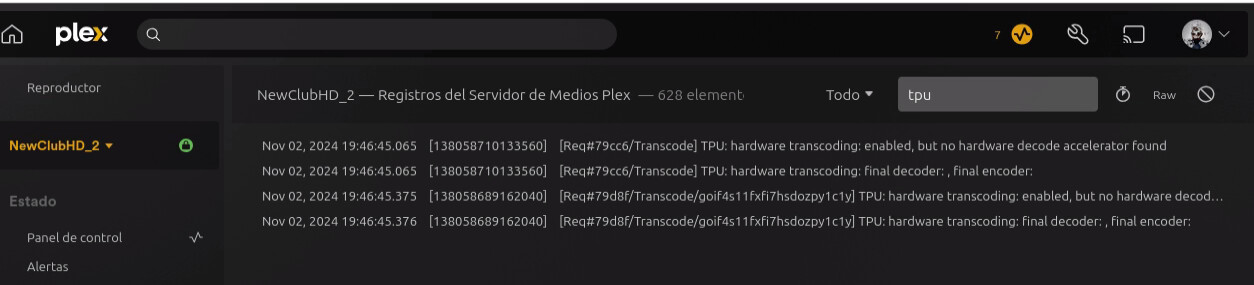
Nov 01, 2024 22:03:42.227 [131335131769656] DEBUG - [Req#1e3/Transcode] TPU: hardware transcoding: enabled, but no hardware decode accelerator found
Nov 01, 2024 22:03:42.227 [131335131769656] DEBUG - [Req#1e3/Transcode] [Universal] Using local file path instead of URL: /media/Seriály/The Witcher (2019)/Season 1/The Witcher - S01E01 - The End’s Beginning.mkv
Nov 01, 2024 22:03:42.227 [131335131769656] DEBUG - [Req#1e3/Transcode] TPU: hardware transcoding: final decoder: , final encoder:
Nov 01, 2024 22:03:42.227 [131335131769656] DEBUG - [Req#1e3/Transcode/JobRunner] Job running: FFMPEG_EXTERNAL_LIBS=‘/config/Library/Application\ Support/Plex\ Media\ Server/Codecs/db205f4-631e8759786d054613dad5b2-linux-x86_64/’ X_PLEX_TOKEN=xxxxxxxxxxxxxxxxxxxxxxxxxxxxxxxxxxxxxxxxxx
EDIT: There is a release of the driver Intel Media Driver 2024Q3 Release - 24.3.4 which does not yet contain support. I’m looking for their Q4 release.
I received that same error in my logs before i used your experimental version. But I did get the xe module loaded and vainfo was reporting using the iHD driver. I will see if i have the same problem this time around.
Since my last post, we’ve done research
The processor was just released by Intel on October 11, 2024.
Expecting support 2 weeks later is very ambitious
Everything we can find at GitHub for the Intel Media Driver does not indicate the IMD (driver) provides support your CPU/GPU.
– MTLx (MTL: Meteor Lake, ARL-S/H: Arrow Lake) (per GitHub)
We’ve discussed it and the following work is needed:
Linux kernel 6.8 will provide you enough baseline support for the CPU. 6.8 provides full support for the P-E core architecture.
Intel must release a version of the Intel Media Driver which includes support.
We must then fold that release into our work schedule to update the IMD for everyone ( Updating the IMD always causes breakage somewhere with certain users which we will need to work through )
We updated our Intel Media Driver earlier this year for Ubuntu 24.04 release (IMD 24Q1)
Our driver update will result in a Forum Preview for this new CPU family because the driver itself is changing.
Unknowns to us at this time:
Integrated GPU Arc Xe2 (Arrow Lake-S) )While it would be nice to have a brand new CPU supported as of Day 1, we don’t have enough hands on our Playback team to make it happen instantly.
Thanks for all your help.
I completely understand that with this CPU being only a couple weeks old, that I should not expect much support.
Does QuickSync require X Server?
Nov 01, 2024 21:12:14.550 [140000733702968] DEBUG - [Req#aa/Transcode] Codecs: testing h264_vaapi (encoder)
Nov 01, 2024 21:12:14.550 [140000733702968] DEBUG - [Req#aa/Transcode] Codecs: hardware transcoding: testing API vaapi for device '/dev/dri/renderD128' (Arrow Lake-U [Intel Graphics])
Nov 01, 2024 21:12:14.550 [140000733702968] ERROR - [Req#aa/Transcode] [FFMPEG] - No VA display found for device /dev/dri/renderD128.
Nov 01, 2024 21:12:14.550 [140000733702968] DEBUG - [Req#aa/Transcode] Codecs: hardware transcoding: opening hw device failed - probably not supported by this system, error: Invalid argument
Nov 01, 2024 21:12:14.550 [140000733702968] DEBUG - [Req#aa/Transcode] Could not create hardware context for h264_vaapi
Nov 01, 2024 21:12:14.550 [140000733702968] DEBUG - [Req#aa/Transcode] Codecs: testing hevc (decoder) with hwdevice vaapi
Nov 01, 2024 21:12:14.550 [140000733702968] DEBUG - [Req#aa/Transcode] Codecs: hardware transcoding: testing API vaapi for device '/dev/dri/renderD128' (Arrow Lake-U [Intel Graphics])
Nov 01, 2024 21:12:14.550 [140000733702968] ERROR - [Req#aa/Transcode] [FFMPEG] - No VA display found for device /dev/dri/renderD128.
Nov 01, 2024 21:12:14.550 [140000733702968] DEBUG - [Req#aa/Transcode] Codecs: hardware transcoding: opening hw device failed - probably not supported by this system, error: Invalid argument
Nov 01, 2024 21:12:14.550 [140000733702968] DEBUG - [Req#aa/Transcode] Could not create hardware context for hevc
Nov 01, 2024 21:12:14.550 [140000733702968] DEBUG - [Req#aa/Transcode] MDE: Selected protocol dash; container: mp4
Nov 01, 2024 21:12:14.550 [140000733702968] DEBUG - [Req#aa/Transcode] MDE: analyzing media item 1
I started with a fresh headless install
Installed Podman
Added my user to the video and render groups
Ran the composer file below, then ran your steps above to get the deb installed inside the container. It showed the correct CPU on the transcode page.
Here is my composer file
x-podman:
  in_pod: false

services:
  plex:
    image: docker.io/plexinc/pms-docker
    container_name: plex
    network_mode: host
    shm_size: 8gb
    restart: always
    volumes:
      - /opt/plex/database:/config
      - /opt/plex:/data
      - /media:/media
    environment:
      - TZ=America/New_York
    devices:
      - /dev/dri:/dev/dri
00:00.0 Host bridge: Intel Corporation Device 7d1b (rev 01)
	DeviceName: Onboard - Other
	Subsystem: Micro-Star International Co., Ltd. [MSI] Device 7e32
00:01.0 PCI bridge: Intel Corporation Device 7ecc (rev 10)
	Subsystem: Micro-Star International Co., Ltd. [MSI] Device 7e32
	Kernel driver in use: pcieport
00:02.0 VGA compatible controller: Intel Corporation Arrow Lake-U [Intel Graphics] (rev 06)
	DeviceName: Onboard - Video
	Subsystem: Micro-Star International Co., Ltd. [MSI] Device 7e32
	Kernel driver in use: i915
	Kernel modules: i915
On difference from the Ubuntu 24.10 full desktop is I don’t remember how I got it to show the xe kernel module loaded, not sure if it matters.
I’ll also play around and see if I can get the xe module loaded
I always enjoy these threads even if I don’t have the issue at hand.
That’s news to me. Cool! Can’t wait to see what this will do for us.
Quick Sync Video (QSV) does not require an X server (my 22.04 server is headless and is my primary PMS server.)
– You can easily / safely run Ubuntu Server (headless)
– Use SSH login (using ssh-copy-id for key exchange)
lspci output looks good , quite similar to mine
[chuck@lizum Downloads.2006]$ sudo lspci
00:00.0 Host bridge: Intel Corporation Device 4660 (rev 02)
00:01.0 PCI bridge: Intel Corporation 12th Gen Core Processor PCI Express x16 Controller #1 (rev 02)
00:02.0 Display controller: Intel Corporation AlderLake-S GT1 (rev 0c)
00:06.0 PCI bridge: Intel Corporation 12th Gen Core Processor PCI Express x4 Controller #0 (rev 02)
00:08.0 System peripheral: Intel Corporation 12th Gen Core Processor Gaussian & Neural Accelerator (rev 02)
00:14.0 USB controller: Intel Corporation Device 7ae0 (rev 11)
00:14.2 RAM memory: Intel Corporation Device 7aa7 (rev 11)
00:14.3 Network controller: Intel Corporation Device 7af0 (rev 11)
00:16.0 Communication controller: Intel Corporation Device 7ae8 (rev 11)
00:17.0 SATA controller: Intel Corporation Device 7ae2 (rev 11)
00:1a.0 PCI bridge: Intel Corporation Device 7ac8 (rev 11)
00:1b.0 PCI bridge: Intel Corporation Device 7ac4 (rev 11)
00:1c.0 PCI bridge: Intel Corporation Device 7abe (rev 11)
00:1d.0 PCI bridge: Intel Corporation Device 7ab0 (rev 11)
00:1d.4 PCI bridge: Intel Corporation Device 7ab4 (rev 11)
00:1f.0 ISA bridge: Intel Corporation Device 7a84 (rev 11)
00:1f.3 Audio device: Intel Corporation Device 7ad0 (rev 11)
00:1f.4 SMBus: Intel Corporation Device 7aa3 (rev 11)
00:1f.5 Serial bus controller: Intel Corporation Device 7aa4 (rev 11)
01:00.0 VGA compatible controller: NVIDIA Corporation Device 28b0 (rev a1)
01:00.1 Audio device: NVIDIA Corporation Device 22be (rev a1)
02:00.0 Non-Volatile memory controller: Sandisk Corp Device 5030 (rev 01)
03:00.0 Non-Volatile memory controller: Samsung Electronics Co Ltd NVMe SSD Controller SM981/PM981/PM983
04:00.0 PCI bridge: Intel Corporation Thunderbolt 4 Bridge [Maple Ridge 4C 2020] (rev 02)
05:00.0 PCI bridge: Intel Corporation Thunderbolt 4 Bridge [Maple Ridge 4C 2020] (rev 02)
05:01.0 PCI bridge: Intel Corporation Thunderbolt 4 Bridge [Maple Ridge 4C 2020] (rev 02)
05:02.0 PCI bridge: Intel Corporation Thunderbolt 4 Bridge [Maple Ridge 4C 2020] (rev 02)
05:03.0 PCI bridge: Intel Corporation Thunderbolt 4 Bridge [Maple Ridge 4C 2020] (rev 02)
06:00.0 USB controller: Intel Corporation Thunderbolt 4 NHI [Maple Ridge 4C 2020]
3a:00.0 USB controller: Intel Corporation Thunderbolt 4 USB Controller [Maple Ridge 4C 2020]
6e:00.0 Ethernet controller: Intel Corporation Ethernet Controller I225-LM (rev 03)
6f:00.0 Ethernet controller: Aquantia Corp. Device 14c0 (rev 03)
70:00.0 Non-Volatile memory controller: Micron/Crucial Technology Device 5415 (rev 01))
Best I can ask is for you to give us a bit of time.
We’re finishing up the HEVC encoder Forum Preview.
Today we updated all the hardware IDs (the experimental build I shared).
Both the HEVC output and the updated PCI IDs are about to head to Engineering review and then QA.
I can’t put an exact date on it but I wouldn’t be surprised if this makes it into the next formal build.
I don’t know what comes next because FFMPEG 6.1 upgrade work has already started and is nearing conpletion.
We’ll be discussing the “what to do next / what order” in our next meeting on Thursday.
Does your ‘’’lspci -k’’’ show the xe module loaded?
Fixed it!
with chmod -R 777 /dev/dri on the host.
Its a permission issue for the podman container, so ill just need to fix permissions and should be good to go with podman and plex and your experimental build for now
the docker instructions your provided though do not persist through a compose down and compose up, so will need to figure that out.
That’s great. That means I need to go re-read, again, every bit of the Intel Media Driver documentation  lol
lol
For other things:
chmod will reset at the next reboot.Look at my ID. This is the relationship you must maintain.
chuck@lizum Downloads.2007]$ groups chuck
chuck : chuck adm cdrom sudo dip video plugdev render lpadmin lxd sambashare incus incus-admin
It’s a member of the group which owns /dev/dri
[chuck@lizum Downloads.2008]$ ls -la /dev/dri
total 0
drwxr-xr-x   3 root root        140 Oct 29 16:33 ./
drwxr-xr-x  22 root root       5720 Nov  1 12:35 ../
drwxr-xr-x   2 root root        140 Nov  1 12:35 by-path/
crw-rw----+  1 root render 226,   1 Nov  1 12:35 card1
crw-rw----+  1 root render 226,   2 Nov  1 12:35 card2
crw-rw----+  1 root render 226, 128 Nov  1 12:35 renderD128
crw-rw----+  1 root render 226, 129 Nov  1 12:35 renderD129
[chuck@lizum Downloads.2009]$Review everything about your container – especially permissions.
If the Core 7 Ultra will work with the experimental build then so should yours.
Still trying to understand podman namespace mapping stuff. I don’t think docker would have the issue since it runs as root?
For podman I run the container as me who i thought i added to the render/video group. I think that maps to the root user inside the container cause i think that is the user it starts up with inside the container, but then i think it runs the plex service as ‘plex’ user which might be the user that is having the issue. I’ll have to play around with it a little more to see if i can figure it out. Or switch back to docker to not have to mess with trying to figure out permissions lol, but wanted to give podman a chance.
Ignore that Docker itself runs as root . It needs root priv to work.
Look at the UID & GID you have defined INSIDE the container
– PLEX_UID, PLEX_GID -or- PUID, PGID
– These are the values which matter
Remember, Inside the container, everything is ‘root’. Your spec defines the translation from ‘root:root’ to what you need on the real host.
( aka. The UID & GID mapping you define are the values you want for OUTSIDE the container as it returns to the host namespace.)
This mapping is what confuses the vast majority of folks.
Let me share it this way:
id chuck returns: uid=1000(chuck) gid=1000(chuck) PUID=1000 and PGID=1000--device=/dev/dri:/dev/driWith the container created, we make certain user chuck:chuck has permission to access '/dev/dri`
[chuck@lizum ~.1999]$ ls -la /dev/dri
total 0
drwxr-xr-x   3 root root        140 Oct 29 16:33 ./
drwxr-xr-x  22 root root       5740 Nov  2 02:59 ../
drwxr-xr-x   2 root root        140 Nov  2 11:43 by-path/
crw-rw----+  1 root render 226,   1 Nov  1 12:35 card1
crw-rw----+  1 root render 226,   2 Nov  2 11:43 card2
crw-rw----+  1 root render 226, 128 Nov  1 12:35 renderD128
crw-rw----+  1 root render 226, 129 Nov  1 12:35 renderD129
[chuck@lizum ~.2000]$
render owns /dev/dri, we add render to chucksudo usermod -aG render chuck
When Docker launches the container, It will get the group list for ‘chuck’ which now also contains group ‘render’
Permissions now align for the 660 which /dev/dri is defined as.
In my installation scripting, I write a udev rule /lib/udev/rules.d/60-plex-hw-transcoding.rules
As the installation runs, I obtain the GID of /dev/dri and write a permission rule for it.
The general format of the rule is:
SUBSYSTEM=="drm", GROUP="<group_name_here>" , MODE="0660"
For my host (Ubuntu) , it looks like this:
[chuck@lizum rules.d.2003]$ cat 60-plex-hw-transcoding.rules
SUBSYSTEM=="drm", GROUP="render" , MODE="0660"
[chuck@lizum rules.d.2004]$
Activating this rule does the 'chmod 0660` for all drm-owned inodes (the ‘card*’ and ‘renderD*’ filenames.
This might be what you’re missing ??
I might switch back to docker, but wanted to give podman a chance. I don’t think the above logic applies to podman permissions, but i maybe wrong as i am still learning how podman works.
It leverages linux namespaces and does some sort of gid and uid namespace mapping that i am still trying to understand. Something along the lines of if i start the container as me then inside the container the user ends up mapping back to my user on the host but does not keep groups.
I’ll post back here the solution for podman if i figure it out.
I did give my user the proper group adds before starting the container.
Containers are all namespaces.
Did you look at udev (and perform the udevadm --trigger) for managing /dev/dri ?
The username you use should exist on the host.
That username is a member of the group which owns /dev/dri
A username inside a container (namespace) has no context / does not exist outside the container unless there is a UID/GID match.
LXC is the same way.
Tone mapping and hardware accelerated video encoding not working on a ASUSTeK COMPUTER INC. NUC14RVK-B
Ubuntu: 24.04.1 LTS
Kernel: Linux 6.8.0-48-generic
CPU: Intel® Core™ 3 100U
GPU: Intel® Graphics (RPL-U)
PMS Version: 1.41.3.9148
Installation: amd64.deb package
If I disable only tone mapping it still doesn’t work
gtwp@jorge-MiniPC:~$ ls -la /dev/dri
total 0
drwxr-xr-x   3 root root        100 nov  2 10:52 .
drwxr-xr-x  19 root root       4960 nov  2 10:56 ..
drwxr-xr-x   2 root root         80 nov  2 10:52 by-path
crw-rw----+  1 root render 226,   1 nov  2 10:52 card1
crw-rw----+  1 root render 226, 128 nov  2 10:52 renderD128
gtwp@jorge-MiniPC:~$ ls -laR /dev/dri
/dev/dri:
total 0
drwxr-xr-x   3 root root        100 nov  2 10:52 .
drwxr-xr-x  19 root root       4960 nov  2 10:56 ..
drwxr-xr-x   2 root root         80 nov  2 10:52 by-path
crw-rw----+  1 root render 226,   1 nov  2 10:52 card1
crw-rw----+  1 root render 226, 128 nov  2 10:52 renderD128

/dev/dri/by-path:
total 0
drwxr-xr-x 2 root root  80 nov  2 10:52 .
drwxr-xr-x 3 root root 100 nov  2 10:52 ..
lrwxrwxrwx 1 root root   8 nov  2 10:52 pci-0000:00:02.0-card -> ../card1
lrwxrwxrwx 1 root root  13 nov  2 10:52 pci-0000:00:02.0-render -> ../renderD128
gtwp@jorge-MiniPC:~$ groups plex
plex : plex video render
gtwp@jorge-MiniPC:~$ lspci -k | grep -EA3 'VGA|3D|Display'
00:02.0 VGA compatible controller: Intel Corporation Raptor Lake-U [Intel Graphics] (rev 04)
	DeviceName: Onboard - Video
	Subsystem: ASUSTeK Computer Inc. Raptor Lake-U [Intel Graphics]
	Kernel driver in use: i915
gtwp@jorge-MiniPC:~$
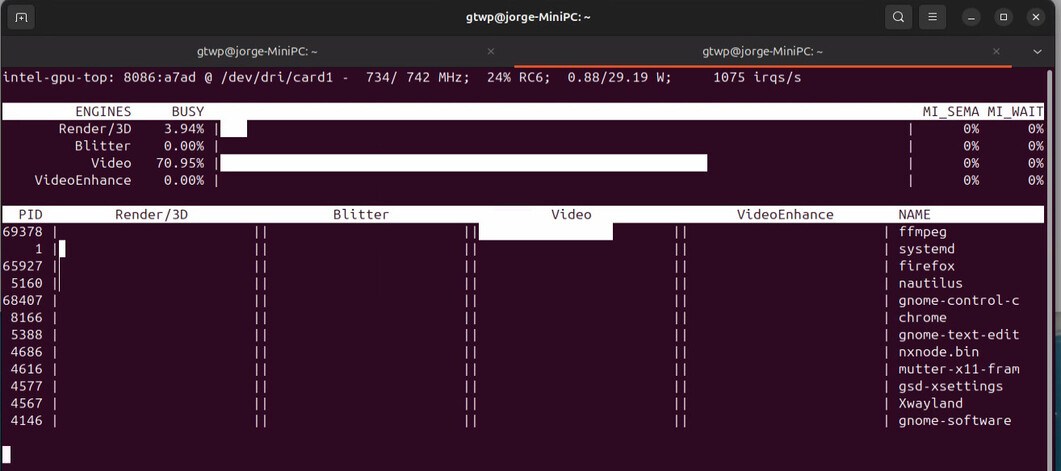
works with ffmpeg
I gave up with trying to run the image with podman in rootless mode lol I ran it with podman in rootful mode and it hardware transcodes it fine…