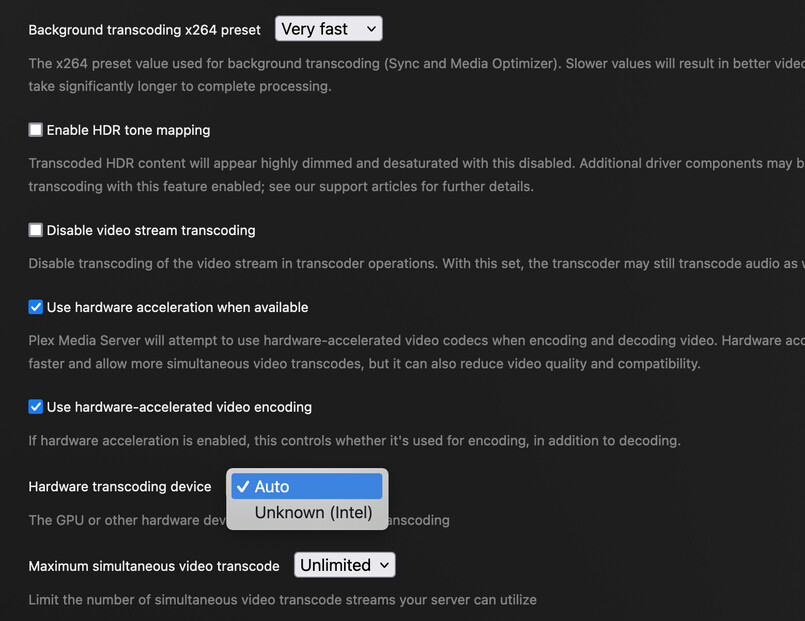
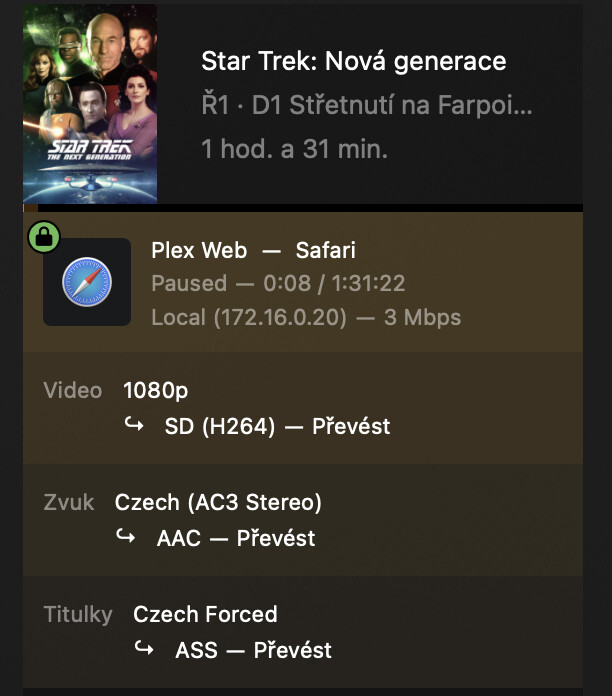
Core Ultra 7 265K - QuickSync - Linux

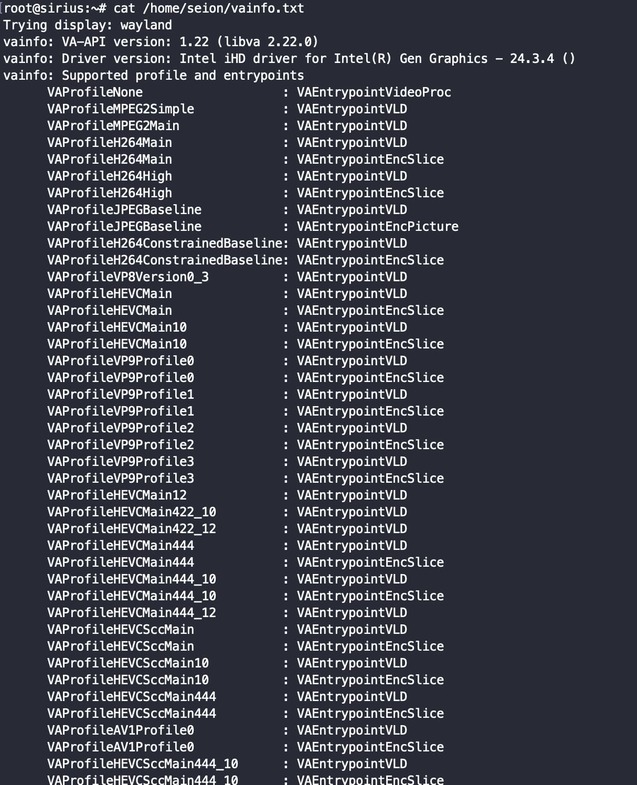
I am not able to get QuickSync transcoding to work on the following hardware:

  • Intel Core Ultra 7 265K
  • 96GB Memory
  • MSI z890 Tomahawk Motherboard

I would like this to work headless, but I am doing all my testing currently on Ubuntu 24.10 full desktop with gui installed.

I have Plex Pass

Server Version#: 1.41.1.9057
Player Version#: 4.138.0
Distro’s

  • Ubuntu 24.10 (Kernel 6.11)
  • Debian Testing (Trixie) (Kernel 6.11.4)

Plex Media Server.log
Password: #Pl3x!L0g
Link: Proton Drive

root@sirius:~# lspci -k
00:00.0 Host bridge: Intel Corporation Device 7d1b (rev 01)
    DeviceName: Onboard - Other
    Subsystem: Micro-Star International Co., Ltd. [MSI] Device 7e32
00:01.0 PCI bridge: Intel Corporation Device 7ecc (rev 10)
    Subsystem: Micro-Star International Co., Ltd. [MSI] Device 7e32
    Kernel driver in use: pcieport
00:02.0 VGA compatible controller: Intel Corporation Arrow Lake-U [Intel Graphics] (rev 06)
    DeviceName: Onboard - Video
    Subsystem: Micro-Star International Co., Ltd. [MSI] Device 7e32
    Kernel driver in use: i915
    Kernel modules: i915, xe
root@sirius:~# lspci -nn
00:00.0 Host bridge [0600]: Intel Corporation Device [8086:7d1b] (rev 01)
00:01.0 PCI bridge [0604]: Intel Corporation Device [8086:7ecc] (rev 10)
00:02.0 VGA compatible controller [0300]: Intel Corporation Arrow Lake-U [Intel Graphics] [8086:7d67] (rev 06)
root@sirius:~# lsmod | grep xe
xe                   3162112  0
drm_gpuvm              45056  1 xe
drm_exec               12288  2 drm_gpuvm,xe
gpu_sched              61440  1 xe
drm_suballoc_helper    16384  1 xe
drm_ttm_helper         16384  1 xe
drm_buddy              24576  2 xe,i915
ttm                   110592  3 drm_ttm_helper,xe,i915
drm_display_helper    278528  2 xe,i915
cec                    94208  3 drm_display_helper,xe,i915
i2c_algo_bit           16384  2 xe,i915
video                  77824  2 xe,i915
If you are apart of the Discord Community, I started there and you can see the thread here Discord

@seion

We’ve been updating the CPU/GPU names this week.

This is an EXPERIMENTAL build.

It may not be stable for anything else but:

  1. CPU/GPU should now identify correctly.
  2. CPU/GPU transcoding should work correctly.

https://artifacts.plex.tv/plex-media-server-experimental/1.41.3.9148-40c811519/debian/plexmediaserver_1.41.3.9148-40c811519_amd64.deb

I cannot speak to Ubuntu 24.10. It’s new. No testing of it has been performed here yet.

@bckp

Hey, Can you join us here ?

Updated build

Well that works :slight_smile:

1 Like

I will join you anywhere buddy :slight_smile:


yet

So only partial success, Plex does recognize my graphics card, yet not use it… i will verify if there is no docker issue in this part, if it have rights to use it and verify that stuff… and keep you informed

I will be doing a fresh installed of Debian Testing here soon and will try again and see if it works. I will then move to trying it in a Podman Container. If you look at that Discord link I had, I messed around with a bunch of stuff and cannot say that did not affect the outcome of it working.

@bckp

Turn off the subtitles for a moment and retest :slight_smile:

I will install it on bare metal, jist to verify it is not some docker issue, cant fully reinstall as i have production stuff there…

Totally understand.

Small (1 folder), bare metal, will confirm it works.
It will also prove/disprove docker issue

You can setup a custom location using /etc/systemd/system/plexmediaserver.service.d/override.conf

@seion

I advise caution when using “Debian Testing”.

Any & All “Beta” distros have problems.

As such, we cannot support those type releases.

I advise you to stick to mainstream releases. “Bleeding edge” does cut deep in most cases.

@ChuckPa
I can’t boot Debian Stable at all with the Ultra Core 7 265K. The kernel I think is too old. Most I could do is stick with Ubuntu 24.10

Too OLD?

Let me look for you.

I know the 6.8 kernel (Ubuntu 24.04 LTS) is good enough for AlderLake, RaptorLake and MeteorLake Desktop processors.

Have you considered a test install with Ubuntu Server 24.04 (you want headless, right?)

EDIT: It’s ArrowLake (as I thought). You can go Ubuntu Server route with good stability and success. It might be a few updates until the kernel itself has all the bells and whistles but you’re fine in a server environment. Kernel 6.8 already has the bulk of it for the AlderLake and above.

EDIT: Debian Bookworm is 6.1 kernel. I’m on Ubuntu 22.04 on my desktop and already 6.8-48

Is there a way to get that experimental build into a docker image?

@seion

No. The docker image hasn’t been built yet, Docker images get built when the CI does a production build.

We only built x86_64

Is that experimental build, what ever was changed in it to fix ArrowLake issues, planned for an upcoming release at all yet?

The experimental build updates ALL the current CPUs and GPUs.

Primary example: I have a Nvidia RTX 2000 GPU. PMS could not identify it / use it correctly until now (January 2024 released product)

This work is a major update for all of PMS and will go to review & QA next.

I cannot promise how quickly it gets released but would NOT be surprised to see it in the next release cycle.

@seion
@bckp

If you want to use this DEB in your docker.

There is a little bit of editing you need do

docker exec -it [plex_container_name] /bin/bash

Then execute

./plex_service.sh -d

dpkg -i Filename.deb

echo PlexMediaServer-1.41.3.9148-40c811519 > /version.txt

./plex_service.sh -u

—> Replace and update the version number in the string and redo the procedure when the next version comes out and you want to update.

(The contents of /version.txt controls whether or not it force-reloads the DEB)

1 Like

@seion @bckp

Please let me know how you make out with this.

It’s been a while since I hacked a docker image :sunglasses:

Or simply put exit 0 to the shell script that perform update :smiley:

Same :frowning: CPU HURTs… im now installing on bare metal…
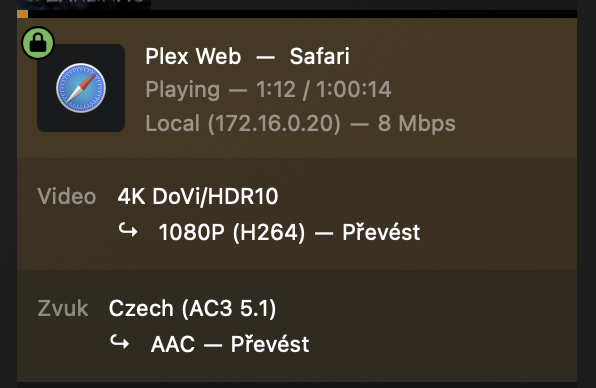

Same for bare-metal, transcode killing cpu, gpu is idle