Hi i am having an issue on a fresh install of PLEX MEDIA server on a NEW PC see below screen grab

Plex Media Server version?
Since it is a new installation, perform a complete uninstall (read the docs), reboot the PC, and try installing again.
thank you. i have tried this and deleted the PLEX SERVER FOLDER from C drive but same outcome . i may have missed reference in docs could u direct me to the correct document please
See https://support.plex.tv/articles/repair-a-corrupted-database/ and https://support.plex.tv/articles/202915258-where-is-the-plex-media-server-data-directory-located/ the AppData location is where your databases are kept, not the Program files path
The correct document is Uninstall Plex Media Server.
Step 1: Stop Plex Media Server if it is running.
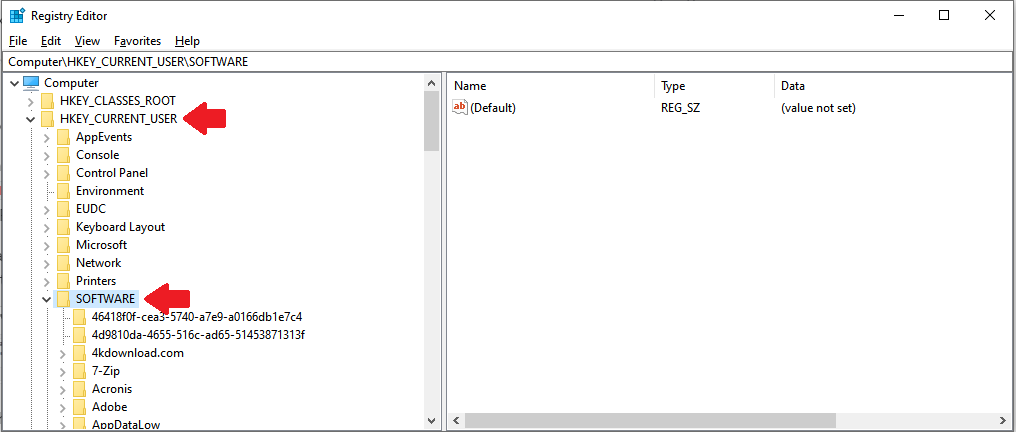
Step 2: Using RegEdit, delete the HKEY_CURRENT_USER\Software\Plex, Inc. registry key (see below).
Step 3: Uninstall the Plex Media Server application. Perform a standard Windows uninstall. Do not use Revo or other such uninstallers.
Step 4: Delete the Plex Data Folder. On Windows, it is C:\Users\User_Name\AppData\Local\Plex Media Server. User_Name = the username that was used when Plex was installed.
Note that AppData is normally a hidden directory. To make it visible, in Windows File Manager, select the View tab. Then check the box for Hidden Items.

Step 4: Reboot the PC.
Step 5: Re-download the current public or beta version of Plex Media Server. Be sure to choose the 64-bit version.
Step 6: Install Plex Media Server.
Registry Editor (RegEdit)
- Run RegEdit
- Expand HKEY_CURRENT_USER
- Expand SOFTWARE
- Scroll down until you see
Plex, Inc. - Right click on
Plex, Inc.and choose delete - Quit RegEdit.