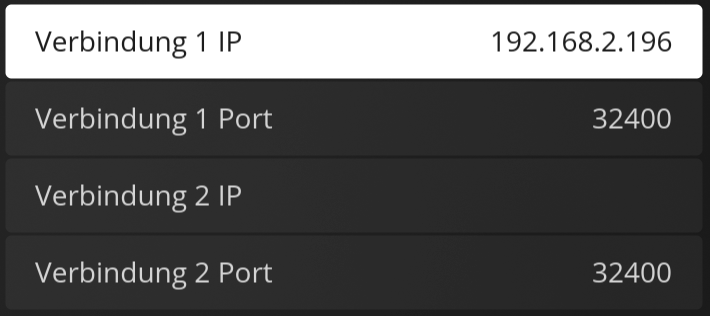
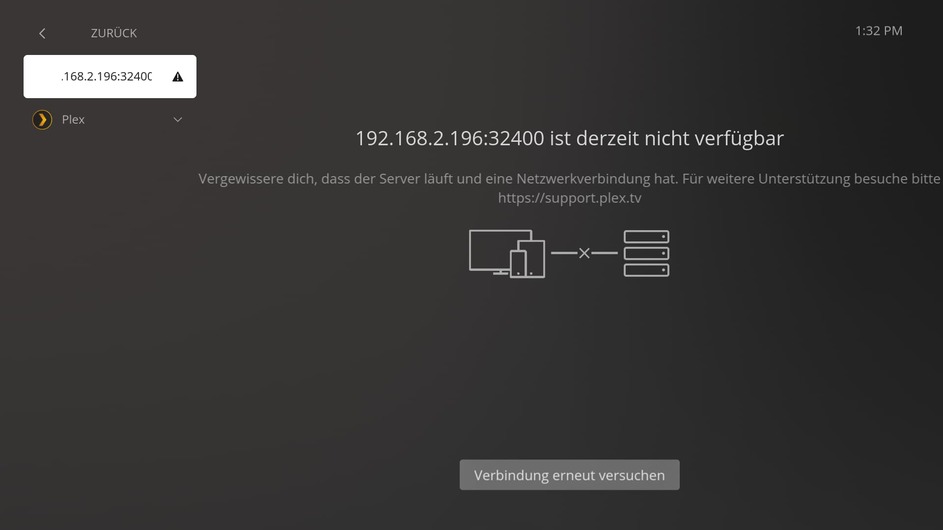
I encounter a issue when i try to add my server.
Installed v1.66.1.215-6346cfaf via snap on Ubuntu 22.04.4 LTS
In the logs after i set my server, i see a CORS error and cant play any files from my server.
It justs says “cant connect”.
Aug 28, 2024 16:21:54.989 [126707689135488] ERROR - [Web] Access to XMLHttpRequest at 'http://192.168.2.196:32400/identity?X-Plex-Token=xxxxxxxxxxxxxxxxxxxx' from origin 'file://' has been blocked by CORS policy: The 'Access-Control-Allow-Origin' header has a value 'https://app.plex.tv' that is not equal to the supplied origin.
Aug 28, 2024 16:21:55.038 [126707689135488] ERROR - [Web] 07/03/2024 16:21:55:038 [null:or9d311e0fe697pii59tiay6] WARN 07/03/2024 16:21:54:990 [null:or9d311e0fe697pii59tiay6] WARN [discoverServers] Failed to get identity for manual server 192.168.2.196:32400.
Aug 28, 2024 16:21:55.038 [126707689135488] INFO - [Web] 07/03/2024 16:21:55:038 [null:or9d311e0fe697pii59tiay6] INFO 07/03/2024 16:21:54:992 [null:or9d311e0fe697pii59tiay6] INFO [Server] Testing connections to 192.168.2.196:32400
Aug 28, 2024 16:21:55.040 [126707689135488] ERROR - [Web] Access to XMLHttpRequest at 'http://192.168.2.196:32400/identity' from origin 'file://' has been blocked by CORS policy: The 'Access-Control-Allow-Origin' header has a value 'https://app.plex.tv' that is not equal to the supplied origin.
Aug 28, 2024 16:21:55.040 [126707689135488] INFO - [Web] 07/03/2024 16:21:55:040 [null:or9d311e0fe697pii59tiay6] INFO [Server] Finished testing 192.168.2.196:32400. Result: Could not get a server identifier. Status: notConnected
Aug 28, 2024 16:21:59.892 [126707689135488] INFO - [Web] 07/03/2024 16:21:59:892 [null:or9d311e0fe697pii59tiay6] INFO [Server] Testing connections to 192.168.2.196:32400
Aug 28, 2024 16:21:59.910 [126707689135488] ERROR - [Web] Access to XMLHttpRequest at 'http://192.168.2.196:32400/identity' from origin 'file://' has been blocked by CORS policy: The 'Access-Control-Allow-Origin' header has a value 'https://app.plex.tv' that is not equal to the supplied origin.
Aug 28, 2024 16:21:59.910 [126707689135488] INFO - [Web] 07/03/2024 16:21:59:910 [null:or9d311e0fe697pii59tiay6] INFO [Server] Finished testing 192.168.2.196:32400. Result: Could not get a server identifier. Status: notConnected
Aug 28, 2024 16:21:59.910 [126707689135488] INFO - [Web] 07/03/2024 16:21:59:910 [null:or9d311e0fe697pii59tiay6] INFO [Server Retry] Starting connection retries to 192.168.2.196:32400 (notConnected)
Aug 28, 2024 16:22:01.911 [126707689135488] INFO - [Web] 07/03/2024 16:22:01:911 [null:or9d311e0fe697pii59tiay6] INFO [Server Retry] Retrying connection to 192.168.2.196:32400 (notConnected)
Aug 28, 2024 16:22:01.911 [126707689135488] INFO - [Web] 07/03/2024 16:22:01:911 [null:or9d311e0fe697pii59tiay6] INFO [Server] Testing connections to 192.168.2.196:32400
Aug 28, 2024 16:22:01.925 [126707689135488] ERROR - [Web] Access to XMLHttpRequest at 'http://192.168.2.196:32400/identity' from origin 'file://' has been blocked by CORS policy: The 'Access-Control-Allow-Origin' header has a value 'https://app.plex.tv' that is not equal to the supplied origin.
Aug 28, 2024 16:22:01.925 [126707689135488] INFO - [Web] 07/03/2024 16:22:01:925 [null:or9d311e0fe697pii59tiay6] INFO [Server] Finished testing 192.168.2.196:32400. Result: Could not get a server identifier. Status: notConnected
Aug 28, 2024 16:22:03.090 [126707689135488] INFO - [Web] 07/03/2024 16:22:03:090 [null:or9d311e0fe697pii59tiay6] INFO [Server] Testing connections to 192.168.2.196:32400
Aug 28, 2024 16:22:03.115 [126707689135488] ERROR - [Web] Access to XMLHttpRequest at 'http://192.168.2.196:32400/identity' from origin 'file://' has been blocked by CORS policy: The 'Access-Control-Allow-Origin' header has a value 'https://app.plex.tv' that is not equal to the supplied origin.
Aug 28, 2024 16:22:03.115 [126707689135488] INFO - [Web] 07/03/2024 16:22:03:115 [null:or9d311e0fe697pii59tiay6] INFO [Server] Finished testing 192.168.2.196:32400. Result: Could not get a server identifier. Status: notConnected
Aug 28, 2024 16:22:05.932 [126707689135488] INFO - [Web] 07/03/2024 16:22:05:932 [null:or9d311e0fe697pii59tiay6] INFO [Server Retry] Retrying connection to 192.168.2.196:32400 (notConnected)
Aug 28, 2024 16:22:05.932 [126707689135488] INFO - [Web] 07/03/2024 16:22:05:932 [null:or9d311e0fe697pii59tiay6] INFO [Server] Testing connections to 192.168.2.196:32400
Aug 28, 2024 16:22:05.947 [126707689135488] ERROR - [Web] Access to XMLHttpRequest at 'http://192.168.2.196:32400/identity' from origin 'file://' has been blocked by CORS policy: The 'Access-Control-Allow-Origin' header has a value 'https://app.plex.tv' that is not equal to the supplied origin.
Aug 28, 2024 16:22:05.947 [126707689135488] INFO - [Web] 07/03/2024 16:22:05:947 [null:or9d311e0fe697pii59tiay6] INFO [Server] Finished testing 192.168.2.196:32400. Result: Could not get a server identifier. Status: notConnected
Aug 28, 2024 16:22:11.952 [126707689135488] INFO - [Web] 07/03/2024 16:22:11:947 [null:or9d311e0fe697pii59tiay6] INFO [Server Retry] Retrying connection to 192.168.2.196:32400 (notConnected)
Aug 28, 2024 16:22:11.952 [126707689135488] INFO - [Web] 07/03/2024 16:22:11:952 [null:or9d311e0fe697pii59tiay6] INFO [Server] Testing connections to 192.168.2.196:32400
Aug 28, 2024 16:22:11.972 [126707689135488] ERROR - [Web] Access to XMLHttpRequest at 'http://192.168.2.196:32400/identity' from origin 'file://' has been blocked by CORS policy: The 'Access-Control-Allow-Origin' header has a value 'https://app.plex.tv' that is not equal to the supplied origin.
Aug 28, 2024 16:22:11.973 [126707689135488] INFO - [Web] 07/03/2024 16:22:11:973 [null:or9d311e0fe697pii59tiay6] INFO [Server] Finished testing 192.168.2.196:32400. Result: Could not get a server identifier. Status: notConnected
I tried it with debian, ubuntu & rocky linux.
On all systems i installed snap and tested the version/channels 1.20.1.3105-ac120bc6/latest/stable & 1.67.1.233-0ab7ab17/latest/stable
Every installation shows the same error:
v1.20.1.3105 = working
v1.67.1.233 = CORS Error
Have you manually specified the server in the plex htpc?
The error is weird. Basically, it says “wrong source - expected plex.tv, got 192.168.2.196” - but I have no idea where to find the line “Access-Control-Allow-Origin” that needs to be changed.
#edit
I have seen that you mentioned it being only Linux-specific. This might be due to QT6 being used on Linux and therefore a newer “chromium” version is used.
From what i understand, does the/my server? reject the request to “192.168.2.196” because the origin of the request is “file://” and not “plex.tv”, I may be wrong, but thats how i understand it and how ChatGPT explains it.
Or it might be “server” that derves the HTML page in plex-htpc.
But i dont think there is a webserver when the page is loaded via “file://…”
Oct 02, 2024 13:31:14.252 [128507836964224] ERROR - [Web] Access to XMLHttpRequest at 'http://192.168.2.196:32400/identity?X-Plex-Token=xxxxxxxxxxxxxxxxxxxx' from origin 'file://' has been blocked by CORS policy: The 'Access-Control-Allow-Origin' header has a value 'https://app.plex.tv' that is not equal to the supplied origin.
Is there a reason why you need to manually configure the server?
How else do i add my server when he is not public reachable, and i want it only to use it in the LAN, without account? The setup should work completely offline.
Do you have secure streaming disabled on your server?
Without account and completely offline is probably the crux. With an account, the app gets told where to find the server - nothing else. For this, the server does not need to be publicly reachable. (mine isn’t for example and never will be) It needs to be signed in and the local address needs to be known.
On the client side, when logging in this information is pulled from Plex online service and the device knows where to find the server. (via plex.direct… - once this is known internet can be out for a while, I have no idea how long this works without internet)
Other clients like the Apps on my SmartTVs do not have the problem with my current setup.
There is us also no account singed in and only the manually defined Server IP.
The plex-htpc player is the first one i encounter this CORS issue.
I believe this is a issue on the QT Application with which the htpc player way build.
The older version distributed via snap works, the new/latest not.
Okay, I have tried it on an Ubuntu VM and could reproduce the issue. (although I could not fix it - the only way I could connect to my server was to log in)
The identity part is failing. Plex HTPC somehow does not understand the request it gets back from the server. In the log, it all starts with
INFO [Server] Testing connections to 192.168.1.26:32400
INFO [Server] Finished testing 192.168.1.26:32400. Result: Could not get a server identifier. Status: notConnected
After this line hits the log, the CORS errors come up. I assume that the code first tries to connect to the server directly - that fails and then it somehow expects to get the address via app.plex.tv but only receives the local IP… The page http://192.168.1.26:32400/identity is browsable and does respond with an output. I could not test this against an unclaimed server…
Why does the plex server even send a cors allow origin header set to “app.plex.tv”?
As it is, the “manually define server” functionality makes (in my eyes) no sense.
I tried to override the header with nginx, which worked, but did not trick the player into working. Instead in the log complains:
Oct 07, 2024 14:21:53.227 [131965498199424] ERROR - [Web] Access to XMLHttpRequest at 'http://192.168.2.196/identity?X-Plex-Token=xxxxxxxxxxxxxxxxxxxx' from origin 'file://' has been blocked by CORS policy: The 'Access-Control-Allow-Origin' header contains multiple values 'https://app.plex.tv, *', but only one is allowed.
Oct 07, 2024 14:21:53.311 [131965498199424] ERROR - [Web] 09/01/2024 14:21:53:310 [null:7wfk1qpbz6xrecb82wrqmozk] WARN 09/01/2024 14:21:53:227 [null:7wfk1qpbz6xrecb82wrqmozk] WARN [discoverServers] Failed to get identity for manual server 192.168.2.196:80.
A curl request clearly shows that only one value is set to “*”, not sure where the other “app.plex.tv” header value comes from.
Arguments are passed into QApplication which passes at least some arguments to QTWebEngine.
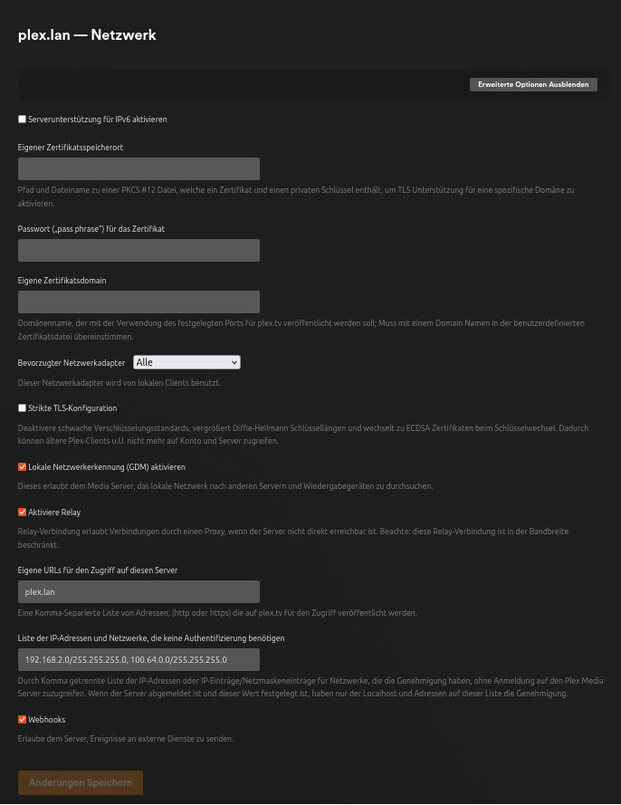
Also, you should note that the server preference for IPs allowed without auth should not have spaces in it. With spaces, it’ll fail to parse what you have, log it, and act as if it is not set.
You should highly consider using an account as you are hitting things which are explicit security protections against malicious actors. With an account, your clients will be given the IP address on your LAN at which the server is accessible and avoid any CORS issues. You can still do this without letting your PMS be accessible outside of you LAN.
How is it safer to use a account and do http requests accross the internet, to obtain a LAN IP than define such IP directly in the application?
Every plex application in my network use the LAN IP.
Why do i need to sign everywhere in to obtain said IP rather then use the functionallity “define manually server” which works perfectly fine on any other player without account or internet but not in the plex-htpc player.
Not to mention that i have to sign in every a couple of weeks when i have not used the player/(smart tv) app.
Using an account allows Plex to generate and assign a certificate to your server which will then allow all Plex clients to use a secure (https) connection to your server.
When i have a attacker in my LAN, that sniffs the traffic between my plex server and player, i have i much bigger problem than the (possible) encrypted traffic from my media server.
Unrelated to that, why is there a “define server manually” possibility when it does not work like expected?
I think the post reply’s got a bit off-topic.
How should we deal with the issue that the server you can define manually cant be used/throw a CORS error?
There are far more security implications in what you are doing that is worth describing here. Put simply, using an account has a far smaller attack surface than setting your server to effectively grant admin access to everything originating from 2 /24 subnets. The CORS configuration on the server is there to try to protect you from much larger attack surface that you have opened yourself up to.
The only reason the IP auth setting still exists is for situations where the user has no other choice and is extremely discouraged.
To be honest: I dont care about security concerns.
Its up to me to security my network and separate things in VLANs etc. pp.
There are reasons why i do things the way i do them.
This post is about a bug, not security concerns.
There is a feature “define manually server” which does not work like it should.
For me there a two possible outcomes:
remove the defect feature
fix it and make it work like it should be
Im not willing to discuses further about security related stuff.