How would I go about running this on Unraid as a scheduled task? I’ve tried running it in User Scripts plugin but get this error - Are you trying to run the tool from outside the container environment ?
After running the DBRepair Plex runs perfect for 5-7 days. It would be great to automate running the script.
As someone who has been using this tool stop automatic status start exit almost since it came out I would say it depends on the amount of content and the frequency you are adding/changing media on your plex server.
If you add very little content (couple of movies, few tv episodes and some music each week) I would say once every few months would be fine. Larger updates say once a month to once a week.
You will notice the more you run the tool the very small improvements in db size etc you will notice over time.
Myself, I use to run it once a week but now its monthly. BTW… it won’t cause any harm running it even once a day if that is what you decide but that would be overkill IMO.
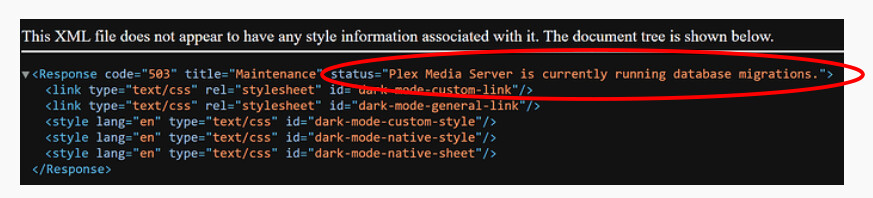
I received a notification of a newer version of Plex. I stopped my Plex server, downloaded the new package, updated to the new version of Plex (from 1.40.1 to 1.40.2) and after starting Plex again, I have an XML error menu and plex no longer starts.
I looked everywhere. I tried the Plex SQLite method, which didn’t work. Then I found your github and followed the instructions and did an Automatic repair.
I have a QNAP server and running Plex as an app, not in a container.
Now after following the steps for Automatic repair, I try doing Step 7 - Start - Start PMS and it returns “Could not start PMS. Error Code: 1”
No clue since I don’t do beta versions. You may want to open a new thread, as advised, to see how long it’s taken for other people and for any help in case it’s stuck.
I don’t think it’s out of the blue. I’m saying databases stopped generating then so I’m assuming I’ve been working with a broken database since then but never saw anything to indicate that
Plex has not created any database backups since 2022 ?
If this is true then the database is indeed damaged and PMS can’t deal with it.
Your choices are to IGNORE (menu option) the constraint errors and try to continue (scanning files and force refreshing metadata) for all library sections.
Constraint errors indicate duplication of data. When IGNORED, those duplicates are dropped without any other consideration. You may get a fully intact DB but may not. There will be some holes in the data (which can be filled in again).
In all cases, when done, Plex will be able to generate backups.
Thanks for the reply. Correct, no database backups since 2022. Luckily, following the manual steps here: Reddit - Dive into anything I was able to successfully repair the database and now your tool also reports it is healthy again. I will be watching much more closely to make sure backups are being created regularly. Also, if there is a next time (please don’t let there be a next time) I will know to try the ignore option.