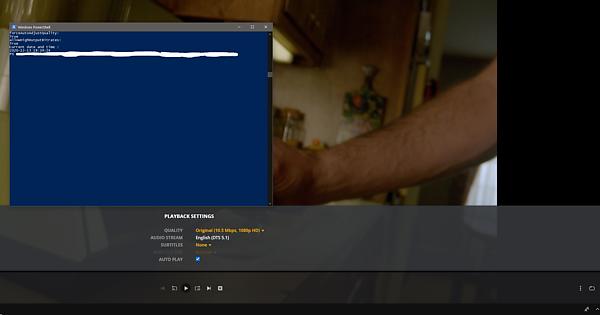
It isn’t just forceAutoAdjustQuality being set. There is another flag allowHighOutputBitrates that from our testing we believe is what allows it to playback direct with enough bandwidth. We aren’t trying to go from Auto to direct. You would be going from Direct to Auto. So if there is enough bandwidth right as they start the stream it plays direct otherwise it starts playing in Auto quality.
Ahh, OK. That’s not what your script said yesterday.
But I still don’t see it. Can you share an example?
I see transcoding everywhere I’ve tried. Mac Plex.app (LAN), iOS (LAN, Remote), ATV (LAN, Remote), Roku (LAN), Web (LAN, Remote).
With forceAutoAdjustQuality=“1” and allowHighOutputBitrates=“1”, playback is still only Direct if the client is configured for more bandwidth than the stream requires.
Sadly, I think it’s clear what forceAutoAdjustQuality=“1” does, and I don’t think there’s any evidence that it enables Direct. I would be surprised if one setting affected multiple behaviors, and I would be surprised if one setting resolved this longstanding issue. (And I REALLY wish it did.)
I don’t know what allowHighOutputBitrates does. I sent a PM to the only forum poster who has ever mentioned it to ask, but I don’t know if they’re around any more. My guess is that it changes internal fudge-factor values when transcoding between codecs, but also doesn’t affect Direct.
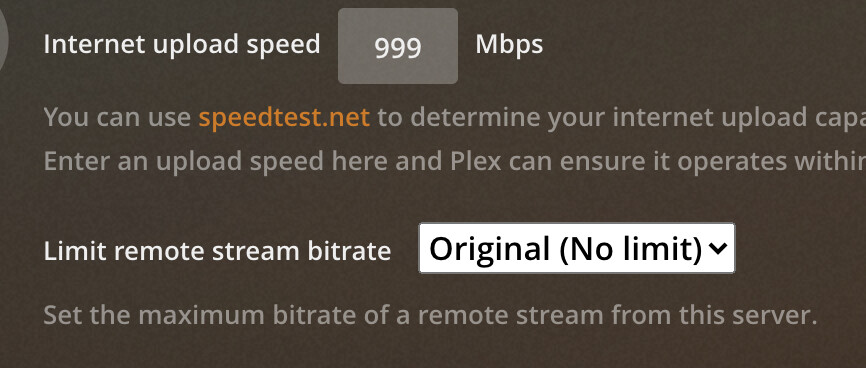
Yeah me and some others were going back and forth between on the HighOutputBitrates flag and it seemed to help so I decided to turn it back on . Are you looking for an example for direct playback? Or an example of the code? Are you limiting bandwidth in the server side under limit remote stream bitrate or is that set to original?
Yes but according the Plex admin that won’t work either they claim it can only transcode not even on the internal. I don’t have enough bandwidth to test this external. Other have tested external.
You mean @DaveBinM’s comment in the Reddit thread? I think he’s subtly wrong there. I don’t think it forces transcoding for ALL videos.
I don’t think forceAutoAdjustQuality changes the behavior for Direct at all. Videos that can be played Direct still are, and videos that wouldn’t be Direct (because of client settings, or any other reason) still aren’t.
I think it basically tells clients: “Enable Automatically adjust quality (within the constraints he describes)”, and if they can, they do.
That’s a good theory and would explain why we still see direct play and Auto. Although the second picture I added of the other user he said he tested with all new clients set with their default settings and had direct playback. So I don’t know at this point. I’d love to get some feedback from the Plex devs because the Plex guy on Reddit is just a tester and probably doesn’t know the details of how it all works.
If you set to Maximum in your client, you wont get a ForcedAuto Stream. As soon as Auto is enabled, there wont be direct play.
Also this is very off topic.
Apologies for dragging this off topic I’ll make a new thread. Even if this does only allow for Transcoding 1080p 20Mbps is better than the stupid 2Mbps Plex stuck us with.
I think maybe it used to, but as I mentioned on Reddit, this is an option that’s more intended for our own internal testing, and not for public use, so there’s not a lot of documentation on it.
Tell me about it… Actions speak louder than words. It’s not like Plex was made in assembly, right? Does anyone even work at Plex? Are they all interns? We get updates for all kinds of things that we do NOT want and tons of other stuff go neglected. Just browse the forums and you’ll see.
CEO/CTO or whatever likes to talk but never delivers. Anyone who’s done software development can smell the bs. Plex needs to get their priorities straight. I, like many others, STILL have to suffer through this.
There’s people in this thread right now that could’ve fixed this problem in a day. These clowns act like they’re doing rocket science. I’m really tired of it.
@elan is the CTO. As far as I am concerned it’s on him. He’ll say whatever to save face. It’s software engineering, not rocket science. I know people with zero college experience that get things done faster than the engineers at Plex. This issue should have been prioritized a long time ago. 720p? In 2021? It’s an absolute joke and we are being treated like we’re fools who can’t see through the nonsense.
I’m an engineering team lead (not at Plex)
As much as I like to think along the lines of the above few comments, I know from actual experience that what seems like a simple solution isn’t always. There could be extenuating circumstances that we don’t know, or it could just be getting deprioritized.
I get similar comments from my users sometimes, and it’s not always that cut and dry. Definitely hurts to hear it, even if I don’t take it personally. Sometimes it’s entirely out of my control. Just the way things go sometimes.
I just had to tell a family member to stop transcoding down to 720p for the 3rd time in a month. I want to completely turn off transcoding but they still need to transcode my x265 to x264.

 . Are you looking for an example for direct playback? Or an example of the code? Are you limiting bandwidth in the server side under limit remote stream bitrate or is that set to original?
 And I’m willing to risk being wrong, because I’d rather be wrong. But I think you’re wrong.