Server Version#:1.25.9.5721
Player Version#:4.69.1
I am having trouble deleting a server. I no longer have any users assigned to it. It shows to be unclaimed. How do I get rid of it.
Usually deleting it from your list of authorized devices should do.
https://app.plex.tv/desktop/#!/settings/devices/pms
That has not worked
So… what exactly are you seeing and where?
Mind sharing a screenshot?
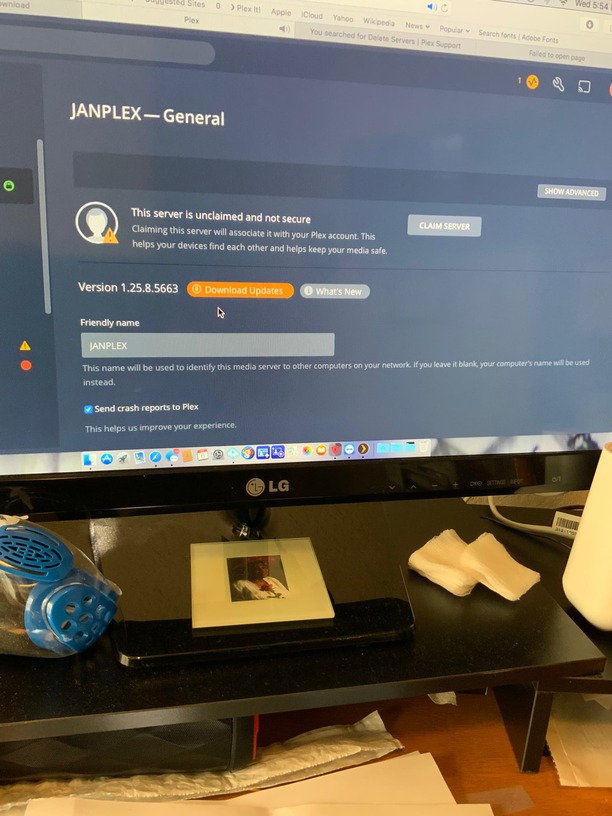
ok… so the server is actually still installed on your machine, you’ve already signed it out (unclaimed) – why not simply uninstall it? While the PMS is still installed on the machine and running you’ll be able to access it through its local IP address (e.g. http://[PMS IP address]:32400/web)

Not sure what that screenshot is supposed to show?!
32400 is now pointed to my new server. It is accessible from the outside just fine
Just want to eliminate the one server no longer active.
If I uninstall PMS will it take out my new server also?
I’m confused…
Did you create a new server on the same machine?
From your first screenshots it looks like the old one was still running – hence I assumed you might want to simply uninstall it.
New server running on separate machine. Always has been. 2 servers on same local network.
Then deleting the old one will do no harm.
I guess I am not sure how to delete
This is running on a Mac?
- Check the menu bar for the Plex icon… click it and select the
Exitoption - Delete the
Plex Media Serverapp from/Applications/.
Do I download and reinstall?
Why would you?
You want to delete it, don’t you?
I have a new device
Sure… if you want Plex to run on the new device, you’ll need to download and install it there 
I will give it a shot. Will keep you posted.
