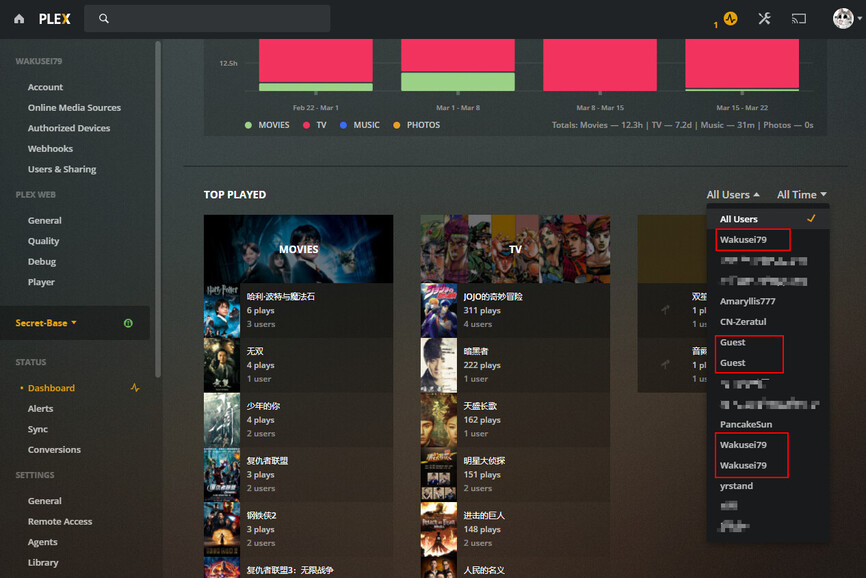
Server Version#: 1.22.0.4163
- How do I delete duplicate user records?
Some old users are no longer in the sharing list. Can the playback records of these users be deleted?
There is no way to manually delete them in the web app. I suppose you can wipe records of them directly in the sql database but I would not attempt unless you know sql well.
Info on that part of the database ( is really for migration) can be found here Move Viewstate/Ratings from One Install to Another | Plex Support
I’m not good with DB editing myself so can’t really help unfortunately.
I have the same problem. Plex … please fix this. It does not affect performance but seeing users that have died is a bit creepy.
Will it do anything if you delete the User/Friend under Settings->Users & Sharing?
It does not. The info on the dashboard is history of your server. Regardless if you are still sharing with them or not the history still exists.
*** I do not take responsibility if things go south, do this at your own risk ***
*** Make a backup of your DB to be safe ***
First you’ll need to download SQLiteBrowser: Version 3.12.1 released - DB Browser for SQLite
Find Plex and stop/exit the program.
Plex database is located here:
“%LOCALAPPDATA%\Plex Media Server\Plug-in Support\Databases”
Make a copy of “com.plexapp.plugins.library.db”
Open “DB Browser for SQLite.exe”
Click on File > Open, navigate to the Plex database and select “com.plexapp.plugins.library.db”
Select “Browse Data” tab > in Tables drop down box select “accounts”
Remember the ID and Name. Right click on the row and select “Delete Record”
This should remove the user from the user list, however it will not remove history information from the database. You can go further by cleaning it up by navigating to any of the “statistics_*” tables. Filter by using the account_id and highlight the rows and select delete record.
Start Plex. If you’ve done it correctly the old user is no longer in the list.
This topic was automatically closed 90 days after the last reply. New replies are no longer allowed.