Synology DS124, Realtek RTD1619B
DSM 7.2.1
My question is whether Plex will also be available for the DS124, processor = Realtek RTD1619B?
Is there a plan/roadmap for this?
Synology DS124, Realtek RTD1619B
DSM 7.2.1
My question is whether Plex will also be available for the DS124, processor = Realtek RTD1619B?
Is there a plan/roadmap for this?
RTD1619B already supported
bash-4.4# cd ..
bash-4.4# ls
conf  etc  home  INFO  scripts	share  shares  target  tmp  var  WIZARD_UIFILES
bash-4.4# cat INFO
package="PlexMediaServer"
version="1.32.7.7571-7000"
os_min_ver="7.0-40000"
description="Plex organizes all of your personal media so you can easily access and enjoy it."
arch="rtd1619 rtd1619b rtd1296 armada37xx"
maintainer="Plex Inc"
displayname="Plex Media Server"
maintainer_url="https://www.plex.tv"
support_url="https://support.plex.tv/"
helpurl="https://support.plex.tv/"
adminport=32400
adminurl=web
dsmuidir="ui"
beta="no"
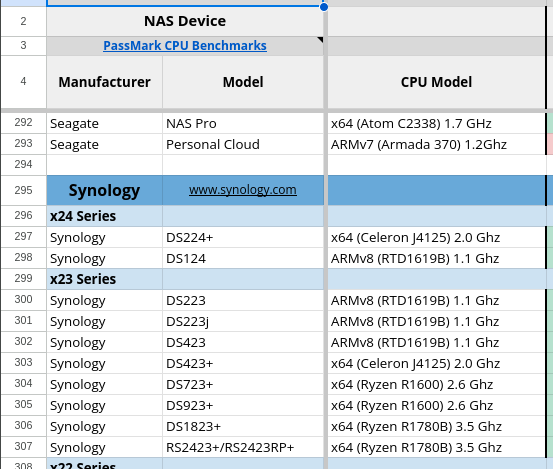
Yes, in that excel seems to have compatibility, but the plex package does not appears in the package center of the Synology. The only solution is using a non-official package or using docker?
It’s supported by the native ARMv8 / AARCH64 package.
Observe -
[chuck@lizum aarch.2003]$ tar xf ../PlexMediaServer-1.32.7.7484-337c79318-aarch64_DSM7.spk
[chuck@lizum aarch.2004]$ ls -la
total 89936
drwxr-xr-x  5 chuck chuck      138 Feb 17 14:54 ./
drwx------ 48 chuck chuck    77824 Feb 17 14:54 ../
drwxr-xr-x  2 chuck chuck       65 Sep  8 11:45 conf/
-rwxr-xr-x  1 chuck chuck      574 Sep  8 11:45 INFO*
-rw-r--r--  1 chuck chuck    52891 Sep  8 11:45 PACKAGE_ICON_256.PNG
-rw-r--r--  1 chuck chuck     6751 Sep  8 11:45 PACKAGE_ICON.PNG
-rw-r--r--  1 chuck chuck 91916347 Sep  8 11:45 package.tgz
drwxr-xr-x  2 chuck chuck     4096 Sep  8 11:45 scripts/
drwxr-xr-x  2 chuck chuck     4096 Sep  8 11:45 WIZARD_UIFILES/
[chuck@lizum aarch.2005]$ cat INFO
package="PlexMediaServer"
version="1.32.7.7484-7000"
os_min_ver="7.0-40000"
description="Plex organizes all of your personal media so you can easily access and enjoy it."
arch="rtd1619 rtd1619b rtd1296 armada37xx"
maintainer="Plex Inc"
displayname="Plex Media Server"
maintainer_url="https://www.plex.tv"
support_url="https://support.plex.tv/"
helpurl="https://support.plex.tv/"
adminport=32400
adminurl=web
dsmuidir="ui"
beta="no"
install_replace_packages="Plex Media Server"
install_conflict_packages="Plex Media Server"
install_replace_force_packages="Plex Media Server"
[chuck@lizum aarch.2006]$
Synology does little with us anymore.
Use the “Manual Install” method – Downloaded from https://plex.tv/downloads.
Thank you for the feedback. I’ve used the manual method and everything is OK. Negative kudos to synology for not supporting 100% officially one of the best reasons to buy a nas…
