After playing, Plex’s “Recently Played” playlist shows the first track - “Common People (full length version)” - as being from the compilation https://musicbrainz.org/release/a074b410-9b50-4414-a541-379871279755 (which is also in my library and is also manually matched by MusicBrainz ID), instead of being from the single from which I actually played it, viz:
By comparison, in dashboard’s Play History, the correct track shows:
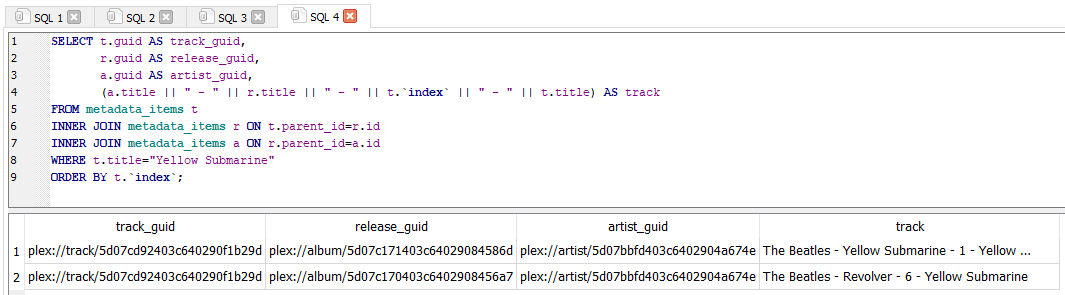
Having looked at my db, it seems that four versions of same song on different releases have for some reason been allocated the same GUID in Plex:
Presumably, this means that Plex can’t tell these versions apart, hence the reason that the Recently Played playlist shows that I’ve played the song, but not from the release from which I played it?
Is there any way to resolve this, so Plex can accurately associate each song with the correct release?
IIRC the guid is based on the MusicBrainz recording id, which isn’t tied to a specific release. The Common People track from both your link above and from Hits point to the same recording (GUID efc9d4c9-9eb4-4226-9217-97c21102542c), so Plex treats them as the same track. If they’re two different recordings (e.g. one’s a live performance or a remix), then you could create a new recording in MusicBrainz and update all applicable existing links accordingly. But if they’re the same track that just appears on different releases, then from MusicBrainz’s point of view everything is working as expected, so it’d be up to Plex to adjust how the Recently Played playlist is generated. There are some less than ideal workarounds you could try like leaving one album unmatched, but the core issue is something Plex would have to address.
As for the difference between the Recently Played playlist and the Play History dashboard, my guess is that the playlist relies solely on the guid, which Plex can’t definitively associate with a particular release, but the play history dashboard uses extra information from the metadata_item_views table in the database (which includes the guid, track title, album title, and artist) to display play history. That’s mostly speculation though.
This is great, thank you. For what it’s worth, I think Plex should address this issue. D’you know how to bump it to the devs, please?
A couple of thoughts.
I can infer from my last screenshot above, of my metadata_items table, that the Plex GUID track/5d07cddb403c640290f88804 must - as you suggest - be pointing to the same track recording MBID, https://musicbrainz.org/recording/efc9d4c9-9eb4-4226-9217-97c21102542c, specifically numbers 1.1 and 1.5. However, I can see too in the same screenshot that the four instances of the track, each from a different album, each has a discrete id and parent_id in the table. Perhaps Plex could use these to distinguish between multiple instances of tracks which share GUIDs?
Failing that, it looks to me like there’s a missing field in the metadata_items table, which should contain release MBID (or some Plex equivalent) for each recording (track). Looking at the two instances of Common People (Full Length Version) at the bottom of my final screen shot, those are taken from Release “Common People” by Pulp - MusicBrainz (id 38204) and https://musicbrainz.org/release/34691b03-4cdf-44aa-b09d-2b57440d3732 (id 71813) respectively - in other words, separate release MBIDs. Could the table to modified to accommodate these data? If so, I imagine the Playlist problem that I’ve identified could subsequently be resolved?
Failing that, could the Recently Played playlist be updated to identify tracks comparably to the Play History dashboard (assuming you’re right, to include GUID, track title, album title, and artist)? Again, the critical missing ingredient from the playlist looks to be album title, with the result that the playlist gets erroneously constructed when tracks share a GUID.
Finally, I appreciate your suggestion about leaving albums unmatched. In this case, where I have four tracks that share a GUID across four separate albums, I believe that’d require leaving 3/4 albums unmatched to resolve the problem? I agree with you that this workaround sounds less than ideal, since I imagine I’ll find the problem replicated many times across my database with other artists and releases. I’m hoping that the Plex devs might be able to achieve something more satisfactory…
Yeah, keeping track of some additional details like the parent id/guid would probably work. That said, it’s hard to say how easy something will be without knowing exactly what Plex is doing under the hood. As someone who’s been on the receiving end of, “Doing XYZ is so simple, why don’t you just implement it?” many times, I’m always wary of saying, “that should be easy to do” when I don’t know the underlying process. Not to say it’s guaranteed to be a hard problem to solve, but even if it’s not, it’s still something that Plex would have consider being worth their time.
This is essentially what you suggested in #1, since that information isn’t missing, but attached via parent_id. The parent_id links to another item in the metadata_items table that represents the album, which doesn’t have the release MBID directly, but does have the album guid:
That’s definitely another feasible approach. Though I’m curious - if you click on the Common People track in the Play History table, does it take you to the right album, or to the Hits version? I ask because the metadata_item_views table just stores the album as text, not an actual guid/identifier. Using that text to find the right release would probably work in 99.9% of cases, but if you e.g. manually change the title of the album later (or you have multiple releases with the same name), Plex still can’t definitively match it against the right track.
Yeah, definitely not an ideal, or even good, option, but more of a “if you’re really desperate to keep them separated” approach.
Another thing potentially worth mentioning is that this is part of a class of complaints related to Plex using the guid to track data. This is the first time I’m seeing the ‘Recently Played’ scenario, but it also crops up when people are confused why ratings/watch status are synced between separate library items. And it doesn’t just affect music - it also happens to episodes and movies, though least for movies, Multiple Editions will sever the connection. It’s nice in some circumstances (I personally like having an all-up play count for a track instead of individual counts for each release it’s a part of, though others I’m sure would disagree), but as you’ve seen there are several downsides to that approach as well, which was probably part of the motivation behind Multiple Editions.
The officially recommended way would be to create a feature suggestion around using more than just the guid to populate the Recently Added playlist. That way Plex can gauge interest in a suggestion, but that’s still no guarantee Plex will respond/address it. From what I’ve seen, a lot of the time you just have to hope that enough people are similarly annoyed with a behavior to chime in on the thread/use one of their votes on the suggestion so it gains some traction.
Sorry for my slow response but wanted to say, @DTR, that you’ve been brilliantly helpful here. Thanks very much. I shall indeed pursue a feature suggestion, adding the issue I’ve found here to the list of others that’ve arisen in consequence of Plex using GUID to track data. It may come to nothing but it’s worth a punt, I reckon.