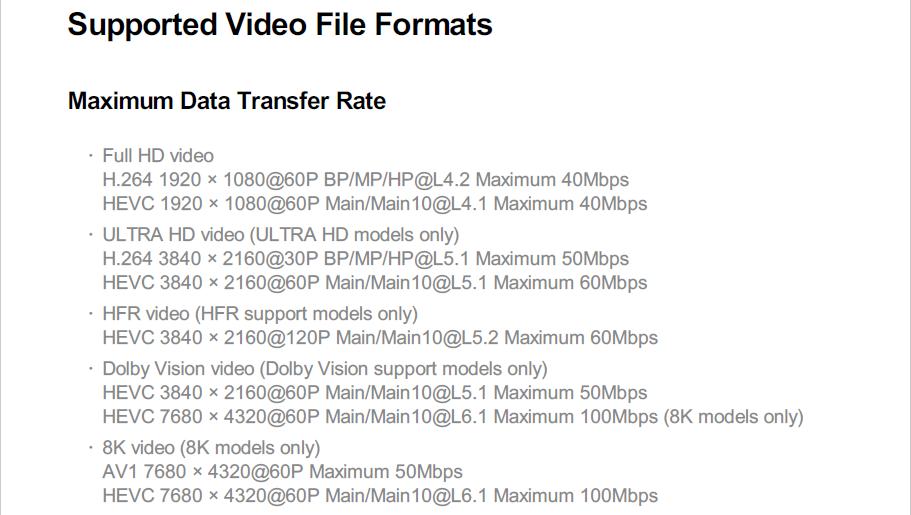
I am having trouble playing 4K Bluray remux files on my LG B8 OLED.
I originally thought this could be a network bandwidth issue, but I have since installed a local LibreSpeed instance on my server and I am getting speeds of 99mpbs+ over Ethernet (expected from the 10/100 port on the B8) and 180mbps+ over Wi-Fi (ie. these are the speeds between my TV and my server hosting Plex, not the internet) - so I don’t think network speed is the issue.
According to Plex Media Server, the total bitrate for the remux file I’m testing is 82.2 Mbps - this is the highest bitrate file I have, but I have also tested other files with bitrates between 70-80mbps and I’m seeing the same results. Only files under 70mbps seem to play reliably. All of these bitrates seem like they should be able to stream comfortably between my server and TV considering my LibreSpeed results though?
When playing the file I’m using to test, this is what playback info shows:
File:
Mode: Direct Play
Container: mkv
Protocol: http
Player Estimated Bandwidth: [blank]

Video:
Codec: hevc
Resolution: 3840x2160
Bitrate: 72.2 Mbps
FPS: 23.976
Aspect: 1.78

Audio:
Codec: dca
Bitrate: 1.5 Mbps
Channels: 7.1

Server:
Location: LAN

Misc:
Status: playing [changes to buffering each time playback stops]
The same file direct plays on my iPhone over Wi-Fi without issue, so this does not seem to be an issue with the server being unable to serve the file.
Stats:
Plex Media Server version 1.32.6.7557

TV:
LG B8 OLED (Model OLED55B8STB)
Software version: 05.50.15
webOS TV Version: 4.4.2-11 (goldilocks-gorongosa)
Plex app name: Plex for LG
Plex app client version: 5.74.0
Plex app platform version: 4.4.0
Any suggestions or insight would be appreciated.