I also would find this very useful, or even a max bitrate or conversion for transcoding.
redicioulus this isn’t done yet … makes absolutely no sense to transcode 4k to 720p, if there is a 1080p Version
Can we please add this simple feature to disable transcoding for specific files either by bitrate, size, resolution, or other factors. In an environment where a single person can stream to a 4k AppleTV or a small phone, there should be a more straight forward way for the server to decide the best available version to stream to that device.
Many of the options named above would make plex way more 4K (and therefore processor  ) friendly!
+1 for the one, it’s something I’m really looking forward!
An option like OP describes would be great “Disable 4K transcoding when lower resolution file is available”.
Another important thing here is that 4k movies are HDR, and plex does not to tone-mapping as other users said, so the transcoded movie looks really washed out…
I really hope the Plex staff gives us some attention here!
I agree. We all know plex doesn’t tone map so it should be simple to program it to use another version for transcoding if it’s available.
I’m using a beta version of plex server that was released yesterday for synology and I’m happy to report that it seems to be working the way we have asked for!
If a movie has a 4k version and a 1080p version, if you choose to transcode to 720p it uses the 1080p version to do the transcode!

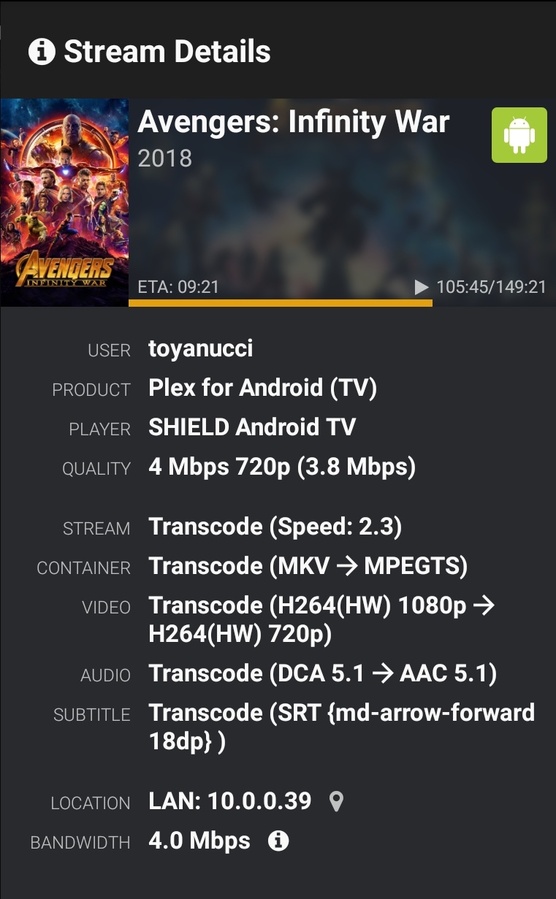
Notice when transcoding to 720p it’s using the h264 encoded 1080p file instead of the HEVC encoded 4k hdr file.
From what I have tested it never tries to transcode the 4k file. If I select to transcode to 1080p 20mb it kind of stalls, but if I go back to original quality then try 20mb again it direct plays the 1080p file.
Woah, that’s amazing!
Does it mean this feature suggestion has been done?
I can’t test it right now, but I’m really curious!
I’ve tested it with the newest builds and it works every time and it should be in the upcoming betas I’d think.
It still needs a little polishing though because when direct playing the 1080p file it still shows as the 4K file in the streaming details
there is also this @ Plex Media Server
- (Prefs) Exposed an advanced preference to disable video transcoding (#10891)
do note, disabling transcoding will not magically make media incompatible with your client start playing.
it will make them NOT PLAY AT ALL.
That’s great news!
Do you know what’s the exact build you’re using?
PlexMediaServer-1.18.6.2343-32db5fbb5
What setting did you have to change to make this happen?
I didn’t make any changes. It just works.
Tried (4K 120mbps 10bit hevc jellyfish) it on my desktop and it seems happy. Tried the same video on my mobile phone (local network), sometimes it would play original 4k and other times it would HW convert to h264.
So i tried it over 4g (remote) on my mobile and it converted HW to h264
I wish I could find more 4k non hdr content. I don’t mind transcoding 4k but it’s the hdr conversion that’s the problem.
Hmm, can anyone confirm that this has been/will be implemented?
Doesn’t seem to be doing that for me with v 1.18.8.2527, I’m having trouble with plex ignoring my 33Mbps 1080p SDR source file and attempting to transcode my 70Mbps 4k HDR10 down to 4Mbps 720p, which is futile as it seems my 3770k doesn’t want to do it, and you know the first 2 rules of 4k.
Yes I can confirm that its already working. I have created 1080p SDR versions for all my 4K HDR movies and Plex is always choosing the 1080p version for transcoding. However, one can still force the server to transcode 4K content by using the Play Version button. Therefore, I had to tell my users to never choose a version manually.
Btw. this is what I am using to tonemap my HDR content with ffmpeg:
-vf zscale=width=1920:height=-2:t=linear,tonemap=tonemap=mobius:param=0.01:desat=0,zscale=t=bt709:m=bt709:r=tv:p=bt709,format=yuv420p
It looks much better than hable tonemapping which is often recommended.
One should have options to
- Disable video transcoding if source is above or equal to a specific resolution
- Disable video transcoding if source is in a specific codec (h265)
If another source resolution is available plex can use that - otherwise it wouldn’t play.
While I would like to have granular control over the transcoding options, I can confirm that Plex is indeed picking the correct resolution file of a movie to transcode to clients based on the client resolution and “best fit”. Thanks to the Plex team for adding this functionality - very much appreciated!
