I’m running a setup where I have a mix of media that’s kept locally and 95% of it is kept on my now read-only google drive enterprise account…
I’m looking for a solution to somehow batch process chapters… I’m not sure if plex would go through all media and then create those chapters if I went ahead and enabled Enable video preview thumbnails, but either way it’s not really something I want to enable anyway, being as CPU instense at it is.
I know that MKVtoolnix is capable of adding chapters, but it’s bit of a pain in the a$$ if you ask me… Especially for 2PB’s worth of Media…
If anyone has a solution or potential solution, I’d love to hear about.
Plex generates chapter thumbnails if Generate chapter thumbnails is enabled. The process is rather quick, as only one image per chapter marker is created.
Video preview thumbnails are used when seeking in Plex apps. The default is to generate one image for every two seconds of video. This can be changed by altering the GenerateBIFFrameInterval. See Advanced, Hidden Server Settings.
thanks so much for the reply… I’ve never really messed with plex’s Generate Chapter thumbnails or any settings like video preview thumbnails, just for the sake of having most of my media on google’s servers… So I’m just wondering, does plex perform a general scan of all media files generating those chapters in additon to Generate chapter thumbnails when it’s enabled? Or would there have to be an existing chapters.xml that exists within the folder structure?
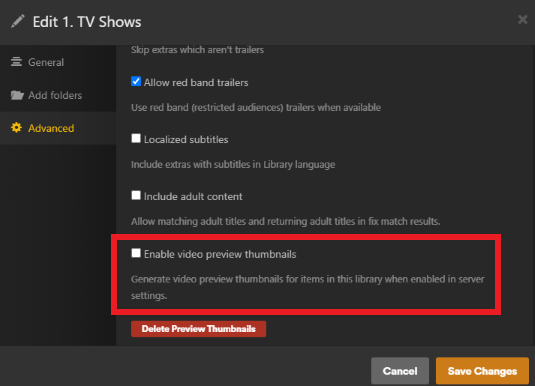
You can include or exclude preview thumbnails per library here
3 dots next to the library → Manage Library → Edit → Advanced
Chapter thumbnails are fine, but be very cautious about enabling video preview thumbnails. They take up more storage space than you might think. They also work your CPU overtime during generation
Um, does your media have chapters at ALL? If not, Plex doesn’t do squat for generating chapters. In fact, how would it determine what a chapter is in a movie or show? They are pretty much arbitrarily determined by the show producers, who think that “this fade to black is a good place to place a chapter marker!”
Chapter preview THUMBNAILS are just images that appear at that exact spot in a chapter you already have in your media file. If there is no chapter, then (AFAIK) no chapter thumbnails get generated.
this is what I’ve figured. I have always known that video preview thumbnails would be CPU intensive, I guess I just always assumed that Chapter thumbnails would be the same… thanks for the heads up!
I too would love to find an app that would create chapters for movies/shows that don’t include them.
Using a remote with Roku to “Fast Forward” to the middle or end of a long movie takes FOREVER and being able to skip ahead or back 5, 10 or 15 minutes would be a dream!
This is exactly why I’m looking for a tool or script to generate those chapters or a chapters.xml file within the folder structure of all the media… I’ve tried mkvtoolnix, but to be honest seems as though it would be pretty labour intensive if I need to manually click through each title and apply a chapters.xml to every media file in my 2PB’s of Media…
So I am aware that having preview thumbnails enabled really wouldn’t do jack, since the chapters.xml doesn’t exist. That’s what I’m looking for a solution to. I really have no intentions in enabling the preview thumbnails, I think my database will just balloon to a massive size.
right??? After 5 or so years of using plex, I’m finally ready to toss the remote at the tv anytime I need to start an episode or even more so, a movie from the start… It’s definitely a pain…
Do you run windows though??? I’ve found a few solutions for windows uses that would work pretty good I think…
I’d love that as well, but the biggest problem is finding out where to place the chapters. There COULD be demand for some kinf of IMCD (Internet Movie Chapter Database), but I doubt anyone has done so. Not to mention, that with potentially dozens of different versions of episodes, movies, files, etc, you’d not be able to ensure your chapters are perfectly aligned.
This is a problem that the Subtitle sites have. You end up having to upload a hundred different versions of a subtitle because there are some that come from a DVD, or from a Blu-Ray, or from a webrip, or from a web-DL, etc etc. If the chapter markers are off by even a second, it might even be worse than not having any at all.
Adding chapter markers modifies the files, so if you’re on read only Google Drive, you’re out of luck unless you move the media to a different location.
For Windows, there is a very old tool, MKV Chapterizer. It has not been updated since 2012, but it still works on Windows 10.
If you’ve a Mac, look at Subler. It is Mac only and outputs MP4/M4V only. It can read MKV files.
If you’re good with scripting and CLI, search “ffmpeg add chapters.” You’ll get a ton of hits.
Funny you mention that it modifies the files… I was literally just reading and came to that realization that it may in fact be an issue for me… However, I could swear that plex would read a file added within the medias files structure (something like Some Series S01E01-chapters.xml)? Is that not the case?
I was also looking at MKV Chapterizer, I was going to mention it to the other guy looking for a solution as well. The issue of course is that it’s very dated and that it seems to only run on Windows. I couldn’t find any other variations to it anywhere either…
Ah muh guh!! That app (MKV Chapterizer) mentions it can pull chapters from ChapterDB, the exact kind of site I doubted existed but would need to exist to add chapters to movies in bulk/easily! (Assuming it still exists, since the Chapterizer site is 11+ years old and the default download links are broken. Alternate download links are found in the patch notes for the current version)
But… yeah, without write access to the files, you could not add chapters to them, and Plex only recognizes built-in chapter metadata, not external. Even if it could support external file support for chapters, they would have to reside side-by-side with the video file itself, which would require write access to the folder. Burned either way.
ChapterDB went offline several years ago. There is a read-only mirror at chapterdb.plex.tv. There’s no info for any movie in the last four or five years (at least). The quality of the info is hit and miss. Still, I have used it a few times to add chapter names to movies that had generic “Chapter X” names. Download the text format and then add them to the media file using MKVToolNix chapter editor.