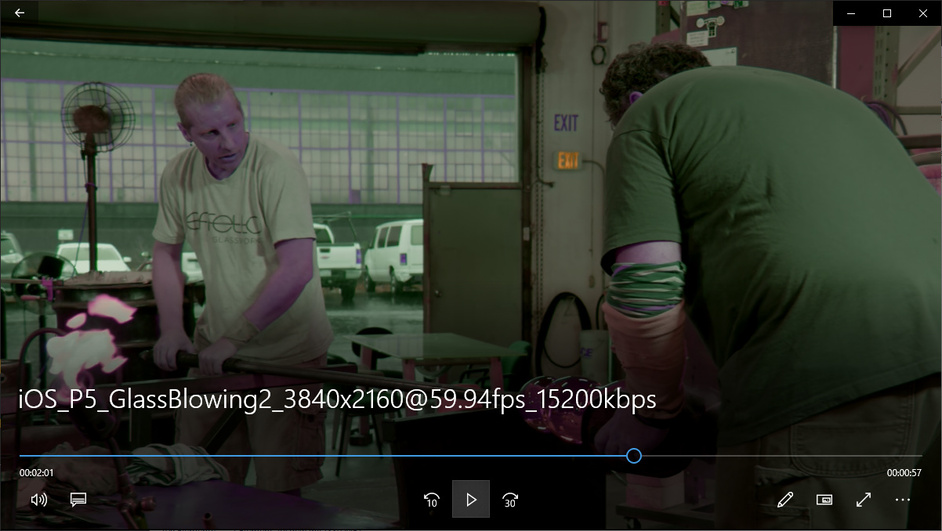
Ok i played it on my gaming system with rtx gpu. VLC and the Movie app from MS also play the video with wrong colors. I think that is not possible otherwise? Only a suitable TV or monitor that correctly recognizes the metadata creates the right picture.
Now the problem is that no player can play DV in an MKV.
The solution is to create a .ts with a modified tsMuxer. Here is a short quote with a description
Goddamn this is AWESOME! Made an unprotected ISO of Joker (you’ll see why in a sec). Created the MKV with MakeMKV. Opened TSMuxer and dropped the MKV onto it. Opened the mounted ISO’s 800.mpls and added the audio track. Spit out a TS file, dropped it on my NAS. Plex picked it up and is now playing in Dolby Vision with ATMOS. Super brilliant and thanks to all who have been fighting this good fight!!
External SRT subtitles are possible. Unfortunately not chapters.
Hello so i’ve went trough the topic and i couldn’t find a solution to my problem.
I’ve got a Phillips TV that supports DV and HDR10 the Plex server is running in a Docker container on a local network.
I’ve tried playing a few of LG’s trailers and only the one that was provided here displays as DV all of the others that i’ve testes are messed up. LG Eye this one is showing some colors but mainly its black and white and has vivid green and purple colors as if its not supported even though the TV recognizes that its DV.
This is the same LG Comparison.
The only thing different from the one provided here and these is that its showing as DV and on the Plex interface it shows HDR in the bottom right corner.
Here are the logs from the server and client while playing the first trailer (in the zip are both logs TV_logger.txt is the client): Logs
Oh one more thing in the logs that i’ve noticed :
07-13 14:34:09.755 i: [TranscodeSession] Direct Play
07-13 14:34:09.755 i: [FF] Video decoder doesn’t support dolbyvision (video/dolby-vision).
07-13 14:34:09.756 i: [FF] Audio decoder doesn’t support dolbyvision (video/dolby-vision).
07-13 14:34:09.756 i: [FF] Video decoder doesn’t support eac3 (audio/eac3).
07-13 14:34:09.766 i: [FF] Audio decoder doesn’t support eac3 (audio/eac3).
Is this something from the TV or the container?