Ds918+ problem hw transcode mpeg2

Here are some logs :slight_smile:

Plex Media Server Logs_2018-11-19_14-52-01.zip (3,3 Mo)

CPU usage during playback :

image
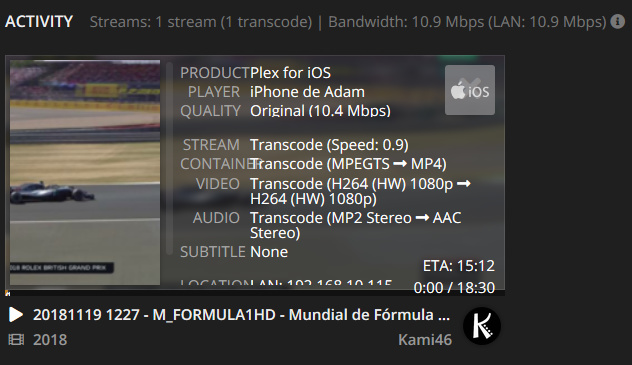
As you can see the Transcoding speed is too close to Realtime (about 1.0x on average, sometimes 1.3x sometimes less than 1.0, and freeze occurs)
This is not LiveTV, this is a recorded live stream from Satellite (.ts file, as the Satellite live stream is in an MPEG2TS container)

Thank you. This isn’t an MPEG2 / HW transcoding issue. It’s a core PMS issue unfortunately. We are trying to find out why PMS has suddenly become unstable on Synology.

I can offer you a different version to test with (as confirmation) if you wish it.

Thanks for this confirmation @ChuckPa

I am currently using a Dockerized PMS (latest 1.14.0.5465 version available), but I can try a regular Synology package beta version if you have one.

Thanks :slight_smile:

PS : probably not related, but there is also another issue with PMS on these J3355/J3455 CPU series NAS (Apollo Lake generation), with color corruption during downscaled transcodes as reported here : Color corruption on resize when HW Transcoding HEVC content to h264, + 4K subs - Synology DS918+ NAS - #18 by Ridley
There is a workaround found in that post waiting for a fix from Intel, but there is no sign for an imminent fix at all :frowning: Could that workaround be directly implemented into PMS builds in the meantime ?

It would have been good to know this is Docker Plex. It is a different packaging and installer.

On Synology, I make certain all the HW linkages are correct. On Docker, you must do them yourself.
Did you make these linkages?

Sorry for overlooking that important detail. The main reason why I am using the official Docker container for Plex on my DS218+ is for automatic PMS updates (a simple container restart triggers the package upgrade).

These are my linkages :
(Synology DSM Host → Path in Plex container)

  • volumes :

/volume1/Plex → /config
/volume1/Plex/tmp_transcoding → /transcode

  • devices :

Host : /dev/dri → /dev/dri (Container)

Running these chmod commands in the host Synology DSM on boot (automatic scheduled task) :

chmod 755 /dev/dri
chmod 666 /dev/dri/*

As a result inside my container, running the command ls -l /dev/dri returns :

total 0
crw-rw-rw- 1 root root 226,   0 Nov 19 14:47 card0
crw-rw-rw- 1 root root 226,  64 Nov 19 14:47 controlD64
crw-rw-rw- 1 root root 226, 128 Nov 19 14:47 renderD128

With all this, I get proper HW transcoding, with barely 0% CPU usage while transcoding a 1080p H264 stream with no audio transcoding (Direct Stream for audio, transcoding only for video).
As soon as the source video stream is interlaced, a fairly big amount of CPU usage gets added when transcoding, as shown in my previous post. :frowning:

And if you wish to know the full story, to fix the color corruption for HEVC 10 bit transcodes, I run the following command after every PMS upgrade :

mv /usr/lib/plexmediaserver/Plex\ Transcoder /usr/lib/plexmediaserver/Plex_Transcoder

and then creating the new Plex Transcoder file, containing :

cat /usr/lib/plexmediaserver/Plex\ Transcoder

#!/bin/bash
DIR="$( cd "$( dirname "${BASH_SOURCE[0]}" )" && pwd )"
declare -a new_args
forbidden_text=":format=nv12"

for param in "$@"; do
  new_args+=("${param//$forbidden_text/}")
  done
  "${DIR}/Plex_Transcoder" "${new_args[@]}"

Hope you see it all clearly now :wink:

If you could implement that last fix for J3355/J3455/N4200 intel cpus in all PMS builds, that would be great (until this gets definitely fixed by Intel)

If you have the udev rules, you would not need the chmod . This is what the Docker doesn’t provide.

If you extract a Synology native package, look at the installer, you will see where these are created.
This will prevent future need of the chmod

1 Like

Regarding any pending corrections to VAAPI from Intel, there is no way to address this by PMS. This is, afterall, in the the hardware driver which Intel owns and controls.

We pull from libva and ffmpeg when those commits are released and Engineering has determined they resolve outstanding issues.

1 Like

Thanks @ChuckPa for your answers :slight_smile:

In case you still need them @ChuckPa here are some logs from a native (non-docker) install. I did not experience any hiccups during the 30 seconds of playback - let me know if you need more.

Plex Media Server Logs_2018-11-21_18-25-43.zip (4.0 MB)

Please continue to test with the native package.
I believe you will quickly see why the native is the best way here.

PMS is easily ported from any Linux system to another, including Synology and QNAP.
There is no benefit to Docker.

Updates can be equally automatic… especially on QNAP

Updates can be equally automatic…

Can native package updates be automated on Synology? I still have to manually download and install each new release.

Synology will update you yes but there is one problem UNTIL DSM 7

They only ship the 32 bit version. You lose HW transcoding.

There are some scripts out there (Scheduled Tasks) which will download and install for you) from plex.tv

Indeed I am not a QNAP user. I will look for automating scripts for Plex for Synology package updates, thanks :slight_smile:
With my setup I can switch very easily from Docker to Plex for Synology (stop container, run native package).

Also I will be using the same Plex Transcoder proxy script to eliminate color corruption issues when using the native Plex package.

This topic was automatically closed 90 days after the last reply. New replies are no longer allowed.