I do not have the following in the x264 Encoder Options on the Advanced tab:
I’m running a 0.10.2.x version of HandBrake, should I be worried that these settings are not present? All of my other settings mirror what you have so kindly provided, but I do not have the “Preview” button under output in the Picture tab.
I would be, but I never manually altered that line of text you show in your image. The settings I made in the UI wrote those values in - like magic. Full screen images are needed to see your other settings.
I guess the question, for now: Is it working? It’s been a while since your post.
A generic response at this time would be to get the 1.10 Version (at least) and see if those settings exist. There are, sometimes, staggering differences in Versions. For Instance, they finally fixed Custom Settings for DVD encodes in V1.10 and it’s working great. I will need to check the latest version (if that’s not it).
I am starting to think about preparing to (eventually) re-write the guide. Don’t Stand By.
I made two user profiles, one for HD and one for 480p - and haven’t had to touch it since then. Drag and Drop, either encode or passthrough audio, ONLY burn in subs (do NOT try to include subs that aren’t burned in - they will end up being ASS subs), and it’s mostly painless.
Apart from the ASS annoyance - a very good build.
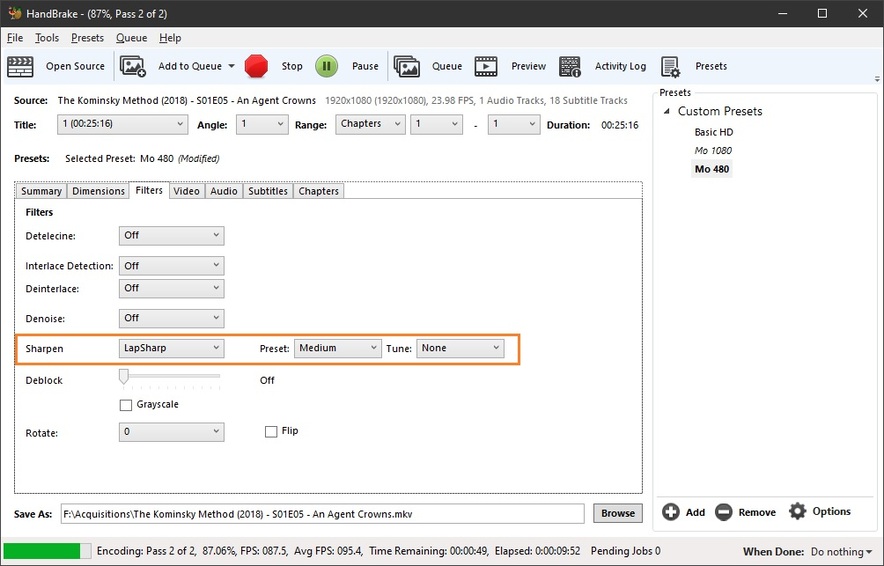
Here’s something in 1.2.2 that is… miraculous:
You know how you’re making 480p encodes of TV Shows (a million episodes take up a lot of space) and they’re perfectly acceptable, take up almost no space and are easy to throw around on the network or internet, but they just look a little like Netflix’s Basic Plan - fuzzy. Sure, they’re 480p, but you have other stuff that doesn’t look fuzzy.
That’s it’s default setting. It adds almost no extra time, you can’t put your finger on exactly what it did, but the ‘fuzzies’ are gone for all intents and purposes. Yes, it’s still 480p, but friends and family agree - something about it is better - keep doing that, whatever it is.
Blows Netflix’s basic plan right out of the water. Sometimes I have trouble seeing a difference in 480 and 720 and that’s good enough for me.
I was re-encoding Monty Python’s Flying Circus (for what seems like has been ongoing for 20 years) from DVD, with that filter, and a default Yadif de-interlacer with no detection (always on) and these are the best Python’s I’ve EVER had. They look better than the DVD they came from - and that just can’t happen… or can it?
They always say about video you can’t have what not there. So is that true or false, the million dollar question.
I always believed that upscaling was all BS, but current generation scalers are so incredible. The only issues are when the source files are blurry, they stay that way on a bigger screen. Your find has improved that picture greatly on my LG OLED 65" with Lewis and his Oxford murders… So pleased.
So Thanks.
As for Monty Python I though they re mastered those titles.
Initial reaction: It does improve video-recorded shows a bit, but also shows a little bit of unnatural shimmer, usually on hair, edges of graphics, etc. Not sure if that would bother me after a while.
Going to try it on film, since it may be a video-specific thing!
That’s what I hear, but the DVDs are still almost $300 and that probably means, for me, another 20 years of trying to get the HD version - unless they just miraculously show up somewhere - and if a show that old is still bringing $300 for DVDs, the people selling them deserve everything they get (or don’t get) when I find them somewhere else other than their Monty Python Gimme You Money We Make You Crazy Store.
Wow there is a lot of suggestions here… I have never had the problem here is what I do
I play the DVD or VHS through a splitter to a Startech DVD recorder it does a nice job recording but the files are a big big… it will only record the audio in stereo… but the gran-kids don’t seem to mind.
Hey guys, first post here. New to Plex and LOVING IT! OMG, seriously it’s amazing!
I have a DVD Rip question on Handbrake, this thread is insanely long and I read most of it, but I don’t see all of my questions answered:
What’s best? x264 or x265 for DVD-rip? I use Plex on my Xbox mostly, but also would like to use it on my iPad/iPhone, and Apple TV when I am traveling.
What’s ideal to use: avg bit-rate, or, RF Quality factor? Which do you guys use more? I am using RF 22
There was a lot of discussion for Anamorphic settings, and Plex not reading the Rip resolution correctly. However, with mine set to “Auto”, I still get 480P on Plex… so Auto is fine then?
Dimension: I set to Auto and it seems to do it fine, or should I play around with this? It says Source: 720/480 --> Output: 851x368 PAR 32x27… YET Plex reads it as 480P, file info also says 480P (this is very confusing)
Filters? I have Decomb, and no Sharpen. Last image here has De-interlace as “off”. What is this and when should it be used/not used?
264 - very few people know how to encode 265 and not that many devices can deal with it without a lot of drama. For DVDs it’s a waste of time. You can make them so small it won’t matter.
I do not use CQ. I want to know how big a file is going to be. CQ’s brain may make one file 4G and the next one 800M - and I can’t see any difference in either of them. Screw that.
For DVDs I use 1050kbps (HD baseline is 3750 - for me), 2 pass, with the default ‘LapSharp’ filter (not used for HD). I don’t de-interlace - unless, of course the material is interlaced, then I use Yadif default with no detection.
For DVDs make a custom user profile, use Custom Anamorphic. Handbrake 1.2.2 is idiot-proof in this regard. Check and Adjust HB’s auto-crop… sometimes it goes a little rogue.
DVDs are stored on Disk at 720x480 (USA). Anamorphic Settings make the thing play back at whatever aspect ratio is required, but if you use Custom, the vertical resolution will always be 480 - the width automatically adjusted to maintain proper aspect ratio.
HB is a lot more forgiving than it used to be. Experiment with your own bit rates and methods - the above work for me and the eyeballs in my head. You’ll have to use your own eyeballs.
Once you have gotten rid of all that profile crap that comes with HB - and make two of your own (HD/DVD) it’ll be way less confusing. While using my ‘480’ profile anything I drop on HB will be immediately ready to go, but some cropping and audio checks are always in order before blast off.
This is becoming less and less true. I have actually moved my entire library to H.265 HEVC, and my DirectPlay percentage is up to 95% (I did a couple of other things too, like burning in subs for foreign language) not down… The only devices that seem to want to transcode it are the PlayStation 4, and older Roku devices… Everything else from my users plays 265 just fine… Just fyi.
btw, the 2017 argument in this thread was amazing… and good on you for sticking to your guns Juice…
I’m still sticking to them - 265 sucks. I don’t have, or plan to use 4K in this lifetime. I have 1 (ONE) device that can deal with 265 - out of about 2 dozen local and remote possibilities so using 265 in Juicetown would be insane - I don’t need it anyway.
I’d be curious to know which devices those are… nearly everything modern can play it (FireStick, FireTV, Vizio TV, Roku (made in the last 3 years), Xbox, AndroidTV, Android Phones, Samsung TV’s etc.
As for it “sucks”, to each their own. It compresses twice as good as 264, so a 3Mbit 265 stream is roughly equivalent to a 6Mbit 264 stream. It’s not just for 4K (though I do have 4K HDR files on my server as well). You can get it further down by doing 10bit (doesn’t need to be a 10bit color profile to reap the benefit of the 10 bit packaging) though I don’t do this myself (unless for my 4K HDR which requires 10bit to display the 10bit color).
My Roku Ultra is all she wrote in the Direct Play 265 area. There is a whole covey of FireTVs (gen 1) devices around Juicetown that fail miserably in that regard.
I don’t need any further compression on TV Shows that are about 400M or Movies that come in between 2 and 4G (mostly). The eyeballs I, or any of the extended Juicettes possess find the quality perfectly acceptable on Plasmas up to 60 inches - and throwing small files around on the network or internet is literally painless. I don’t need to create issues for myself that do not exist and encoding at 265 would be a great way to bring Juicetown down in pile of rubble.
PS: my upload bandwidth is 6MB. Juicetown thrives on low bit rates - and files that Direct Play.
Yeah no worries, like I said, to each their own I do 265 because my eyeballs can see the difference between 3Mbit ABR files and 6Mbit ABR files (264), above 6Mbit, at my viewing distance, it’s not enough of a hindrance for me to further bloat my files, but, there is value to me in getting the size down further (to the 3Mbit range) which I do with 265, and if I want to watch something in all it’s glory, I have the BluRay and the UHD Disks standing by…
4K HDR I keep high average bitrate 30Mbit (Mostly because of the speculars and the shadow details on those files)
1080p I have 3Mbit video streams with 640Kbit AC3 5.1 Audio tracks as primary and the HD Audio as secondary
720p (typically DVR’d content) I do 1.5Mbit video, same audio bitrate as 1080 sans the HD tracks
480 I typically do 1Mbit with just the 640Kbit AC3 track
Average Juicetown eyeball comes in at around 54 years of mileage (with The Mayor well beyond that) - no need wasting any bandwidth on an animal that can’t digest what you’re feeding it.


 I do 265 because my eyeballs can see the difference between 3Mbit ABR files and 6Mbit ABR files (264), above 6Mbit, at my viewing distance, it’s not enough of a hindrance for me to further bloat my files, but, there is value to me in getting the size down further (to the 3Mbit range) which I do with 265, and if I want to watch something in all it’s glory, I have the BluRay and the UHD Disks standing by…