So I’m in the process of ripping my Blu-ray movies. I am wondering if I should store them in the H.265 Codec or the H.264 Codec? I don’t want to keep them in the MKV format since they take up so much space. I plan to use this server to access my movies over WiFi locally and remotely when I’m at school. My question is a lot of my home devices such as my dads home computer is old and doesn’t support HVEC so I just wanted some advice on what to do and if there’s a different way to compress and store these files on my nas
That’s a pretty big topic! 
Firstly, MKV is not actually a format as such… It’s a container, much like MP4.
The main differences between the 2 are ultimately what features are supported within each.
If you don’t have many / any clients that can decode an H.265 video track, then it will force the Server to attempt to transcode it to a codec that is supported by the client. And this is where you will find out IF your server is capable of that, as it does take some ooommppphh to decode H.265.
So, I would suggest trying out a few examples and see what happens. If everything seems to work, then H.265 is certainly better as it is far more efficient, and therefore will both save you Disk Space AND internet bandwidth.
For reference, I am in the process of converting my entire collection to H.265.
Give it a try and see what happens!
Encoding time x264 - reasonable.
Encoding time x265 - the rest of my life.
I can get a ‘reasonable’ 264 encode at 480p (TV Show) done in about 10 minutes.
I can get a ‘more reasonable’ 264 encode at 720p (TV Show) done in about 20 minutes.
I can get a beautiful 1080p encode (TV Show) done in about 30 minutes.
That very same encode at 1080p/265 takes 2 hours(+, never minus - and my machine has decent horsepower).
Sometimes it’s worth it - most times it’s not.
Sure - if someone is making those 265s for me - I’ll take 'em - and they will Direct Play on everything I have. If they didn’t Direct Play on everything I have (or is going to connect remotely) - I wouldn’t touch 'em with a 10 foot pole.
Evaluate and compromise - if necessary.
Storage space is far cheaper than the time and effort required to save as H.265.
Everything needs to be evaluated…
I have to send things upstream.
A MakeMKV rip simply won’t fit into the upstream bandwidth pipe, is a PITA to throw around locally, may or may not Direct Play as it comes off the disc, etc., etc., etc.
I don’t need a 30Mbps episode of Friends (or whatever) that’ll hang like a rotting albatross around my neck for the rest of my life - and everybody out in ‘the world’ that watches it - it has to be transcoded for. Screw that. I’ll spend the 10 minutes to make something decent out of it, that is more than adequate - and fits into every hole it has to fit into.
For instance - I’ve got this thing I’ve been trying to get for years and here it is… now what?:
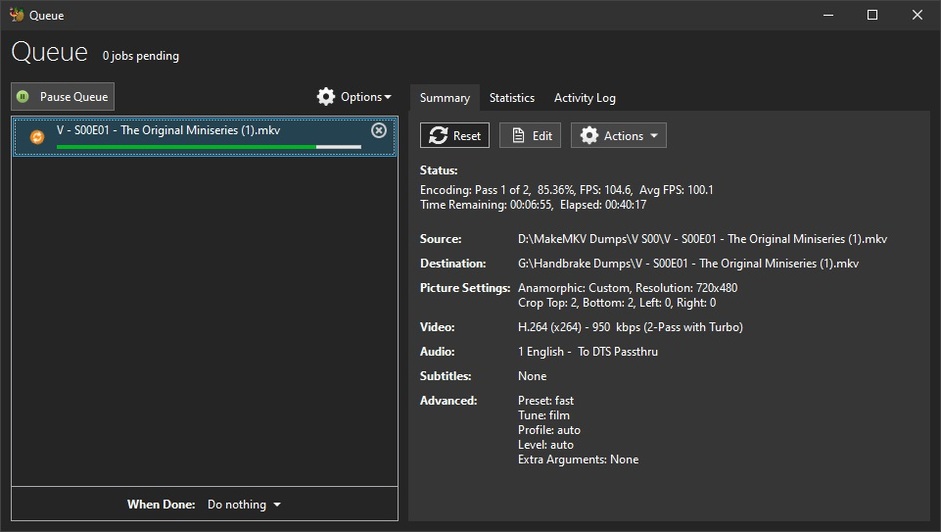
It’s both double-length episodes (I didn’t rip it - or it wouldn’t be) and checks in at 20+ Gigs / 3 hours and change. Oh, it says it’s 1080p, but I’ve lived long enough to know what upscaled 480p looks like and that’s upscaled 480p.
I made a 240 second preview with a light Lapsharp Filter (Film) and it looks BETTER than the source. When it’s done it’ll be a Gig or so, have taken an hour or so to encode, be easy to toss around anywhere, look good and not make a nuisance of itself.
On the other hand I’ve got these BluRay rips that are fantastic and deserve any time I put into them:
General
Unique ID                                : 87018729720319227102668274169028987679 (0x4177329E5FA8034BF3030E766242CB1F)
Complete name                            : G:\TV - Sci-Fi\Star Trek The Next Generation\Season 02\Star Trek The Next Generation - S02E20 - The Emissary.mkv
Format                                   : Matroska
Format version                           : Version 4
File size                                : 533 MiB
Duration                                 : 45 min 30 s
Overall bit rate                         : 1 637 kb/s
Encoded date                             : UTC 2020-07-14 15:40:23
Writing application                      : Lavf58.42.100
Writing library                          : Lavf58.42.100
ErrorDetectionType                       : Per level 1

Video
ID                                       : 1
Format                                   : HEVC
Format/Info                              : High Efficiency Video Coding
Format profile                           : Main@L4@Main
Codec ID                                 : V_MPEGH/ISO/HEVC
Duration                                 : 45 min 30 s
Bit rate                                 : 1 221 kb/s
Width                                    : 1 456 pixels
Height                                   : 1 080 pixels
Display aspect ratio                     : 4:3
Frame rate mode                          : Variable
Original frame rate                      : 23.976 FPS
Color space                              : YUV
Chroma subsampling                       : 4:2:0
Bit depth                                : 8 bits
Stream size                              : 397 MiB (75%)
Writing library                          : x265 3.2.1+1-b5c86a64bbbe:[Windows][GCC 9.2.0][64 bit] 8bit+10bit+12bit
Encoding settings                        : cpuid=1064959 / frame-threads=3 / numa-pools=8 / wpp / no-pmode / no-pme / no-psnr / no-ssim / log-level=2 / input-csp=1 / input-res=1456x1080 / interlace=0 / total-frames=0 / level-idc=0 / high-tier=1 / uhd-bd=0 / ref=1 / no-allow-non-conformance / no-repeat-headers / annexb / no-aud / no-hrd / info / hash=0 / no-temporal-layers / open-gop / min-keyint=24 / keyint=240 / gop-lookahead=0 / bframes=3 / b-adapt=0 / b-pyramid / bframe-bias=0 / rc-lookahead=5 / lookahead-slices=6 / scenecut=0 / radl=0 / no-splice / no-intra-refresh / ctu=32 / min-cu-size=16 / no-rect / no-amp / max-tu-size=32 / tu-inter-depth=1 / tu-intra-depth=1 / limit-tu=0 / rdoq-level=0 / dynamic-rd=0.00 / no-ssim-rd / no-signhide / no-tskip / nr-intra=0 / nr-inter=0 / no-constrained-intra / strong-intra-smoothing / max-merge=2 / limit-refs=0 / no-limit-modes / me=0 / subme=0 / merange=57 / temporal-mvp / no-hme / no-weightp / no-weightb / no-analyze-src-pics / deblock=0:0 / no-sao / no-sao-non-deblock / rd=2 / selective-sao=0 / early-skip / rskip / fast-intra / no-tskip-fast / no-cu-lossless / no-b-intra / no-splitrd-skip / rdpenalty=0 / psy-rd=2.00 / psy-rdoq=0.00 / no-rd-refine / no-lossless / cbqpoffs=0 / crqpoffs=0 / rc=abr / bitrate=1250 / qcomp=0.60 / qpstep=4 / stats-write=0 / stats-read=2 / cplxblur=20.0 / qblur=0.5 / ipratio=1.40 / pbratio=1.30 / aq-mode=1 / aq-strength=0.00 / cutree / zone-count=0 / no-strict-cbr / qg-size=32 / no-rc-grain / qpmax=69 / qpmin=0 / no-const-vbv / sar=1 / overscan=0 / videoformat=5 / range=0 / colorprim=1 / transfer=1 / colormatrix=1 / chromaloc=0 / display-window=0 / cll=0,0 / min-luma=0 / max-luma=255 / log2-max-poc-lsb=8 / vui-timing-info / vui-hrd-info / slices=1 / no-opt-qp-pps / no-opt-ref-list-length-pps / no-multi-pass-opt-rps / scenecut-bias=0.05 / no-opt-cu-delta-qp / no-aq-motion / no-hdr / no-hdr-opt / no-dhdr10-opt / no-idr-recovery-sei / analysis-reuse-level=5 / scale-factor=0 / refine-intra=0 / refine-inter=0 / refine-mv=1 / refine-ctu-distortion=0 / no-limit-sao / ctu-info=0 / no-lowpass-dct / refine-analysis-type=0 / copy-pic=1 / max-ausize-factor=1.0 / no-dynamic-refine / no-single-sei / no-hevc-aq / no-svt / no-field / qp-adaptation-range=1.00
Language                                 : English
Default                                  : Yes
Forced                                   : No
Color range                              : Limited
Color primaries                          : BT.709
Transfer characteristics                 : BT.709
Matrix coefficients                      : Identity
matrix_coefficients_Original             : BT.709

Audio
ID                                       : 2
Format                                   : AC-3
Format/Info                              : Audio Coding 3
Commercial name                          : Dolby Digital
Codec ID                                 : A_AC3
Duration                                 : 45 min 30 s
Bit rate mode                            : Constant
Bit rate                                 : 384 kb/s
Channel(s)                               : 6 channels
Channel layout                           : L R C LFE Ls Rs
Sampling rate                            : 48.0 kHz
Frame rate                               : 31.250 FPS (1536 SPF)
Bit depth                                : 16 bits
Compression mode                         : Lossy
Stream size                              : 125 MiB (23%)
Title                                    : DTS
Writing library                          : Lavc58.77.101 ac3_fixed
Language                                 : English
Service kind                             : Complete Main
Default                                  : Yes
Forced                                   : No
They’re about 500Mb - fly around locally and remotely like they have wings and I can’t see ANY difference in the source and the product. (lucky me, I guess - but nobody else can either).
Those are worthy of any time incurred in their construction. <— and at a little over an hour each - it’s gonna take some time to do 7 seasons… I’ve been 2 weeks on 2 seasons. As soon as that encode that’s going falls out of Handbrake - another TNG is going in - and it’s already in the queue…lol
Storage space is certainly not cheap! My current 10.9TB (4x 6TB in RAID10) cost me a little over £1000 3 years ago. Same disks today are around £800 for the 4x 6TB.
Over the last 2 years, I have reclaimed well over 2TB of space by converting everything to H.265, with NO loss of quality!
Over the last 6 months, I am constantly hovering at around 400GB of free space, because I keep converting… If I hadn’t been doing that, I would have either ran out of space, or had to delete a ton of content, or go and spend another Grand on more storage.
Plus, as a result of converting my content to H.265, “most” of my remote users can now Direct Play more of my content as it now fits up my Internet Pipe.
For reference…
I currently have no 4K content.
I convert all BluRay rips to 10Bit H.265 1080p at 6.5 Mbps (this does not include the audio track)
I convert all TV episodes to 10Bit H.265 720p at 1.2 Mbps.
The result??
My 1080p BluRay rips look as good at a 13Mbps H.264 file, and my 720p TV Episodes look as good as a 2.4 - 3Mbps H.264 file.
But I do agree it is horses for courses! 
I guess my math is different than yours. The value of my time, electric use, and drive cost is cheaper than the cost of conversion.
I have 4x 4TB drives at around a cost of $425 total. If I “pay” myself even a fraction of what I normally get paid for work, the cost of my time to sit and do the conversion just doesn’t add up for me. That’s my math. Not saying yours or mine is wrong, but that’s why I said drive space is cheaper for me. 
I can not see why your sitting there waiting. Conversion is quick to set up and can be done in your absence. When it’s complete the computer just sleeps, waiting for your return. Simple maths.
That would be because I don’t have a new enough rig to plow through my collection. 1st gen Xeon isn’t going to blaze through this task. My server would be cranking away for months 100% maxed out. I am not looking to replace hardware at this point as other financial needs are more pressing. Maybe post pandemic… but not now.
If the sources aren’t 10 bit - you’re wasting a lot of time encoding 10 bit.
You’ll never see the difference in 265/720s at 1.2 and 264/720s at 1.05 - except that the 264s will complete an hour before the 265s will.
Who’s talking plowing. Still does not make sense, your talking your perceived theoretical for converting your Library contents.
Anyway not a lot thought in your hypothesis.
The simple answer here, H.265 is the current roadmap of future storage. At present it is very processor hungry to create but can be rewarding in cases even so. But this discussion has mentioned previously, if there was no need to convert due to a gifted source and all your devices are compatiable with no Trans coding, the sun will be shining bright.
There is a place for HEVC and the results are stunning considering Hard Drive Gb : Quality Video
The results for remote shares are testimony with Plex, I can definitely vouch second to none.
Ok, bear with me then. I’d like to run some actuals.
- Let’s get a test run of a conversion from 64 to 65
- See how long it takes.
- See how much space is saved
- Calculate electric use based on an average conversion times the number of videos I could convert (I’m expecting my server to be pegged 100% cpu for the entire conversion)
- Calculate electric cost times the number of videos I could possibly convert
- Calculate the potential space saved on an average conversion times the number of videos I could convert
- Tally that up against the cost of adding another drive
Did I miss any calculation?
Can we agree to see how this works?
I’d like to get a good setting for doing the test conversion too. I’ve never done it before.
I have DVD rips that haven’t been compressed.
I have 1080 DVR recordings that are set to “Highest Quality” from my HDHR Extend.
If I’m going to do a trial of a conversion, I’d like to see quality results, and not pick a dumb default setting that results in quality loss.
I’ve got Handbrake loaded… what should I pick?
There are some bulletproof settings to start with - and they’ll be as quick as possible:
(HD above - 480p below)
(265 on 480p is a waste of time - 265 on HD material isn’t a waste of time - it just takes a lot of it)
265s will be exactly the same - or at least like this:

… and you can make the bit rate as high as you like. That’s ‘My’ Bit Rate. Your’s may be different, but I suggest you at least try a few 240 second Previews - in an Other Videos Library - so you can test them on everything you have and look at 'em.
Ok, so at this point, my only HD and Full HD content is DVR content.
I don’t own any Bluray media, or rips.
If converting DVD is a waste of time then…
In my use case scenario, that means that drive space is cheaper than the time involved to convert.
I’ve got 800+ DVD movies. I only recently added a HDHR Extend in January of this year and any DVR captures I get are around 5-6GB for a 2 hour movie minus commercials.
Just for curiosity’s sake, I’m trying a DVD rip using the config you have pictured in your suggestion (if I understood your settings correctly).
Where do you read this?
Quality can hardly get much worse than MPEG2 and you’ll save a lot of place (70-90% by experience). I suppose the message above is more that giving them the “gold treatment” might be overkill as the transcode cannot improve the initial encode/rip.
I got it here…
That, and if / when I were to convert to h.265, knowing that DVD content is already lower quality, I don’t want to lose any quality when I do the convert. So going quick with quality loss to some eyeballs, doesn’t seem like something I want to do. I don’t want VHS quality out of my DVD quality rips.
That’s referring to the delta of h264 vs. h265 for low-quality input. (*)
When transcoding, your output will never be better or exactly the same. That being said… when you’re doing a good encode you can get to a level that you barely notice it (or not notice it at all).
Edit:
(*) adding some examples
- Source 1: 750 MB MPEG2 anime episode (approx. 20 min)
- Source 2: 2 GB MPEG 2 tv show episode (approx. 45 min)
| Source | Codec | Preset/Parameters | Size Reduction | Encoding Time |
|---|---|---|---|---|
| 1 | h264 | very slow | -90.75% | 5:50 |
| 1 | h264 | very slow, animation | -91.25% | 5:39 |
| 1 | h264 | slow | -90.75% | 5:06 |
| 1 | h265 | very slow | -90.75% | 5:12 |
| 2 | h264 | slow | -75.00% | 6:45 |
| 2 | h264 | very slow | -75.75% | 22:39 |
| 2 | h264 | slow, film | -74.75% | 6:48 |
| 2 | h264 | very slow, film | -75.50% | 21:47 |
| 2 | h265 | slow | -76.10% | 19:02 |
| 2 | h265 | very slow | -76.20% | 1:45:16 |
Meaning… at some point, the power/time start growing exponentially while the quality improvement (compared to a faster encode) will barely be visible. And yes… same as with audio you’ll certainly find some users who claim they can see it – they’re welcome to spend almost 2 hours encoding a 45 min DVD episode 
If you follow the instructions in the guide I posted - your DVD material will look BETTER than the source.
Converting DVD material to 265 is a waste of time.
Converting DVD material to 264 is NOT a waste of time.
