I’ve had an issue specifically with newer Chromecast and Android App, that the TV Library displays “Add content to this Library - This library is currently empty.” It doesn’t happen on web, samsung smarthub, roku, or windows desktop. The issue has not gone away with the last 4 months of server and app updates.
I’ve looked up similar issues, which none seem to apply since all I’ve read show all devices having an empty library. I did go through several of the suggestions on those threads anyhow, such as permissions, but continue to have issues. If I restart the Plex server, everything works fine again, but between a few hours and a few days later it goes back to the same issue.
I think the new Chromecast with Google TV is based on Android OS, so it makes sense it’s happening on both, but since it’s working fine on other platforms, I’m at a loss. Anyone having similar issues or know of something additional worth trying?
Same problem here, but I’ve found the solution to my issue.
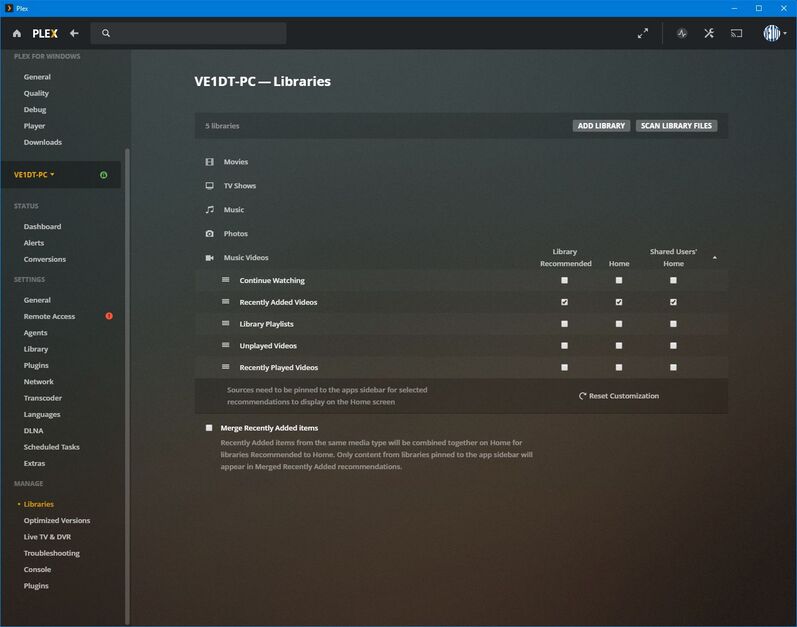
I had played around with “Manage Recommendations” for several Libraries. Basically I cleared all of the options for a couple Libraries that I didn’t want to have cluttering my screen. It didn’t cause any problems on the web viewer or Roku, but causes the libraries to appear as empty on Android.
I “fixed” this by clicking all 3 check boxes on the “Recently Added …” line for libraries that appeared to be empty. Some other combination of settings might also work, but certainly having none enabled does not work for some types of devices.
PS: You have to “hover” over the library name to get the “Manage Recommendations” setting to show up.
I’m not able to tinker now, but wanted to ask, are you referring to this setting being on the media server settings? Or where exactly did you change this? I had given up trying to fix it since no one from Plex responded. My alternative was searching via voice command for a show, but it’s not a good alternative to follow shows.
Yes, Media Server Settings. At least I think that is the right terminology. I am logged in and go to the Settings wrenches icon. Anyway, here’s a screenshot.
It seems that if none of the configurable “recommendations” are enabled, then that Library is being marked as “Empty” even though there is media in the library.