I am having exactly the same problem after upgrading to Windows 2019. It will stream fine to my PC with no transcoding but the moment it goes to my ATV 4k it starts to buffer around 1 minute into it and never recovers. ATV works fine for Netflix and Prime at 4k HDR and the ATV is on a 1gbit LAN the same as the PLEX server. I have only just started to look at the issue so if I find anything I will post back here again. My network is spiking rather high and then nothing as shown in the screenshot below. That is two different times I start playing a movie.
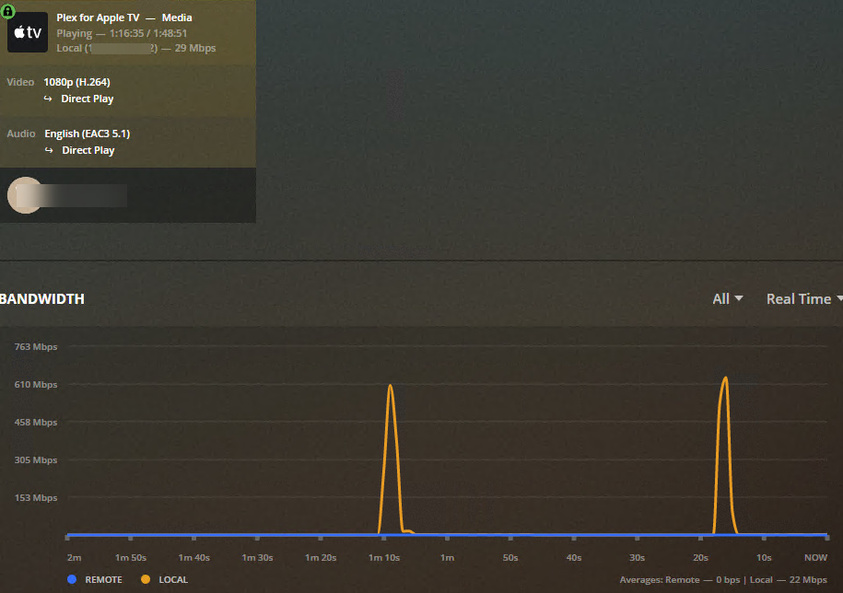
You’re not alone - we all got the same problems but no response from any developer yet.
Here: Buffering w/ 10mbps Direct Play video. WHY?! - #3 by Maddeen
And here: Playback freezing. Help with log files - #9 by Maddeen
And here: Impossible to watch anything - #3 by Maddeen
and last but not least - here: Extreme Buffering after 10-20 Minutes of normal playback - #8 by Maddeen
Not sure whats or even if anything happening behind the Plex curtains. But I don’t like that “no reply attitude” 
2 Likes
Thanks for all of the replies so far. I figured it wasn’t just me with this issue. It’s been a while since I posted information from my first post, and all version numbers have changed since then. So I am posting updated version information:
Server Version#: 1.18.9.2571
Player Version#: 2.15 (14696)
Apple TV 4K tvOS#: 13.4 (17L256)
PMS running on: Windows Server 2019 Standard, Version 1809
Plex Client on Apple TV 4K Settings:
Enhanced Video Player ON
Adjust Video Quality OFF
Allow Direct Play ON
Windows Server 2019 Network Settings (all NICs):
IPv4 Checksum Offload Disabled
TCP Checksum Offload Disabled
Large Send Offload Version 2 (IPv4) Disabled
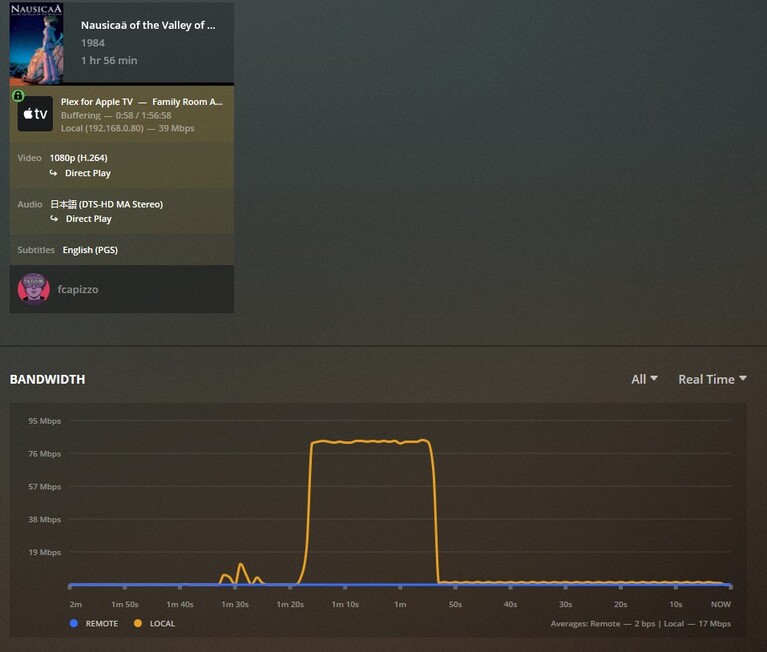
After all this time, and different versions of everything, I still get the same result. As you can see in the image above, there is significant buffering in the beginning. In this particular case, it was buffering at around 90Mb/sec. for 26 seconds. Then the server was sending about 1-2Mb/sec afterwards. There were no playback issues at all during those 26 seconds, but after another 7 seconds (33 seconds in) is when playback couldn’t keep up and we enter the buffering waiting state. I have not had a chance to dive into my own logs, but once I do I may comment.
It would be great if the Plex developers could review the logs and help troubleshoot the issue. Thanks!
1 Like
Just pitching in that I am also running into these buffering issues. They are occurring across 2 different Apple TV 4K boxes (both hardwired), an iPhone 11 Pro Max, and an iPad Pro (12.9, 2018). The issues don’t occur on either of my desktop PCs (both hardwired, both running Windows 10, one is also running the Plex server). I just noticed this start happening after the most recent server update (1.18.9.2571).
The strange thing is, it only seems to be occurring with 4 out of 56 TV series in my library, and only with ones that I originally purchased on iTunes and then removed the DRM from. There are other series that I purchased from iTunes that will stream just fine. I have spot checked some of my iTunes purchased movies and they seem to be playing without a problem, as are the lossless Blu Ray rips. Turning off EVP fixes the problem with the buffering, but causes significantly more playback problems than it fixes.
I did some digging in the PMS logs. Without help from the Plex developers, I’m not sure what the actual issues are. Regardless, here’s what I found that stood out:
Mar 27, 2020 14:58:22.414 [6216] DEBUG - Failed to stream media, client probably disconnected after 638976 bytes: 10054 - An existing connection was forcibly closed by the remote host
Mar 27, 2020 14:58:22.414 [6216] DEBUG - Completed after connection close: [192.168.0.80:49279] 206 GET /library/parts/2046612/1580075625/file.mkv (11 live) TLS 544ms 638976 bytes (range: bytes=0-)
I can tell you that at that time, I did not stop playback. In fact, that’s probably a second or so after starting playing.Not sure why this happened.
Mar 27, 2020 14:59:21.418 [2620] DEBUG - BPQ: onConsiderProcessing: Idle (true)
Mar 27, 2020 14:59:21.418 [2620] DEBUG - BPQ: [Idle] -> [Processing]
Mar 27, 2020 14:59:21.418 [2620] DEBUG - BPQ: generating queue items from 0 generator(s)
Mar 27, 2020 14:59:21.418 [2620] DEBUG - BPQ: generated 0 item(s) for queue
Mar 27, 2020 14:59:21.419 [2620] DEBUG - PlayQueue: 0 generated IDs compressed down to a 20 byte blob.
Mar 27, 2020 14:59:21.419 [2620] DEBUG - PlayQueue: 0 generated IDs compressed down to a 20 byte blob.
Mar 27, 2020 14:59:21.419 [2620] DEBUG - BPQ: [Processing] -> [Idle]
Mar 27, 2020 14:59:21.634 [10852] DEBUG - Auth: authenticated user 1 as fcapizzo
No clue about this playqueue message, but it’s something different.
And here’s something from the Apple TV Plex client logs:
2020/03/27 14:59:47.010 (569 MB) (436053) 🔧 PMKMPVClient.m:493 | [cplayer] v: End buffering (waited 25.382721 secs) [1.044667s].
2020/03/27 14:59:47.039 (569 MB) (2737) 📝 PMKPlaybackEngine.m:487 | <PMKVideoPlaybackEngine: 0x102f4faf0> state did change: 2
In my previous post with the logfiles, I noted that the buffering around 90Mb/sec lasted for 26 seconds. This is the point in the Plex client’s logs that notates that as well. I’m pointing this out specifically because after this moment, PMS is only sending out 1-2Mb/sec of the video stream to the Apple TV. THIS is the actual issue, in my opinion.
I was hoping that Plex developers would have seen and commented on my posts by now, but unfortunately that has not happened. As I mentioned before, I really got used to having the Enhanced Video Player enabled on my Apple TVs in the past.
I am willing to perform more tests if a Plex developer wants me to change settings on the Apple TVs, PMS, or the Windows 2019 Server itself.
Interesting discovery I made…the files I was having problems with were all .mp4 container files (H264, AAC stereo audio). I ran some test files through Handbrake to put them in .mkv containers (kept the video and audio the same) and now they work without any issue. I’m at a loss why a 41GB file would play without stopping to buffer once (even at the start) but an 800MB file can’t play without buffering every 2 seconds.
Practically all of my videos are in an MKV container. Of those videos, most use H.264 codec, and the rest use HEVC (H.265). I’ve tried videos with both codecs in my tests when EVP is enabled, and I still get the same buffering problem.
Hello,
i have a similar problem.
- tvOS software version: 13.4(17L256)
- Plex app version: 2.16(14822)
- Plex server version: 1.19.1.2645
- I have 2 VLANs. When the player is on the same subnet as the server, then the movie is playing fine. But when the player is on the other VLAN then i have this buffering issue. To reproduce it faster i played a 4k Movie over 1Gb Ethernet. Internetconnection: 250Mbit down / 25Mbit up
i do not see any messages in the logfile, regarding the buffering.
@swoop124, is your other VLAN using a different subnet than the first one that has PMS running on it? If so, you’ll need to update the LAN Networks section of your PMS settings area to include that other subnet. In general, only player IPs on the same subnet as PMS are considered local LAN traffic, and everything else WAN traffic. See this post for details.
That isn’t my issue, but hopefully that solves an issue for one person.
Now only if a Plex developer would dig into my issue…
@fcapizzo could you try using mpv to play the file?
Basically, in a machine different than your server, install mpv and give it the URL to your file (through Plex Media Server)
In order to get this URL you can look for the video you want to play in the web app, inspect its info and then check the XML (more detailed instructions here: https://support.plex.tv/articles/201998867-investigate-media-information-and-formats/)
From that XML you will see a key attribute inside a Part element that looks like key="/library/parts/8355/1586719723/file.mkv"
If you take the URL of the XML (from the browser address bar) and replace the /library/metadata/12345 part with the key above, you will get the URL to the file.
In the end you need something like:
https://yourserver.plex.direct:32400/library/parts/8355/1586719723/file.mkv?X-Plex-Token=my-plex-token
Following the steps above you will get a URL like that (with different numbers and more parameters, not only X-Plex-Token) that you can give to mpv to make it play the file via Plex Media Server.
At this point, I’m basically interested in knowing if mpv also presents this issue or not.
Please let me know if you need more help to get that URL!
Hi, @sergiou87. Thanks for your reply. I installed mpv on my Windows 10 notebook, and was able to create the modified URL for one of my video files. I could not figure out a way to effectively “drag and drop” the URL. I created a shortcut with that URL in my browser, and even a .url file with the URL in it. Dropping either of those into mpv would make the app disappear (I assume it crashed?). If I actually run the URL in my browser, it wants to download the entire video file. With that method, if I choose mpv to play the file, then it’s just playing the now-local video file, which isn’t the same as streaming it. Regardless, with that last method, mpv played my video file without issue on my Windows 10 notebook.
Perhaps I’m doing something wrong? Let me know if I need to do something differently.
Sorry I only use mpv from macOS in command line, no idea if it’s any different from Windows 
But you can probably do the same, open a command line prompt wherever your mpv.exe is, and run mpv https://...the-file-URL...
I also tried via command-line in Windows, but got this error:
Failed to open https://192-168-0-7.11647c10c14e4470be711442f5d2859a.plex.direct:32400/library/parts/2046612/1580075625/file.mkv?checkFiles=1.
[ytdl_hook]
[ytdl_hook] youtube-dl failed: not found or not enough permissions
The token is definitely in the URL, and as mentioned before the URL does work in a browser. Sorry, not sure what I’m doing wrong here.
I re-read your first post and decided to remove all the ? options from the middle URL, and made it look like your URL. Now I’m able to actually stream with mpv using the URL I created.
That being said, I used the same video I’ve been using from my first post. I let the video play for 10 minutes and there were no issues streaming it from mpv. On my home wifi, it streamed well at around 38-45Mbps.
I’m not sure what that tells you in regards to my problem, but let me know if there’s anything else I can test.
2 Likes
Thank you! Just to confirm, that’s from a machine different than your server, right? A different Windows machine.
If so, that tells me I might be lucky and the problem is not related to mpv. But I might also be unlucky because it could be related to mpv… but only on Apple platforms (iOS, tvOS and macOS  ).
).
Do you see this problem if you use the Plex Desktop app instead from that very same Windows machine? @Maddeen reported in another thread that could reproduce the problem with Plex Desktop from macOS, I wonder what his experience would be with mpv from macOS… 
@fcapizzo, thank you for your answer. Yes, i have not only two VLANs with different class C-IP-Subnets. I had the class B-Subnet in Local-Nerwork , but there where this buffering issues.
Now i have added each IP-Subnet seperatly and now it seems to work.
I am testing right now.
Thanks
I will report back when it beginns to buffer again
@sergiou87, to be clear, my PMS server is a Windows Server 2019 computer. The system I ran the mpv test on is a Windows 10 notebook computer. I also played the same video on the Plex Windows app ( Version 1.8.0.1159-67c4a549) on that same Windows 10 notebook. Playback was perfect, at a very constant 36Mbs. Enhanced Video Player is not an option on the Windows version of the Plex app, and I assume that’s because a Windows PC can direct play a lot of the content.
Have the same issue with latest Apple TV app. Turned off the advanced video player and now everything is fine again (no “hitching”). As a bonus, this also gave my subtitles a black border like I used to have, so I’m sticking with the old player for now.
I’m having similar symptoms and I’ve been having them for at least one month if not for longer. This doesn’t seem to have anything to do with the Enhanced Video Player, at least not for me.
No matter what I do there are several h265/MKV movies that I simply cannot play on my Apple TV 4K using the latest Plex-app for tvOS. First I thought it was the 4K h265 causing issues, so I grabbed the same movies in 1080P h264/MKV but still the same issues.
Using the Plex-app they won’t start at all. Just endless buffering and nothing ever happens. Rebooting my server, my switches, my router, my Apple-TV etc but nothing helps.
Using Infuse Pro the movies will start to play but after 1 min - 2,5 min it stops dead and continuously buffers as well.
After reading through this thread I tried several things:
Server Version#: 1.19.2.2673
Player Version#: 2.16
Apple TV 4K tvOS#: 13.4
Server-OS: Windows Server 2019 (17763.1158)
I tried disabling various offloading options on my Intel X550 NIC on my Windows Server. Didn’t change a thing. I tried to switch NIC’s from the Intel X550 10Gbit to Intel i211 1Gbit and Realtek 1Gbit NIC but same behaviour.
Tried to disable IPv6 (I have a fully deployed native IPv6 in my home but Plex insists on using IPv4 regardless according to the dashboard but I decided to try disabling IPv6 on the Plex server just to test) but still the same.
I tried to switch from using Ethernet on the Apple TV over to using WiFi as my Ubiquiti Access Points are connected directly to the same switch as my Plex-server, whereas my Apple TV running Ethernet is connected to another switch. Less cabling, one less network switch just for testing. Same results.
Testing using the Plex-app on our PlayStation 4 Pro and Xbox One X and everything works on them. They are running Ethernet to the very same switch as the Apple TV.
Playback of the same movies on my iPad Pro and iPhone is also working. It’s even working when my server has to transcode from 4K HDR H265/HEVC. It’s only the Apple TV and tvOS having issues.
Decided to even try to factory default my Apple TV 4K, but still the same.
Best regards,
Thomas Andre aka RamGuy
EDIT:
Never mind. After 20 min playback on the Xbox One X it also stopped and just kept on buffering forever. It’s really hard for me trying to grasp what is going on.
EDIT2:
I will attempt to see what happens if I simply fire up another Windows Server 2019 installation in Hyper-V on the same server and try to add the same files and play them from there.
EDIT3:
I have tried to run Windows Server 2019 in Hyper-V, same results. I tried Windows 10 1809 LTSC in Hyper-V, same results. I tried a older version of the Plex Media Server (1.16.5.1554) same results. I tried Ubuntu Server 19.10 in Hyper-V, same results).
I tried to fire up another router, with another subnet, moved a completely different machine running Windows 10 2004 and Plex Media Server 1.19.2.2673 and my Apple TV 4K to this subnet. Everything is connected directly into the router, no switches or anything. The only two devices connected was the Win10 machine running the Plex Server and my Apple TV 4K and still same results.
Playing the same file on my iPhone, iPad or on Windows 10 using Plex-app (Windows Store) or the Plex Media Player is working. I suspect the issues has to do with tvOS or the tvOS app/player?
EDIT4:
Plex Media Server Databases_2020-04-23_15-05-50.zip (14.0 MB) Plex Media Server Logs_2020-04-23_15-05-33.zip (5.3 MB)
Enabled verbose logging on the server and replicated the issue. The files is playing perfectly fine on iOS on my iPad first and then at 14:47 I start trying to play it on tvOS on my Apple TV 4K but it never starts. Just endless buffering.
Speedtest.net on the Apple TV is showing 980 mbps down and 920 mbps up. This is streamed locally so shouldn’t really matter but it shows that the Ethernet is indeed running full 1Gbps. I mapped Infuse directly to my server using SMB and used the speedtest tool within Infuse Pro towards my server and it was averaging at around 180 mbps. Playing back Parasite on my Apple TV using Infuse Pro when it’s connected using SMB is working perfectly.
When using the Plex-app or using Infuse Pro towards my server when Infuse Pro is connected using Plex instead of SMB and it’s not working.
EDIT5:
I dug through the logs myself and noticed this:
Apr 23, 2020 14:47:37.580 [0332] DEBUG - We’re going to try to auto-select an audio stream for account 21396574.
Apr 23, 2020 14:47:37.580 [0332] DEBUG - Selecting best audio stream for part ID 73061 (autoselect: 1 language: en)
Apr 23, 2020 14:47:37.580 [0332] DEBUG - We’re going to try to auto-select a subtitle.
Apr 23, 2020 14:47:37.580 [0332] DEBUG - Audio Stream: 162733, Subtitle Stream: -1
Apr 23, 2020 14:47:37.581 [0332] VERBOSE - Auth: tokens were refreshed recently enough
Apr 23, 2020 14:47:37.581 [0332] DEBUG - We’re going to try to auto-select an audio stream for account 21396574.
Apr 23, 2020 14:47:37.581 [0332] DEBUG - Selecting best audio stream for part ID 72984 (autoselect: 1 language: en)
Apr 23, 2020 14:47:37.581 [0332] DEBUG - We’re going to try to auto-select a subtitle.
Apr 23, 2020 14:47:37.581 [0332] DEBUG - Audio Stream: 162196, Subtitle Stream: -1
Apr 23, 2020 14:47:37.582 [0332] VERBOSE - Auth: tokens were refreshed recently enough
Apr 23, 2020 14:47:37.582 [0332] DEBUG - We’re going to try to auto-select an audio stream for account 21396574.
Apr 23, 2020 14:47:37.582 [0332] DEBUG - Selecting best audio stream for part ID 71719 (autoselect: 1 language: en)
Apr 23, 2020 14:47:37.582 [0332] DEBUG - We’re going to try to auto-select a subtitle.
Apr 23, 2020 14:47:37.582 [0332] DEBUG - Audio Stream: 156689, Subtitle Stream: -1
Apr 23, 2020 14:47:37.583 [0332] VERBOSE - Auth: tokens were refreshed recently enough
Apr 23, 2020 14:47:37.583 [0332] DEBUG - We’re going to try to auto-select an audio stream for account 21396574.
Apr 23, 2020 14:47:37.583 [0332] DEBUG - Selecting best audio stream for part ID 71132 (autoselect: 1 language: en)
Apr 23, 2020 14:47:37.583 [0332] DEBUG - We’re going to try to auto-select a subtitle.
Apr 23, 2020 14:47:37.583 [0332] DEBUG - Audio Stream: 153810, Subtitle Stream: -1
Apr 23, 2020 14:47:37.583 [0332] VERBOSE - Auth: tokens were refreshed recently enough
Apr 23, 2020 14:47:37.584 [0332] DEBUG - We’re going to try to auto-select an audio stream for account 21396574.
Apr 23, 2020 14:47:37.584 [0332] DEBUG - Selecting best audio stream for part ID 72330 (autoselect: 1 language: en)
Apr 23, 2020 14:47:37.584 [0332] DEBUG - We’re going to try to auto-select a subtitle.
Apr 23, 2020 14:47:37.584 [0332] DEBUG - Audio Stream: 159004, Subtitle Stream: -1
Apr 23, 2020 14:47:37.585 [0332] VERBOSE - Auth: tokens were refreshed recently enough
Apr 23, 2020 14:47:37.585 [0332] DEBUG - We’re going to try to auto-select an audio stream for account 21396574.
Apr 23, 2020 14:47:37.585 [0332] DEBUG - Selecting best audio stream for part ID 63535 (autoselect: 1 language: en)
I tried switching from the Dolby True HD audio track to the Dolby Digital audio track and then it’s starts playing right away.
