Yes… Run it again on the PC.
I am concerned about that ‘Unknown command:’ thing.
I’ll find and fix that.  It’s harmless else the tool would have exited…
Yes… Run it again on the PC.
I am concerned about that ‘Unknown command:’ thing.
I’ll find and fix that. It’s harmless else the tool would have exited…
Probably just me typing in the wrong command somewhere?
Running it again 
Also sorry for my lazyness messing things up 
When you get to the point of Exiting – Don’t exit immediately.
Let it stay in the tool until you’ve checked PMS.
I’m running 1.02.00 now here.
bash-4.4# ./DBRepair.sh


      Plex Media Server Database Repair Utility (Synology (DSM 7))
                       Version v1.02.00


Select

  1 - 'stop'      - Stop PMS.
  2 - 'automatic' - Check, Repair/Optimize, and Reindex Database in one step.
  3 - 'check'     - Perform integrity check of database.
  4 - 'vacuum'    - Remove empty space from database without optimizing.
  5 - 'repair'    - Repair/Optimize databases.
  6 - 'reindex'   - Rebuild database database indexes.
  7 - 'start'     - Start PMS

  8 - 'import'    - Import watch history from another database independent of Plex. (risky).
  9 - 'replace'   - Replace current databases with newest usable backup copy (interactive).
 10 - 'show'      - Show logfile.
 11 - 'status'    - Report status of PMS (run-state and databases).
 12 - 'undo'      - Undo last successful command.

 42 - 'ignore'    - Ignore duplicate/constraint errors.

 88 - 'update'    - Check for updates.
 99 - 'quit'      - Quit immediately.  Keep all temporary files.
      'exit'      - Exit with cleanup options.

Enter command # -or- command name (4 char min) : stop

Stopping PMS.
Stopped PMS.

Select

  1 - 'stop'      - Stop PMS.
  2 - 'automatic' - Check, Repair/Optimize, and Reindex Database in one step.
  3 - 'check'     - Perform integrity check of database.
  4 - 'vacuum'    - Remove empty space from database without optimizing.
  5 - 'repair'    - Repair/Optimize databases.
  6 - 'reindex'   - Rebuild database database indexes.
  7 - 'start'     - Start PMS

  8 - 'import'    - Import watch history from another database independent of Plex. (risky).
  9 - 'replace'   - Replace current databases with newest usable backup copy (interactive).
 10 - 'show'      - Show logfile.
 11 - 'status'    - Report status of PMS (run-state and databases).
 12 - 'undo'      - Undo last successful command.

 42 - 'ignore'    - Ignore duplicate/constraint errors.

 88 - 'update'    - Check for updates.
 99 - 'quit'      - Quit immediately.  Keep all temporary files.
      'exit'      - Exit with cleanup options.

Enter command # -or- command name (4 char min) : auto

Automatic Check,Repair,Index started.

Checking the PMS databases
Check complete.  PMS main database is OK.
Check complete.  PMS blobs database is OK.

Exporting current databases using timestamp: 2024-01-12_13.13.35
Exporting Main DB
Exporting Blobs DB
Successfully exported the main and blobs databases.  Proceeding to import into new databases.
Importing Main DB.
Importing Blobs DB.
Successfully imported databases.
Verifying databases integrity after importing.
Verification complete.  PMS main database is OK.
Verification complete.  PMS blobs database is OK.
Saving current databases with '-BACKUP-2024-01-12_13.13.35'
Making repaired databases active
Repair complete. Please check your library settings and contents for completeness.
Recommend:  Scan Files and Refresh all metadata for each library section.

Backing up of databases
Backup current databases with '-BACKUP-2024-01-12_13.13.41' timestamp.
Reindexing main database
Reindexing main database successful.
Reindexing blobs database
Reindexing blobs database successful.
Reindex complete.
Automatic Check, Repair/optimize, & Index successful.

Select

  1 - 'stop'      - Stop PMS.
  2 - 'automatic' - Check, Repair/Optimize, and Reindex Database in one step.
  3 - 'check'     - Perform integrity check of database.
  4 - 'vacuum'    - Remove empty space from database without optimizing.
  5 - 'repair'    - Repair/Optimize databases.
  6 - 'reindex'   - Rebuild database database indexes.
  7 - 'start'     - Start PMS

  8 - 'import'    - Import watch history from another database independent of Plex. (risky).
  9 - 'replace'   - Replace current databases with newest usable backup copy (interactive).
 10 - 'show'      - Show logfile.
 11 - 'status'    - Report status of PMS (run-state and databases).
 12 - 'undo'      - Undo last successful command.

 42 - 'ignore'    - Ignore duplicate/constraint errors.

 88 - 'update'    - Check for updates.
 99 - 'quit'      - Quit immediately.  Keep all temporary files.
      'exit'      - Exit with cleanup options.

Enter command # -or- command name (4 char min) : start

Starting PMS.
Started PMS

Select

  1 - 'stop'      - Stop PMS.
  2 - 'automatic' - Check, Repair/Optimize, and Reindex Database in one step.
  3 - 'check'     - Perform integrity check of database.
  4 - 'vacuum'    - Remove empty space from database without optimizing.
  5 - 'repair'    - Repair/Optimize databases.
  6 - 'reindex'   - Rebuild database database indexes.
  7 - 'start'     - Start PMS

  8 - 'import'    - Import watch history from another database independent of Plex. (risky).
  9 - 'replace'   - Replace current databases with newest usable backup copy (interactive).
 10 - 'show'      - Show logfile.
 11 - 'status'    - Report status of PMS (run-state and databases).
 12 - 'undo'      - Undo last successful command.

 42 - 'ignore'    - Ignore duplicate/constraint errors.

 88 - 'update'    - Check for updates.
 99 - 'quit'      - Quit immediately.  Keep all temporary files.
      'exit'      - Exit with cleanup options.

Enter command # -or- command name (4 char min) : exit

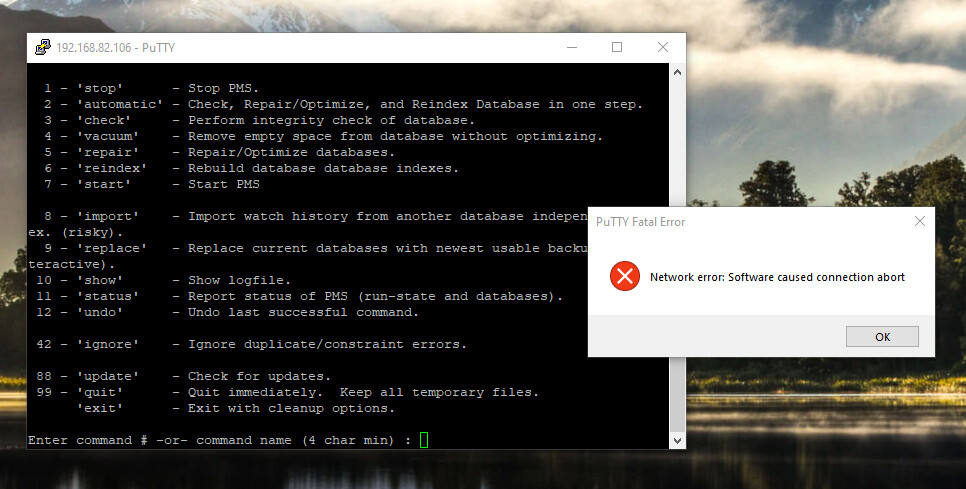
Ok to remove temporary databases/workfiles for this session? (Y/N) ?

This cant be good
No, that’s not good … and it’s not me either.
Something with your network is wonky.
Is the PC wired or wireless ?
Wired
Tried changing keep alive settings in putty.
Really not having a good day 
I normally use DEFAULTS for everything in Putty.
(the more you fuss with it the worse it gets)
Is your PC software up to date ?
It should be yes
Google says its something about firewall closing it.
Gotten to the exporting blobs now so seems to work better.
I hope
So far I managed also to block myself from ny plex nas with too many wrong passwords.
Really really not having a good day
But at least you are a bright light in it Thank you for your patience
I think you’re going to be the FIRST CANDIDATE for using my DBRepair.sh tool as a Scheduled Task on the Syno lol
(I’m writing the How-To now. I figured out how to make it work with DSM 7 app-armor)
I am willing!
Me and putty does not seem to be all that good friends
I have to go eat. Will let PC do its things…crossing fingers it keeps doing it!
I will let you know later how it goes Thanks again!
OK.. let’s do this on the fly. (you only need the DSM 7 GUI)
(This is work in progress – I’ll amend as we go)
================================================
DBRepair.sh with DSM 7DSM 7 has implemented tighter security than its DSM 6 predecessor.
One side effect of that change is we cannot freely run ‘Plex SQLite’ which is needed for DBRepair.sh to do what it does from Task Scheduler.
To setup a Scheduled Task (Control Panel - Task Scheduler) to run DBRepair, we need an extra step.
This How-To shows exactly how to do it.
There are two steps:
Grant your/some DSM username permission to run with elevated privileges
(This should be a username which meets the following conditions)
– Isn’t accessible by anyone but yourself
– Isn’t used for normal daily NAS operation (until you’re comfortable with with it)
Create the scheduled task which uses that username.
The first step in granting permission requires a modification to a DSM configuration file. The specific file we will modify is /etc/sudoers.
The safest way to do this is via a scheduled task which runs only once or on demand.
– The username you use cannot have any spaces
– Name can contain Letters, Digits, Period, and Underscore
1.Create a Scheduled Task User-defined script
– Runs as: ‘root’
– Is not enabled
– Does not run on a schedule
– Has a very obvious task name
– (this could make your system vulnerable if you misuse it so caution is advised)
– Task Settings:
Paste this text into the “Task Settings” (User-defined script window) then edit the username for your usage.
#!/bin/bash
#
# This script grants the given syno username (your username)
#  the ability to elevate to 'root' privilege for use with DBRepair.sh
#
# Set your Syno username here (no spaces)
# Change 'chuck' to be the username you want to use
MyUsername=chuck

# Confirm username exists
if [ "$(id $MyUsername)" = "" ]; then
  echo ERROR:  No such user \'$MyUsername\'
  exit 1
fi

# Remove old record
sed -i s/^${MyUsername}.\*$// /etc/sudoers

# Add myself to sudoers
echo "$MyUsername" 'ALL=(ALL) NOPASSWD: ALL' >> /etc/sudoers
When you’ve finished editing the username, SAVE the task.
Type show and look at the logfile. You should see a nice full session – Like this:
2024-01-12 12.40.09 - ============================================================
2024-01-12 12.40.09 - Session start: Host is Synology (DSM 7)
2024-01-12 12.40.13 - Stop    - PASS
2024-01-12 12.40.14 - Auto    - START
2024-01-12 12.40.14 - Check   - Check com.plexapp.plugins.library.db - PASS
2024-01-12 12.40.15 - Check   - Check com.plexapp.plugins.library.blobs.db - PASS
2024-01-12 12.40.15 - Check   - PASS
2024-01-12 12.40.18 - Repair  - Export databases - PASS
2024-01-12 12.40.21 - Repair  - Import - PASS
2024-01-12 12.40.21 - Repair  - Verify main database - PASS (Size: 7MB/7MB).
2024-01-12 12.40.21 - Repair  - Verify blobs database - PASS (Size: 1MB/1MB).
2024-01-12 12.40.21 - Repair  - Move files - PASS
2024-01-12 12.40.21 - Repair  - PASS
2024-01-12 12.40.21 - Repair  - PASS
2024-01-12 12.40.21 - Reindex - MakeBackup com.plexapp.plugins.library.db - PASS
2024-01-12 12.40.21 - Reindex - MakeBackup com.plexapp.plugins.library.blobs.db - PASS
2024-01-12 12.40.21 - Reindex - MakeBackup - PASS
2024-01-12 12.40.22 - Reindex - Reindex: com.plexapp.plugins.library.db - PASS
2024-01-12 12.40.22 - Reindex - Reindex: com.plexapp.plugins.library.blobs.db - PASS
2024-01-12 12.40.22 - Reindex - PASS
2024-01-12 12.40.22 - Reindex - PASS
2024-01-12 12.40.22 - Auto    - COMPLETED
2024-01-12 12.40.29 - Start   - PASS
2024-01-12 12.40.29 - Exit    - Delete temp files.
2024-01-12 12.40.29 - Session end. Fri Jan 12 12:40:29 PM EST 2024
2024-01-12 12.40.29 - ============================================================
It doesn’t require deleting the temp files (yet). We’ll do that when it exits.
Concern is the other parts (auto & reindex) ran correctly.
Sorry… I misread –
Your Logfile shows making it active.
you’re good to go… startup PMS
Thank you so much!
I will look at your guide tomorrow! 
Evening so need to spend time with wife!