ERROR - Waited over 10 seconds for a busy database; giving up

Summary: Started seeing this database busy error a couple of weeks ago. Had a hard drive on that system crash but the db was stored on a secondary drive so ti wasn’t affected, just lost the thumbnail stores. Since getting the system back up it’s had occasional hangs and I started taking note of when they would hit and i’ve narrowed it down to the library scans.

If I start the server up and let it run with library scans disabled I tend to have no issues. I have seen as many as 16 people connected at once with no issues. Within five minutes of running a full library scan these busy database messages start to appear and the webinterface hangs as do client connections.

OS: RHEL 9.2
RAM: 16G
HD: 1.5T free ( software raid1 ext4 | Samsung SSD 870 EVO)
Server Version#: 1.32.3.7089
DB Cache size: 2048

plex plex 3.6G May 31 11:12 com.plexapp.plugins.library.blobs.db
plex plex 1.2G May 31 11:24 com.plexapp.plugins.library.db

Plex Media Server Logs_2023-05-31_11-19-02.zip (4.3 MB)

I’ve run an integrity check on both and vacuum. No errors turned up. Went ahead and did a recovery and rebuild just to make sure that everything was clean. I’ve also tried various values on the db cache size but it doesn’t seem to make a difference. Any idea @ChuckPa

  1. enable the ssd management
sudo systemctl enable fstrim       # This enables monthly automatic
sudo systemctl start fstrim        # This makes it run now (system will appear to hang -- don't panic)

2.  Run my DBRepair to optimize the PMS database.   I do what PMS can't because it's running.   You will want the 'Auto' mode.


https://github.com/ChuckPa/PlexDBRepair

Intructions and examples in README.md

Enabling the fstrim.timer was a good call I hadn’t considered that since I just added the flash over the holiday. As for the autorepair, handy, and I will keep that around for sure, but it’s doing the same steps I just did. which was the integrity check, vacuum, dump, import. I did neglect to reindex, I figured since it was doing an import like that it should have already had them straight.

DBRepair.log (1.5 KB)

Had everything running fine for the last two hours. Had it scan the tv library right after I brought it back up and it had no issues.

A few minutes ago I told it to scan the movies library and the waiting on the busy database messages are back and there are corresponding messages in syslog.

May 31 14:52:13 plex sh[312667]: Sqlite3: Sleeping for 200ms to retry busy DB.

Plex Media Server Logs_2023-05-31_15-14-44.zip (3.6 MB)

Here’s a fresh set of logs. I did the scan back around 2:45 or so, and it’s now 3:15 and it has hung so many times I restarted the process despite whatever had the lock. This library isn’t that big ~6000 items. The other library has likely 10 times the item count and isn’t displaying this. It’s almost like some type of loop possibly? Is there a way to see what the thread is that gets cited when entries like these pop up?

May 31, 2023 15:10:04.765 [139690401295160] DEBUG - 7 threads are waiting on db connections held by threads: 139690338519864,139689763765048,139689784769336,139689688693560,139690074139448,139689707916088,139690346904376,139690244959032,139689710025528,139689714244408,139690281548600,139690287852344,139689716353848,139690060757816,139690237041464,139689718463288,139690267507512,139689695021880,139689705806648,139690058062648
May 31, 2023 15:10:05.689 [139690070272824] DEBUG - [Req#62cf9] 7 threads are waiting on db connections held by threads: 139690338519864,139689763765048,139689784769336,139689688693560,139690074139448,139689707916088,139690346904376,139690244959032,139689710025528,139689714244408,139690281548600,139690287852344,139689716353848,139690060757816,139690237041464,139689718463288,139690267507512,139689695021880,139689705806648,139690058062648

@wilpig

Auto does more than vacuum. Vacuum isn’t the complete answer.
The ‘repair’ process does two major steps:

  1. Export (in table sorted order)
  2. Import the sorted table to create a new physically compact and contiguous table
  3. Generates SQLite indexes so PMS doesn’t have to

How many media items do you have indexed in Plex ? (rough count)
How much of that is music ?

I am asking because:

  1. The size of your main DB and size of the blobs DB are big
  2. You have an old i5 CPU (it’s 10 years old)
  3. While an SSD extends the life of older CPUs, there are some things SSDs can’t fix (Like getting in and out of a big database quickly)
  4. The total item count is going to reach a point where you’ll need an i7 or better.

I have i7-7700 & i7-8809 (twice the passmarks of this i5). When dealing with big databases, the Per-core / per-thread speed is critical to PMS running smoothly because many of its operations (especially scanning) grabs Exclusive locks on the DB (which makes other threads wait.

1 Like

Total item count 95408, no music. I’ve been looking at upgrading the CPU/board/memory on that and just haven’t dropped the cash on it yet. Is there any general idea on passmark vs index size?

What is part of the scanning process that is the trigger on that condition? If it were just the item count I’d expect it to hit when I scan any of the other content stores as well, but it only does it with the specific one. Once it gets in that state it doesn’t seem to be able to get out. Whatever task is hung clears and it jerks to life for a few minutes then it’s back into the pit. The primary plexmediaserver pid also jumps to ~350% usage as it consumes all four cores.

Interesting.

I can load up a 340,000 item count DB, run the tool, and there are no issues.
(there are rarely issues anyway unless I deliberately try to break the DB)

I wonder if your indexes are in need of rebuilding and/or you really do need the full export/import treament. (export/import also drops ALL the dead records which SQLite would otherwise have to step through on its internal table row linked list)

THIS :point_up: is simply unacceptable. Not even an i5, with this item count, should do hit 3.5 full cores unless the DB is roasted and in serious need of attention.

I did the fully export/import before I ran your autofix, and then it did it again as part of that function.

I have two thoughts on it, I have four libraries set up. only this library is showing this weirdness. The others don’t have collections enabled, where this one does. Is it possible that the collections portion is trying to reference something that got nuked when I lost the primary drive last week for the preview files, poster art, something? I’m not sure how it references the preview thumbnails on disk I just assumed it stores some type of ID in the database, but I guess it could be calculating the ID on the fly and then checking the disk to see if there is anything there. Would disabling collections and nuking all the tags to remove possibly help here or just muddy the waters?

The second thought is the cpu usage could be tied to HDR content with this latest release. It’s all showing HW but right now with 3 active clients it should not be showing a load of 13!!!
Screenshot 2023-05-31 at 5.21.33 PM
Screenshot 2023-05-31 at 5.22.22 PM

How much memory is in that thing ???

Kswap should NOT be taking time. (you’re swapping – VERY VERY BAD)

Why are you running memory compaction ?
That’ll chew the HELL out of your CPU.

You again are correct that setting was different. Looks like Red Hat changed the default from 0 in RHEL8 to 20, stealthily, for RHEL9.

grep . /proc/sys/vm/compact*

/proc/sys/vm/compaction_proactiveness:20
/proc/sys/vm/compact_unevictable_allowed:1

I’ve dropped that back to 0. It has 16G which should be plenty for this, it doesn’t run anything else it’s dedicated to its job. The OS is likely consuming all the rest as buffer pulling the content from the network.

All is stable at the moment, I’ll monitor more tonight and report back tomorrow.

You should probably consider a permanent sysctl.conf override.

We’re on the same page.

# cat /etc/sysctl.d/40-plex-lag.conf
vm.compaction_proactiveness=0

It does appear to be running better but definitely still has a gremlin in the system. I’m currently remote and was watching a movie with family and there were 6 or 7 streams in progress at the time. The movie hung and I checked the system and the usage went from ~10% to 100% again and it started murdering processes according the server log.

Plex Media Server Logs_2023-06-02_20-40-32.zip (4.7 MB)

I’ve gone ahead and ordered parts that will be in next week after I get back from this trip, but this definitely feels like some internal process is going haywire. Based on sar it is happening every 6 hours, and the library scan is set for 6 hours currently.

  • What is there in the library scan process that could be a trigger other than some major database issue that isn’t getting solved by an check → vacuum → export → import → reindex cycle?
  • Is there a table that doesn’t get its indexes checked? something that is used an external key that isn’t linked specifically in the schema?
  • Is there any possibility that something has gotten nested via a collection that is causing some type of loop?

Which GPU are you using?

if you’re running 6 transcodes, at about 680-800 MB each on the GPU, that’s pushing the typical 5GB memory limit on a P2200.

It’s also possible, given the audio conversions I’m seeing, you’re running out of CPU for that. (Dolby Eac3) the Dolby converters are not CPU friendly.

P2000. That’s a good chunk of memory per transcode, I don’t typically see that kind of usage.

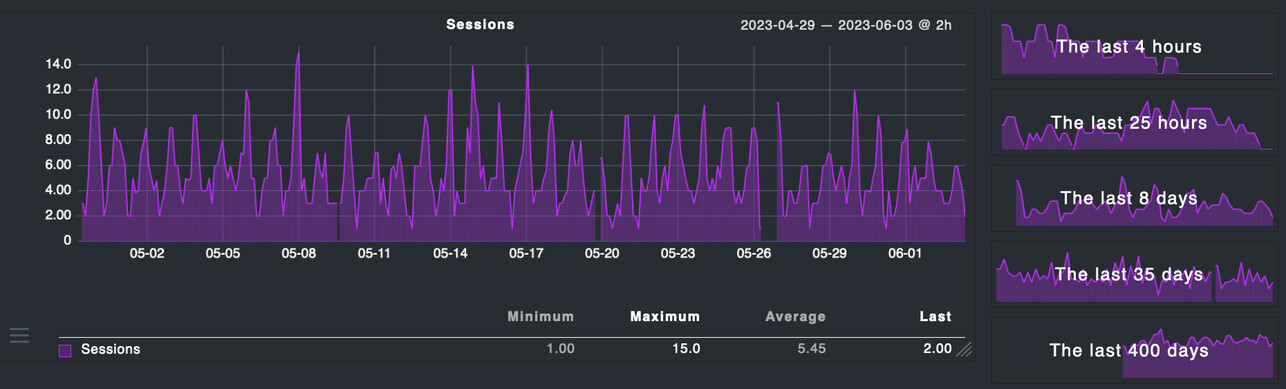
Here’s the last 35 days of usage out of the card. 16 has been the max i’ve personally seen at any given time before exhausting the memory, but typically when I look there are ~8 jobs going simultaneously. That card has been a real performer.


Thanks for this info.
Clearly I must be somewhat excessive (?) with my source files? :thinking: :rofl:
I use HEVC HDR rips from MakeMKV almost exclusively.

We can put the card to rest for you. :white_check_mark:

That only leaves the question of: "Are you running out of CPU with Dolby / audio ? "

I’m sure at times I definitely am, but I don’t think that is the root of this. I decided to abuse it heavily this morning after I poked at the stats for the last 24 hours. I made some observations.

1.30.1.6497 - can’t downgrade to here because metadata_items schema has changed
1.30.2.6563 - scanning problem gone, hevc decoding problem present
1.31.0.6654 - same hevc problem
1.31.1.6716 - hevc problem gone <–winner, winner, chicken dinner? saw some locking but doesn’t seem to be as bad
1.31.1.6733 - monitoring

Poor database got smacked around and props to the devs that have added in the upgrade/downgrade bits that run. Currently monitoring and just over 20 minutes now without any slow database messages. I’ve hit it with direct plays, hevc transcodes, hevc hdr transcodes, .264 transcodes as well. Just after the scans finished the Scanner task jumped up to 300% usage but that was to be expected. I have not seen the Plex Media Server process get higher than 200% where before it was getting to 400% until it would reset all the processes on its own. It still really feels to me like something changed going into the 1.32.x builds that I might be hitting an edge case that wasn’t considered? Slow DB messages started showing at 28 minutes while I was still editing.

I’m doing family things and not able to watch this as closely as I’d like but I’ll try to check tonight when the traffic usually gets heavy and see if the audio encoder tasks are fighting to be top banana. What all schema changes were in the 1.31 → 1.32 that the main plex media server process are using?

Finally back home. Current state of the environment.

Plex: 1.32.4.7164
OS: RHEL9.2
RAM: 64GB
CPU: Ryzen 7 5800G
Hardware assist: Quadro P2000

New hardware is a screaming banshee.

Jun 09, 2023 15:34:07.910 [140186319350584] ERROR - [Req#7f55] Waited over 10 seconds for a busy database; giving up.
Jun 09, 2023 15:34:08.127 [140186308537144] ERROR - [Req#7f8e] Waited over 10 seconds for a busy database; giving up.

I have not rebuilt the DB again since replacing the hardware, everything is current. Either there is something in this new build causing database hangs with large libraries that i’m hitting or there might be some type of db corruption that wasn’t fixed with the previous dump → import → reindex cycle before. What can I do to get the best info to you all to try and isolate what’s up? I can say that it is 100% triggered by a library scan. When the server comes up it’s solid and quick to respond. After I manually trigger a library scan I get the database busy problem.

Solved?

Been watching this closely and noticed that it was only getting hangs when scanning one section that reported ~6500(section a) items while it was also scanning another section that lists ~90000(section b) items was having no issues whatsoever.

section a had ~1000 collections many of which were just single items so I cleared any that were less than 2 items and the database hanging went from around 10 minutes on average to 4-5. I left it sit overnight and didn’t get any messages from anyone that it hung up and didn’t see anything in my logs showing any serious issues but it was still hanging upon scanning this section. I kicked off a manual scan and noticed these two lines about directories having files but differing entries in the database. I haven’t changed any content for those to be off.

Each time I kicked off a manual scan those numbers were moving around. I looked at the source for that library and it has 5 directories that it is looking at. Four of them are flat, no subdirectories just files the fifth is for optimized versions that plex creates. After looking at the content in that directory I removed all the “optimized” versions from the “optimized versions” menu then verified that directory was empty on disk. All of the files had been removed but there were a few directories left over and a symlink.

4.0K lrwxrwxrwx. 1 plex plex   52 Dec  8  2021  mobile.versions -> '/media/transcode/Plex Versions/Optimized for Mobile/'
   0 drwxrwxrwx. 1 plex plex    0 May 14 00:50  plex.metadata
   0 drwxr-xr-x. 1 plex plex    0 Jun 10 07:46 'Plex Versions'

Just to be clean I cleared all of this then ran a new scan. There have been no busy database messages since. Those two lines about the directories with differing item counts have not shown up again. I can kick off a scan on this library now and it finishes within 60 seconds, have done so repeatedly and it appears to be good now. I did not create any of this directory structure but it has been in place over several years and many MANY plex versions.

I’ll give it a couple of days to be certain but it does appear to be good, finally.

tl;dr; It appears as though the content scanner was getting in a bad state due to possibly iterating over a symlink that was creating extra content entries.
