The remote packaged with the Plex iOS app is frustrating to use. If there’s a wiki describing the functionality of each button, I’d appreciate a link. Today, I was using it and had trouble figuring out how to fast forward. I eventually got the menu to show during playback and selected fast forward as needed. This, however, is incredibly inconvenient.
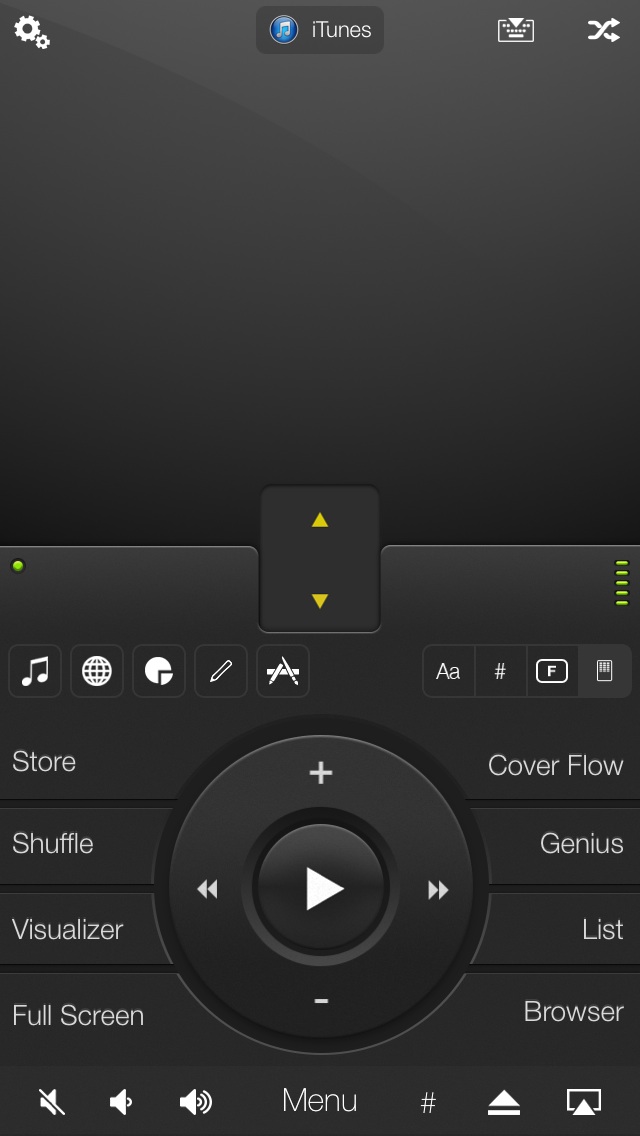
What would be nice is a more customizable experience with the remote. For example, I’d love to dedicate a button for play/pause, fast forward, rewind, skip 1%, jump 10%, escape, menu, subtitle toggle, etc. I don’t need all the functionality that say, a keyboard, would provide, but certainly my most used functions I’d like to be able to map in a manner I’d like. I’m pretty sure that a play/pause button surrounded by four arrows (double clicking on the left/right arrows could be used for fast forward/rewind) with say 8 customizable buttons surrounding it and maybe volume controls on the bottom. I’ve played around with mobile mouse pro a bit, and I’m thinking of something along these lines:
http://www.mobilemouse.com/images/support/iPhone_air_mouse_media_remote.jpg
but without the mouse aspects of it (and with a Plex-ish redesign). The eight tabs surrounding the center circle (e.g. visualizer, full screen, etc.) are customizable.
2021 clean-up: obsolete (the remote feature described here is no longer in place; instead you can now remote control another plex client through the regular mini-player interface)