Feedback on the new music app (Plexamp) for iOS devices (iPad)

I have been playing with the new Plex iOS apps–both Plex (for video) and Plexamp for music and audiobooks. I have not yet tried the new app for photos. My device is an iPad Pro, about 4 years old.

To begin, I do not really mind having to use three apps to access content that I used to access through one app. I can get used to that, as long as the performance is as good (and supposedly better).

On the music app . . .

I have loaded new tracks through my Windows PC app, and it seems to work. The new audiobook shows up on my iPad.

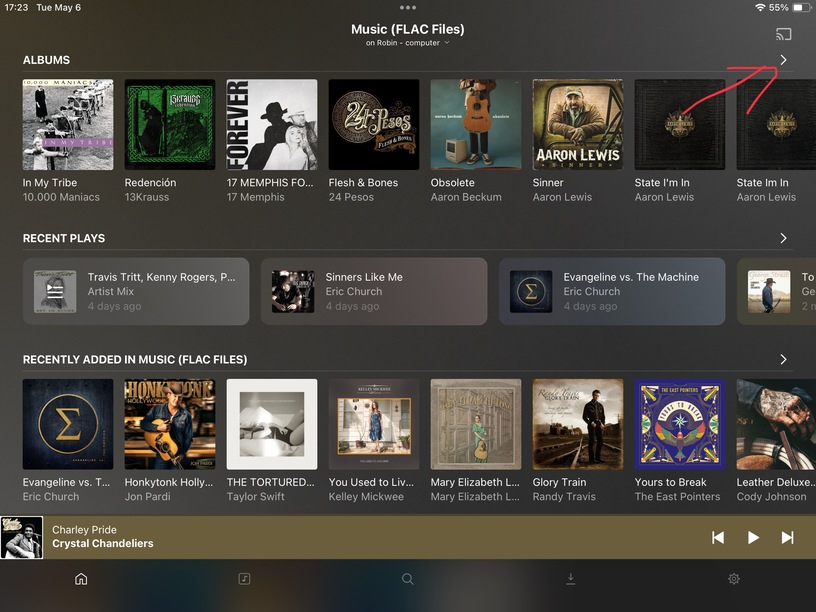
The interface and organization is odd, and not intuitive. It opens on whichever page I was last on, and that is fine. The Home Page is useless. What in the world are the “Mix Build” functions for? The “Library” function under “Recent Plays” provides no benefit to me. Nor does the “History” of recent plays. The “Search” tab serves no purpose. The “Download” tab is of no value whatsoever. The “Music” tab always takes me to a page with many different ways to access the content, but as I ALWAYS want to access by “Album” this is a nonessential page that just requires more work. This music tab does not allow me to select which library I want. It only works with the library it is currently in. But then it does nor report anywhere on the screen which library that is. This is annoying. Probably an easy fix, I would guess.

Why would I have to go to “Settings” to switch to a specific library? That seems very odd to me. It certainly is not intuitive. The “Source Selection” functionality seems lost among a whole bunch of other functionality that is of no value. Why not make it easy to switch to different libraries with a dedicated tab for that purpose? When I get to the “Source Selection” screen there is no way to reorder the libraries. That is not user-friendly. I hope you fix this content selection process soon.

My needs are simple. 1. Select library. 2. Select specific album. 3. Stream content to my TVs, my PC, my iPad. 4. Share selected libraries with friends.

I can eventually get to whatever it is that I want to listen to, but the process of getting there is cumbersome and not intuitive. You have put far too much useless functionality into this interface, the net result being the interface is too complex, too cluttered, and too difficult to navigate as it requires too many clicks to accomplish basis needs: find desired content, play it.

I think this app could be streamlined and simplified to make it far easier/quicker to access content. I think it could be good. Right now it is a bit of a mess. Intrust you will figure this out.

I am wondering . . . Is this Plexamp app going to be available on my TVs? My primary access to music/audiobook content is through the TVs. Secondarily through my home base PC, thirdly through the iPad. Never through my iPhone.

Not sure whether you’ve noticed but you can switch the library at the top of the home screen without going to settings.

I agree it’s not ideal and would much rather all libraries were always actively loaded for searching and finding, but it is what it is.

Also, again not ideal, but you can pin Albums or Artists to your home page also by using the house with the + icon from the library tab. This at least gives you a quick shortcut to the library displayed in a quicker fashion. And you can reorder the libraries in Settings > Experience > Home Screen so it displays what you want and in which order.

1 Like

Well, I use some of the features you don’t, so I guess it’s a tie.

Many would disagree with you.

That is rather strange, but like you said, it remembers what tab it opens on, so you can live on the library tab.

You don’t; use the v dropdown on the upper left of the home screen to switch.

How many libraries do you have? Organizing by title is the most logical way to layout lists of things :sweat_smile:

Most people live inside a single library.

I don’t think we will, given that your needs seem rather esoteric compared to the majority of the user base.

2 Likes

I see that I can do this. But switching libraries is a function of primary importance. Why do you make this function on the Home Page so small as to be unnoticeable?

This should be a large button, not a small one. Moreover, there is no way to switch to a different library on the Music tab. Don’t you agree that is where the function to change to a different library should be? But it is not there. It is only on the Home page in a very small click link AND on the Settings tab mixed in with a lot of settings stuff mist users set once and then never need it again.


I have hundreds and hundreds of albums in my 19 different music and audiobook libraries (525 music and 432 audiobook). Why would I want to pin Albums to my Home Page? I only access content by Albums, so the Artist functionality is not of interest to me, though I understand it will be to many others.

I do not see a “+ icon”? I do not understand what you are saying here. There is nothing like that on the Library tab. Please explain. This is a mystery.

I notice there is a track playing bar the runs across the bottom of every tab. It seems to be playing some track, but it is never a track that I am currently listening to, nor one that I have recently listened to. It is selecting tracks wholly at random. Morever the minute I touch the screen a different track is called up. Worse yet, I cannot close this bar down. Whatever purpose you have for this bar thingy is just not working, and thus currently is not useful.

The Library tab has many useless ways of sorting content. Maybe some users want to access content by album genres, artist genres, styles, moods and/or record labels, but I would be surprised to learn there are many. perhaps you might allow users to hide the sort criteria they will not use?

I have learned how to change the order of libraries. Thank you for making that easy.

On my Home page I have a Recent Plays section with a Library button. I click on it and it shows some one track that I have not even played lately. That is useless.

There are also the Artist Mix Builder and Album Mix Builder buttons. I have no idea what they are for. Some higher level “play list” perhaps? That is, for me, a useless function. I have nearly 1,000 albums and see no reason to create a playlist of albums. I never access content by artist, though the album might be labeled “Very Best of the Beatles”. In other words, I create my own albums.

As you say, it opens on the Library tab, so maybe I never need to see the the tabs. So, it would be great to see improvements made to the Library tab . . . such as placing a large change library’ button there.

" You don’t; use the v dropdown on the upper left of the home screen to switch."


But there is no such “v” dropdown on my upper left Home page?

What?

I cannot imagine having all my nearly 1,000 albums in a single library. I would be scrolling down forever.


Really? My needs are simple, not “esoteric” . . . not in the least. I read elsewhere that you accuse users of having weird ideas. I assure you, my ideas are not weird. I appreciate all you work here, but you should appreciate the time I am investing in providing feedback.

I am patient. I trust that you will get things right.

1 Like

Just so you comprehend I am just a user like you who has tried to show you ways you can customize your Home Screen. I have absolutely nothing to do with the design or anything with Plex at all so maybe watch your tone a little?

As far as the library suggestion etc it was just a thought because it serves as a shortcut to all your albums. FWIW I have 2213 albums so you can use that for context too.

Anyways here are some screenshots,

Anyways if you want to figure it out, it’s easily customized. But I’m out of here as you seem to prefer to complain. Maybe look at Roon instead.

3 Likes

I think there’s no winning here :sweat_smile: I agree the v is kind of small, but now that you know, you know. Again, MOST people only have a single music library so it doesn’t matter.

This is the library selection, for most users.

This is an exceptional number of libraries, far beyond the common usage. That being said, you have a quick way to switch between them on the home page.

19 different audio libraries is … esoteric.

Really appreciate your help in here :folded_hands:

3 Likes

I think you’re holding something wrong as I have a considerably larger library than you and rarely find myself scrolling through all the albums. Instead, you can access subsets via e.g. genres or styles, or filter on different decades or whatever. Lots of ways to slice a single library up.

1 Like

And that’s e.g. where the those additional radios / stations / mix builders can come handy.
You have a rough idea what albums you’d like to listen too… put them in an Album Mix and Plexamp will create you a nice set from that selection – with smooth transitions if your server completed the sonic analysis of your music.

1 Like

This is where Search, a thing you do not use, can help.

I cannot imaging switching libraries by genre or artist or albums A to D or whatever and scrolling to what I want. Wow.

While I think you are an absolute mad lad, this thread is a great example of how users want different things and how hard it is to make software that satisfies most people. I think your requests to have the ability to simplify the UI are not unreasonable. Dismissing features like the mix builders as “not useful” is maybe assuming too much about what other people want, though.

Excuse me, I am looking for a fax number and I have to get back to paging through the white pages. I’m only on “B.”

7 Likes

All this suggests that different people set up Plex in different ways–some configurations better than others. Perhaps my configuration is not the most efficient, but it has worked very well. I just hope the new apps allow me to work in a manner similar to what I have been doing for 7 or 8 years.

I do have 19 libraries for audio. Eight of them I use for audiobooks. So, I use this multi-library option to segment my audiobooks into different genres–one for philosophy, one for culture, one for Christian books, one for books by C.S. Lewis, one for essays by C.S. Lewis, one for Scripture . . . and so on,

Eleven of my libraries are for music. One for orchestral, one for classical voice, one for classical solo instrumental, one for Baroque, one for pop, one for rock, one for jazz, and one for my wife’s favorites.

So it seems several of you are saying I could put all these nearly 1,000 albums into far fewer libraries, perhaps as few as two–music and audiobooks. And then I could use filters or screens to sort content by my self-defined genre categories. If so, that fact I just did not know 7 or I years ago. Users, like me, had no sample or example setups available to guide our configuration protocols. I just had to figure out something (anything) that would work. And so I did. But perhaps mine is not the most efficient structure. Still, switching for library to library has never been particularly difficult. Why having just two libraries rather than 19 is better is unclear. I am not sure I understand the benefits in ease of use.

Maybe this would be a benefit . . in my orchestral music library I have maybe 250 different albums, of those maybe 20 or more being symphonies and concertos and overtures by Beethoven. Another 12 by Tchaikovsky. My content is sorted by “Albums” and my album nomenclature is largely based upon composer name first (Beethoven), then second by type of composition (symphonies versus concertos) then by specific piece of music (Symphony #5 versus #7, et.n) then by specific performance (Dudamel with the Berlin Philharmonic). The Beethoven stuff is near the top, and thus easy to find. The music of Tchaikovsky is toward the bottom, and thus requires considerable scrolling. Perhaps a system bssed upon fewer libraries coupled with filters (or styles) would have meaningful advantages.

I do wonder about this . . . I share selected content with various family and friends. It seems that what is shared is determine by library. So, I can easily share specific libraries and not others when I decide what to share with them. For example, my sister, an atheist, does not get the Christian or C.S. Lewis stuff.

Perhaps there is a better way to do that, too.

Is it worth the effort to change my system of organization? Not sure about that. I would need to learn how to set all the various filters, styles, etc. Perhaps someone could point me to knowledge sets on how to do this? I am willing to change my process, if there is a “sound” rationale for doing so.

My main concern is that I will be able to access my music through Plex via my TVs. I have three stereo systems in my house. One is connected to my PC–I am not worried about losing that. The other two sound systems access music solely through Plex. I do not want to lose that.

By the way, my situation in videos is even more complex. There I have 33 different libraries, with perhaps another thousand separate tracks. Thankfully, I am not worried about losing access to videos.

100% agreed.

I mean, clearly the C.S. Lewis books belong in Christian books, but other than that, I can see why you chose to segregate the wide variety of music you have.

Now that you know the shortcut for switching libraries, perhaps it’s less painful to live with 19?

The best way for this is the headless version of Plexamp connected to a receiver. We’re working on ways to make this more easily done for people.

Thank you for the discussion!

2 Likes

I just want to know if you got all 6182 albums legitimately @elan :rofl:

Limewire maybe LOL?!

It’s not wrong to use a lot of libraries but the designers’ intent is to make use of Collections and Smart Playlists and other ways to segment your content within fewer libraries.

Having most of your music in one library will let you better use things like the mix builder and Sonic Analysis. “Plexamp, play me stuff like this track.” That can help you rediscover tracks you have not heard in a long time. Since it can only operate on one library at a time, that kind of feature works best when the music is all within reach.

And even if you only ever choose to listen to full albums, having them all in one library and using Search and Collections still seems like it would save you some clicks.

(I still think it is a great idea to split audio into separate libraries for audiobooks, classical music, and modern music, only an absolute lunatic would blend that content!)

You could always try life on the other side. Copy all of your modern music files into a new single library. Explore the mix builders, decades radio, and other discovery features… Play with Collections and Smart Playlists. You might actually like it. If not, just delete the test library and carry on.

Um, it’s very well possible… I’ve done my fair share of legal obtaining of albums in the eBay and 2nd hand markets. I hit thrift shops and flee markets where paying for media is cents not dollars.