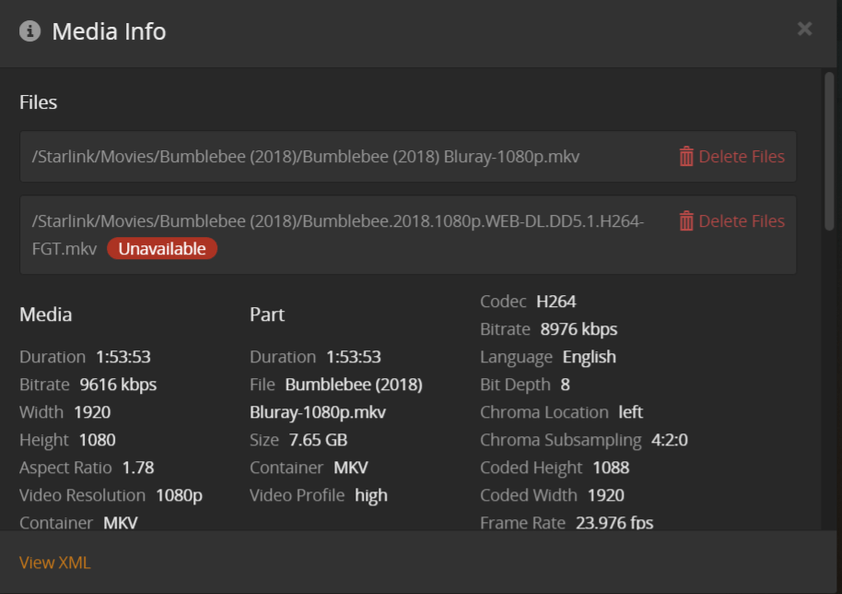
Are those files on some external or n network drive that might get disconnected during sleep?
The good news… it seems you have disabled Empty trash automatically after every scan – otherwise that would result in the movie record getting deleted from your Plex library.
Or are the files actually gone?!
Plex itself does not delete your media. There’s only one exception where you can configure how many unwatched episodes of a show you want to keep (that feature is intended for the Plex DVR but can apparently also be used for “regular” / non-DVR’ed episodes).
i’m leaning towards this ^ what @tom80H said…
looking at your file names… something is renaming them to title (year) quality.
depending on how you have your scans and renaming… plex might be scanning files when added, then something is renaming them, then plex sees it as a “new” file, but the OLD name is still being referenced.
Plex bug - I’m noticing that Plex is deleting my media stored in my TV Shows library that are set in the DVR to delete after X days, or X episodes.
For example, see the attachment below. I record the Three Stooges and copy the episodes from the DVR to an external drive that I can watch with the kids later. BUT, since I have the DVR set to delete after a few days AND a day after watching it, Plex is deleting the files in my TV Shows library (different from DVR) on an external drive.
That’s a poor implementation because the DVR is on 1 server whereas the files are stored on another (The TV show is set to record - that is on a device on an internal drive, the recorded files are moved to another server and another library all together).
This was not happening until recently until I had to rebuild the NVidia Shield so this has not been an issue and looks like a recent development.
If you have added the storage location (the one where the files are moved to after the recording) to a library that exists on the server with the DVR, then the deletion policy will also affect these files.
You can only separate this fully, by not adding this final storage location to the “DVR” server.
Server 1: Nvidia Shield has a server and on this is where I have the DVR Library.
Server 2: Windows machine with the library for recorded TV shows on an external drive. I copy the shows from Server 1 (download file) to Server 2 and into a separate TV Shows library, completely separate from the DVR.
If I set a new show to record on the DVR (Server 1) with it to keep ‘at most’ 3 episodes for example, that setting follows through to Server 2 and that TV show will also keep at most, 3 episodes.
That doesn’t sound right. Have you checked the setting on the second server?
There is no mechanism to propagate that kind of information across different Plex servers.
Yes, I have never set anything to delete on ‘Server 2’. And, the only shows that delete are the shows that are setup to record with the DVR. All other shows remain in tact.
Yes, I download the shows from the DVR server to another machine and the machine where I have the downloaded/encoded and copied will have their directories deleted.
Are you running two separate instances of Plex Media Server? I think that’s were some confusion comes in.
If you’re only running one instance of PMS, then you’re out of luck. Those deletion settings that you set on the DVR side will reach across libraries to delete files you’ve watched. Tracking for that “feature” runs by show, not by library or location.
I racked my head wondering why my Big Bang Theory episodes (this was a while the show was still running live) would delete every few days in my permanent library, when I had the DVR set to remove them X amount of days after I watched them.
It sounds totally counter-intuitive, I know… but this is what Plex deems necessary.
EDIT: Even if you are indeed running two PMS instances, if the one with the delete settings can see the other library at all, it will perform its purge on it.
I do have 2 servers, the one with the DVR is on an NVidia Shield Pro and I copy/download to a Windows box where I encode them into a .mkv from the .ts files.
It’s a terrible bug because the ‘delete after watching’ should be based on server and at a minimum the library. As the shield has its own ‘DVR’ library it is THAT library where the files should delete from and not the ‘TV’ library on a different server. That’s like setting an alarm in one house to wake a person up at 5 AM’ but it sets the alarm in a 2nd house so you update the alarm to go off at 6 AM in the 2nd house and it updates the 1st house to be 6 AM so the person missed whatever they were waking up at 5 for.
If the files (not the library setup) are in the same location across both servers then it would be more accurate to say that those two alarm clocks, although set differently for different people, are actually in the same room.
I know it sucks, and it took me a while to wrap my head around. It just is what it is. I made similar arguments when delete settings applied to the same show across two libraries.