Howdy all,
Hopefully I can describe my issue clearly.
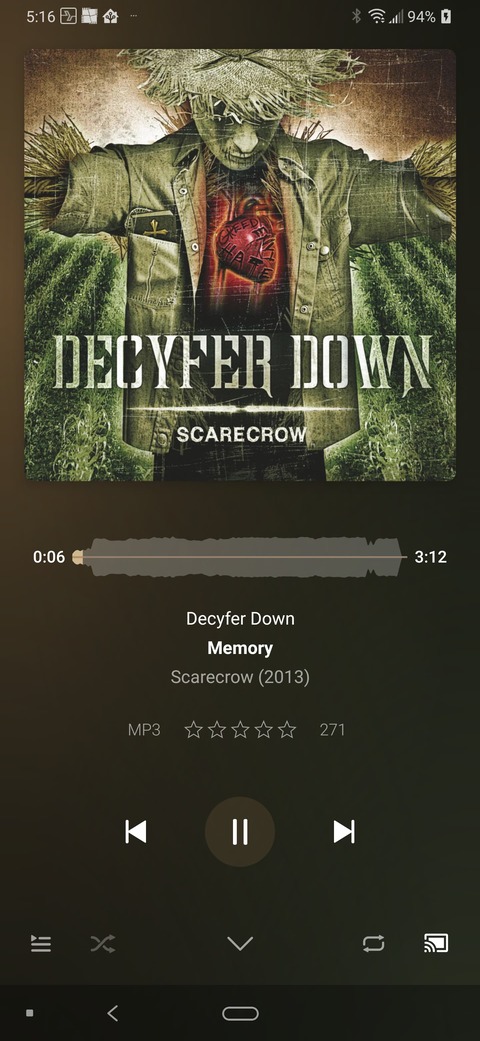
I’m not sure if there is a setting I need to change, but If I’m casting (on the window where you start playing a track (full screen) not sure what it’s called) and then open the casting button and click disconnect, the focus is forced back to the Home (recently played) window.
That is what is expected; the player window has to go away because you’re disconnecting from playback. If you want to move playback local instead, tap on “This device” instead of disconnecting.
From my perspective, I’m disconnecting from a speaker, not playback. Is this somehow a Google limitation? If not, why not return to the originating window when disconnecting?
All that said, I’m still intermittently getting thrown back into the library which is the worst case issue.
So is this a technical limitation? Otherwise I don’t understand.
My Audio Receiver Analogy:
The screen below is my “radio receiver screen” which contains my transport functions, and the cast button is my “receivers speaker buttons (A,B,C A-B… etc)”. If I change a speaker on my receiver, the receiver screen does not change it’s focus away from the original screen. Why would Plexamp?
The intermittent library focus bug can be duplicated with repetition. I can created it at about 1 out of 10-15 disconnects.
Perhaps I don’t understand what you’re doing and what you’re expecting.
If you bring up the cast dialog with something playing:
Tapping on another player “switches output” so it plays there, the player remains visible.
Tapping on “This device” switches output to the local device, the player remains visible.
Tapping on disconnect means “I don’t want anything to do with this playback session anymore”. In many cases playback will continue on the remote device. However, we hide the player because you disconnected from it.
First off I really appreciate you taking the time to understand my issue. It’s refreshing to see, especially when I’m failing at making my point clearly. So thank You!
Why does it mean that? How is a “playback session” defined in regards to the user experience? Why doesn’t the Select Player window act just like a normal output selector?
I’m trying to understand why the current order of operation is in place, as it’s not very intuitive IMO. Seems like there is no good reason to move focus to another area when disconnecting from a player. I move between casting to CCA’s to the Phone quite a bit, and it’s inconvenient when I’ve disconnected to have to find my place back to resume where I left off, and is the crux of my issue
I don’t want Plexamp to move the focus from the player window unless I want it to move when disconnecting from player for the above reason.
An observation: when the player is paused; switching to a different CCA device will auto start the track in the Select Player window, but when doing the same exact thing and switching to “This device” it doesn’t.
Why a different user experience depending on player?
On another user experience question: Why not close the Select Player windows after a selection has been made?