Server Version#: 1.18.5.2309
Player Version#:
I have my plex media server on an I7-5600k and when i start gaming on my OTHER gaming computer my users complain about plex buffering and they have to go down to 2mbps. This is 1 person streaming it does this. Also I have 50mbps upload and 400mbps download speeds. It’s not a transcoding issue. How can i fix this? Why will plex not just continually download the video instead of doing it in spurts?
My guess is your gaming is overloading your local network in some way. It is probably something fixable locally but it will be hard to find.
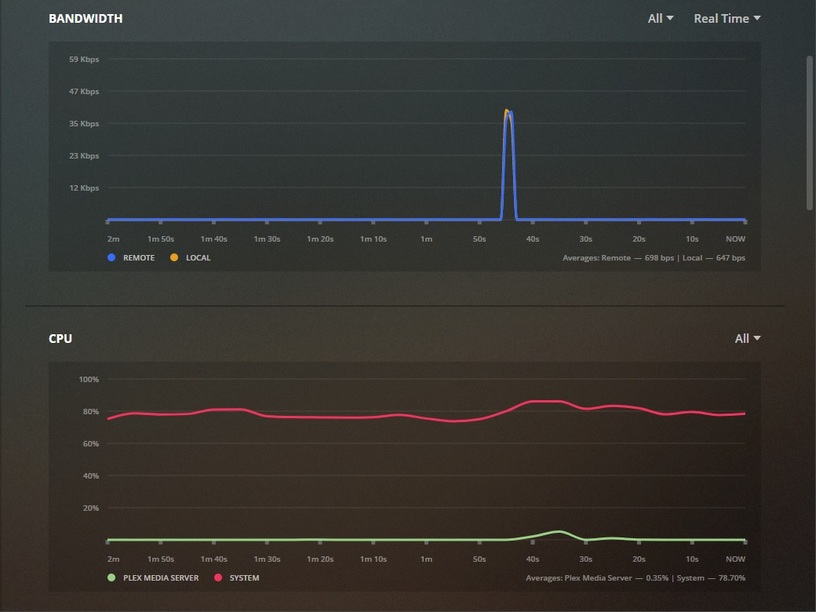
When you’re gaming and streams are in progress go to Dashboard and look at what’s going on:
I have no streams in progress ATM, but I do have a Handbrake Job in progress and we’ll let that stand in for a Game. As you can see HB has my CPU up against the wall, going through it’s pockets for spare change.
I can tell you from experience I can deliver at least 2 Direct Play streams without issue, but if somebody starts transcoding something while I’m playing a Game, I’m gonna die, or they’re gonna buffer - or both.
You can probably start at the Dashboard and figure it out from there. CPU won’t be a factor for your case, but bandwidth may.
“Spurts” is how Plex works - it fills a buffer on the client end, waits for a moment, then sends more. You may be able to fiddle with the buffer size on the client, making it larger so it’ll hold more program before it loads up again - that might help.
As for gaming bandwidth that’s going to be fairly steady, but if the gaming bandwdith and the Plex bandwidth bump heads - who’s going to win? I don’t know. I suspect your gaming wins, if they’re buffering and you’re not dying…lol
Gaming doesn’t need a lot of bandwidth. I was already gaming in my ISDN days with 8 kb/s. Today it should take up something like 1-3 Mbit/s, so virtually nothing.
@JuiceWSA: He says he uses a dedicate machine for gaming which is seperate from his Plex machine…
I can’t believe this is related somehow. There must be another root cause for this.
I’d go with @Elijah_Baley 's thesis first.
Are both the Plex server and the gaming machine connected wirelessly?
You want to avoid that. Plex servers work best with wired networks.
It most defiantly is related. I turn on a game and it plex immediately buffers. I close the game and it goes back to normal. My gaming computer is a separate computer from my Plex.
I’m NOT connected wirelessly on either machine.
Could it be something with the priority of bandwidth on the router? Or could it be that my ISP is throttling my bandwidth during prime time hours and it’s too low for both? Speed tests show it’s fine but I know ISP’s fake speed tests from most speed test websites.
I do run both my computers with a static IP address. I don’t know if that could cause some issues.
I did notice that.
I do know that gaming isn’t very demanding.
The dashboard will show the gaming stream as steady and Plex is pulsing and I suspect the steadier stream wins the day.
I’m a gamer now, have been a gamer longer than many have been alive, I can game and deliver a few Direct Play streams without issue so if there’s a general issue with gaming and streaming - I don’t know about it 'cause it don’t happen at my house.
The dashboard may show something else, but we’ll never know if we never go there to see what it may be.
Candy Crush doesn’t make you a gamer 
Oh yes it does (chest all puffed out).

Actually I ruled at Pong.
I wonder if it is something similar to what some users are reporting, where their router is crashing as soon as Plex is running.
There are some very weird router firmwares out there. And if your router is supplied by your ISP, you are double unlucky.
Indeed.
Looking at the Dashboard will show how light-weight, but steadier, the gaming stream is. @emersand12 has already said if the ‘streamers’ lower to 720 the stream continues - so we kinda already know what might be going on, but we don’t know why.
The dashboard doesn’t see the gaming, it is on another machine. The plex dashboard does not monitor the traffic of the whole LAN but merely the machine plex runs on.
If it all, he has to look at his router/firewall that connects to the outside world.
The router could activate a QoS policy, once it detects an online game running. (To ensure a stable and lag-free gaming experience.)
This could potentially enlarge packet latency and reduce available bandwidth for other data streams – in this case Plex.
That’s what I was wondering if it was but if I were to turn off the QoS policy would my gaming start to lag?
Also this doesn’t happen if I stream locally and game at the same time. It’s only an issue for my remote users. That might be why most people have not seen this issue before or realized it.
Only you can test this.
There are too many factors in play here, to predict this.
Possibly, it might be OK most of the times. But if too many/big remote streams are clogging up your upload bandwidth, then your gaming might indeed start to lag.
I will give this a try and let everyone know if it works.
I wonder how big those remote streams are and I wonder how we’d see… oh I know… the dashboard would show us some info…lol
If @emersand12 had his own router/modem he might fiddle with the QoS, but any fiddling will now have to be done at the ISP - and they aren’t great fiddlers.
Also I’m new to the forums. How do you reply with the users message in the reply?