I’m having trouble getting Plex to see the proper IPs for clients on my local network due to NGINX Proxy - X-Forwarded-For ignored for 192.168 / 10.0 / private addresses. My server is running in a VM with its own LAN, and I’m wondering if, as a result, it’s not advertising the correct local IP server URL, causing the clients to be unable to access it locally through that and having to use the custom server URL, resulting in them getting the IP address of my WAN. I don’t know how Plex tells clients which server URL to use so it’s hard for me to make sense of precisely what’s going on. Any help would be appreciated.
Look at what you’ve done.
- PMS -
- In a VM
- Behind a proxy
- on its own LAN
As kind as I can say it –
STOP THE MADNESS

You’ve got all those layers wrapping it ; of course there’s no way for the clients (On the OUTSIDE of the wrapping paper) to understand how to get through all the wrappers.
You essentially have at least 3 layers of NAT – ALL ON YOUR LAN.
You have the 4th layer as you transition the LAN-WAN address boundary.
Don’t do things ‘just because you can’ 
“K.I.S.S” is your friend here. Get the basics working then experiment later
I have 5 PMS servers on my LAN (One subnet) . Some are in PEER-addressed VMs (ESXi).
Each has a static IP address.
My main PMS has a custom server access URL
- (settings - server - network - show advanced)
– Uses my FQDN
– FQDN points to my WAN IP
– The firewall forwards that port (NAT port forwarding) to the server’s IP
Assuming you program your own network to properly route network traffic (a BIG if ), then getting the clients the proper IP to access the server is the next step.
Since you used the word “Custom server access URLs”, I assume you filled in this?:
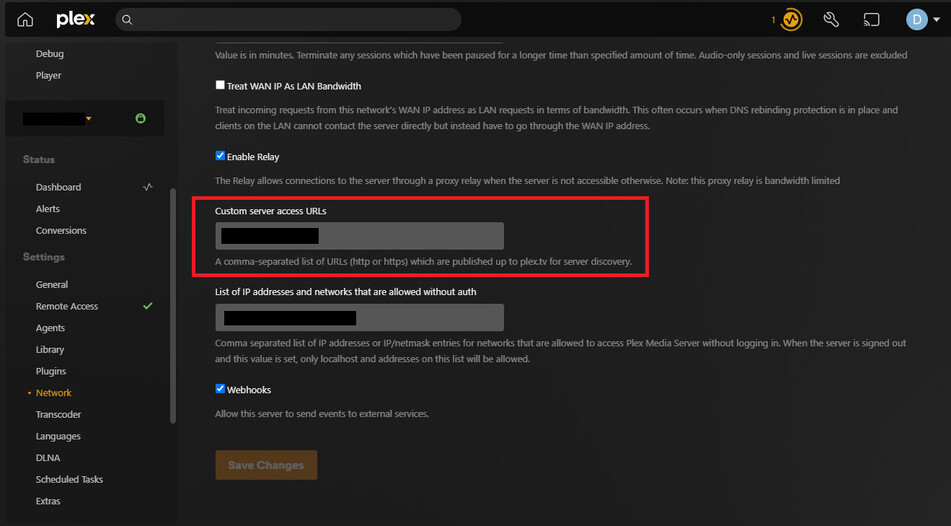
I think that, once you fill this in, your server tells Plex (the company) the IP address(s) that the server has, as well as everything in this box. Then when a client starts up it is given that list of IPs and it tries them one by one until it connects to the server. If this fails, the client then attempts the WAN address of the server and connects that way.
This means that if you want clients to connect via it’s VM internal LAN IP, then you need to make sure your routers are designed to route traffic in this LAN to the router that handles the LAN. Most likely, you need to set a route to this LAN in your own router - to forward all LAN traffic to the IP of the computer that runs the VM itself, as it is running a virtual router to handle this LAN network.
You can use the information in this post to see exactly what connection information is being published by your server:
As to how that information is determined, it depends. My experience is that it populates the list from:
- Any interfaces on the local server which have a default gateway defined (or the specific interface specified in the server’s network settings).
- Any custom server access URLs configured on the server.
- (If remote access is enabled) The server’s detected public IP addresses. “Detection” here means what it determines to be its external IP addresses.
For each, the port used for the connection can be configured, except for the local interfaces; those will all use 32400.
I’d check what is being published and see if that matches your expectations.
LOL I guess I do see your point. I may just move the Plex VM onto the regular LAN to remove at least one layer.
Here’s what I’m wondering with this…since the issue is that the Plex server in the VM doesn’t know that it’s getting NAT’d before reaching the external IP, can I manually publish the plex.direct URL of its IP on my home LAN (not the VM LAN) and have the clients connect that way? For example, let’s say my Plex is at 10.0.0.10 and ends up getting NAT’d to the regular LAN through 192.168.1.15. Can I put a publish URL as https://192-168-1-15.serverid.plex.direct and thus enable the clients to know where to connect to it?
keep going!
There is no need of a proxy when you have a FQDN with proper firewall.
If you’re running more than 2 subnets at home (Guest WiFI and main) at home – stop and rethink. Subnet masks are key. Think it through
Thanks so much! This is extremely helpful.
If the VM is configured as PEER networking, It becomes another HOST on your LAN as if a real machine.
Some call PEER == BRIDGE.
NAT is your enemy
The point of the proxy is to enable connecting externally on port 443 to bypass port based firewalls. I can’t just forward 32400 to 443 because I’m running other web servers. Oh, there’s actually one extra layer I didn’t even mention now that I think about it LOL. I’m using SSLH to multiplex the connection on 443 so I can run a web server, SSH, and OpenVPN all on that port. sigh Why do I do this to myself?
I think I’ll do this for the Plex VM at least.
I’m sorry, I can’t follow that mess anymore.
We’re here to help with Plex but, in this case, un***** the network is beyond the scope of what we do
Maybe get a pfsense and do it that way.
My main question was about figuring out how Plex advertises the server URL, which was answered, so thank you all!
PMS queries the host environment it’s in.
E.G. ifconfig
It finds the gateway to the WAN (first adapter with Link and gateway)
That goes to plex.tv as the IP.
It’s in your logs under MyPlex.
Plex.tv looks at the WAN IP the message was received from.
Marriage of addresses is complete.
One final question relating to this…if it can connect on multiple URLs, how does it decide which one to use?
Default gateway.
PMS is not designed, nor does it support multi-homed (commercial-like) operation.
Most folks have an ISP-provided modem/router.
1 Like
Inbound client connections on LAN are obvious even if on a different subnet than the default. ( If the server receives it – and no ‘preferred interface’ is set, it will acknowledge all )
WAN inbound is expected via the primary adapter.
Yes, you can create a br0 adapter
– it is the default adapter (based on configuration)
– it concidentally also supports other addresses.
Be advised, this type of networking configuration is not supported.
When I muck it up, even I get yelled at 
My advice:
- Setup the external URL (FQDN) to forward to your modem/router/firewall.
- Add that FQDN to PMS.
As previously referenced above about “other servers/services” and port 443 –
There comes a time when multiple hosts are required.
If trying to perform layer 7 routing in the Proxy – Time to rethink/redesign the implementation.
Here is how I do many things.
LXC (all the features of a VM without all the waste) and then serveral ESXi VMs for testing all the supported platforms.
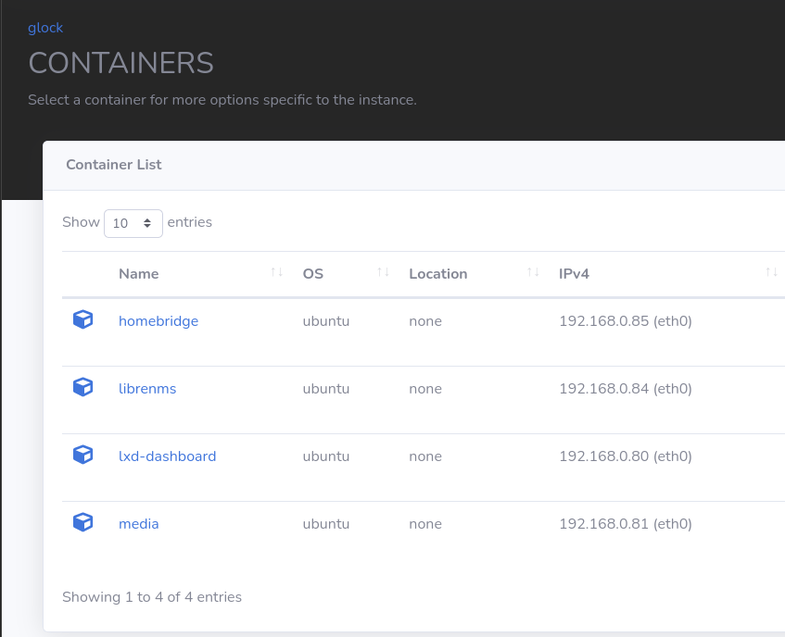
I ran several Plex servers in LXC with ease prior to getting my NUC8’s to use instead.
This topic was automatically closed 90 days after the last reply. New replies are no longer allowed.
