That should work. The name of the group doesn’t really matter.
Confirming that it works for me, using a mere Athlon 200GE.

That should work. The name of the group doesn’t really matter.
Confirming that it works for me, using a mere Athlon 200GE.
Just to confirm, what exactly are your settings? Could you share your docker run command/compose file?
I’m using Unraid as the host, for which there’s a handy linuxserver.io template for Plex. I downloaded it and edited it to change the repo to @mauimauer 's and to add the --device=/dev/dri parameter.
root@localhost:# /usr/local/emhttp/plugins/dynamix.docker.manager/scripts/docker run -d --name='PlexMediaServer' --net='host' -e TZ="Europe/London" -e HOST_OS="Unraid" -e 'VERSION'='latest' -e 'NVIDIA_VISIBLE_DEVICES'='' -e 'TCP_PORT_32400'='32400' -e 'TCP_PORT_3005'='3005' -e 'TCP_PORT_8324'='8324' -e 'TCP_PORT_32469'='32469' -e 'UDP_PORT_1900'='1900' -e 'UDP_PORT_32410'='32410' -e 'UDP_PORT_32412'='32412' -e 'UDP_PORT_32413'='32413' -e 'UDP_PORT_32414'='32414' -e 'PUID'='99' -e 'PGID'='100' -v '/mnt/user/P_Public/Media/Movies/':'/movies':'rw' -v '/mnt/user/P_Public/Media/TV/':'/tv':'rw' -v '/mnt/user/P_Public/Media/Music/':'/music':'rw' -v '':'/transcode':'rw' -v '/mnt/user/appdata/PlexMediaServer':'/config':'rw' --device=/dev/dri 'mauimauer/plex'

1697050aa03e63386ea0dcc59f6facbbfbbe74543a7ae923f9ee7484968f7d35

The command finished successfully!
From inside the container vainfo looks very much like yours:
Interesting, I copied your run command and it’s still not working.
[16:55:02] /opt/docker$ uname -a
Linux astraeus 5.10.14-051014-generic #202102071532 SMP Sun Feb 7 15:52:46 UTC 2021 x86_64 x86_64 x86_64 GNU/Linux
[16:55:18] /opt/docker$ cat /etc/lsb-release
DISTRIB_ID=Ubuntu
DISTRIB_RELEASE=20.04
DISTRIB_CODENAME=focal
DISTRIB_DESCRIPTION="Ubuntu 20.04.2 LTS"
The only difference I see is you have kernel 5.10.1-unraid while I have kernel 5.10.14-051014-generic. Everything else looks to be the same
Forgive me for asking, but you do have hardware acceleration enabled in Settings > Transcoder, don’t you? It’s the only remaining thing I can think of that would prevent it from working. You must have the amdgpu module and various others loaded in order for /dev/dri to appear. After setting everything up I did reboot my server because amdgpu isn’t loaded by default. I had tested by manually modprobe-ing it but wanted to make it automatically load on start-up via /etc/modprobe.d, so rebooting is something else I could suggest. Beyond that, I’m at a loss.
One thing I notice is that I’m getting hardware accelerated decoding with my Raven Ridge APU, but the encoding is being done in software, if I understand the Dashboard display correctly.
Yeah I am looking into that as well, it seems something has changed with the most recent Plex release. I definitely had transcoding HW enabled as well.
Feb 13, 2021 16:14:14.963 [0x7f5ebf29b700] Debug — Jobs: ‘/usr/lib/plexmediaserver/Plex Transcoder’ exit code for process 1943 is -9 (signal: Killed)
Feb 13, 2021 16:14:14.964 [0x7f5e917fa700] Debug — [Transcode/ldkukyij37ccns4h4wn4hseq] [FFMPEG] - Created surface 0x1.
Feb 13, 2021 16:14:14.964 [0x7f5e917fa700] Debug — [Transcode/ldkukyij37ccns4h4wn4hseq] [FFMPEG] - Direct mapping disabled: deriving image does not work: 1 (operation failed).
Something changed: I used to have this:
Jan 10, 2021 15:04:45.920 [0x7f8ba1ffb700] DEBUG - [Transcode] TPU: hardware transcoding: final decoder: vaapi, final encoder: vaapi
Jan 10, 2021 15:04:45.921 [0x7f8ba1ffb700] DEBUG - [Transcode] Job running: EAE_ROOT='/tmp/pms-3adf971d-cad0-4ad6-ab1e-384cf8beb562/EasyAudioEncoder' FFMPEG_EXTERNAL_LIBS='/config/Library/Application\ Support/Plex\ Media\ Server/Codecs/367b3d4-3654-linux-x86_64/' LIBVA_DRIVERS_PATH='/usr/lib/plexmediaserver/lib/dri' XDG_CACHE_HOME='/config/Library/Application Support/Plex Media Server/Cache' XDG_DATA_HOME='/usr/lib/plexmediaserver/Resources' X_PLEX_TOKEN=xxxxxxxxxxxxxxxxxxxxs' '/usr/lib/plexmediaserver/Plex Transcoder' '-codec:0' 'h264' '-hwaccel:0' 'vaapi' '-hwaccel_fallback_threshold:0' '10' '-hwaccel_output_format:0' 'vaapi' '-hwaccel_device:0' 'vaapi' '-codec:1' 'dca' '-analyzeduration' '20000000' '-probesize' '20000000' '-i' '/data/xxxxxx' '-filter_complex' '[0:0]hwupload[0];[0]scale_vaapi=w=1920:h=1080:format=nv12[1];[1]hwupload[2]' '-filter_complex' '[0:1] aresample=async=1:ocl='\''stereo'\'':rematrix_maxval=0.000000dB:osr=48000[3]' '-map' '[2]' '-metadata:s:0' 'language=eng' '-codec:0' 'h264_vaapi' '-b:0' '6974k' '-maxrate:0' '9299k' '-bufsize:0' '18598k' '-r:0' '23.975999999999999' '-force_key_frames:0' 'expr:gte(t,0+n_forced*1)' '-map' '[3]' '-metadata:s:1' 'language=eng' '-codec:1' 'libmp3lame' '-q:1' '0' '-segment_format' 'mpegts' '-f' 'ssegment' '-individual_header_trailer' '0' '-segment_time' '1' '-segment_start_number' '0' '-segment_copyts' '1' '-segment_time_delta' '0.0625' '-segment_list' 'http://127.0.0.1:32400/video/:/transcode/session/se7dqvxc077f8x3tkfnrzqjp/8cc3d9f4-6a98-46e1-88b9-c706aac7d30d/seglist?X-Plex-Http-Pipeline=infinite' '-segment_list_type' 'csv' '-segment_list_size' '5' '-segment_list_separate_stream_times' '1' '-segment_list_unfinished' '1' '-max_delay' '5000000' '-avoid_negative_ts' 'disabled' '-map_metadata' '-1' '-map_chapters' '-1' 'media-%05d.ts' '-start_at_zero' '-copyts' '-vsync' 'cfr' '-init_hw_device' 'vaapi=vaapi:' '-filter_hw_device' 'vaapi' '-y' '-nostats' '-loglevel' 'quiet' '-loglevel_plex' 'error' '-progressurl' 'http://127.0.0.1:32400/video/:/transcode/session/
With the latest plex it is:
Feb 13, 2021 16:13:30.064 [0x7f5eb6103700] Debug — [Transcode] TPU: hardware transcoding: final decoder: vaapi, final encoder:
Feb 13, 2021 16:13:30.064 [0x7f5eb6103700] Debug — [Transcode] Job running: FFMPEG_EXTERNAL_LIBS='/config/Library/Application\ Support/Plex\ Media\ Server/Codecs/367b3d4-3673-linux-x86_64/' LIBVA_DRIVERS_PATH='/usr/lib/plexmediaserver/lib/dri' X_PLEX_TOKEN=xxxxxxxxxxxxxxxxxxxxs' '/usr/lib/plexmediaserver/Plex Transcoder' '-codec:#0x01' 'h264' '-hwaccel:#0x01' 'vaapi' '-hwaccel_fallback_threshold:#0x01' '10' '-hwaccel_device:#0x01' 'vaapi' '-codec:#0x02' 'aac' '-analyzeduration' '20000000' '-probesize' '20000000' '-i' '/data/xxxxxx' '-filter_complex' '[0:#0x01]scale=w=1920:h=800[0];[0]format=pix_fmts=yuv420p|nv12[1]' '-map' '[1]' '-codec:0' 'libx264' '-crf:0' '16' '-maxrate:0' '2827k' '-bufsize:0' '5654k' '-r:0' '23.975999999999999' '-preset:0' 'veryfast' '-x264opts:0' 'subme=0:me_range=4:rc_lookahead=10:me=hex:8x8dct=0:partitions=none' '-force_key_frames:0' 'expr:gte(t,n_forced*3)' '-filter_complex' '[0:#0x02] aresample=async=1:ocl='\''stereo'\'':rematrix_maxval=0.000000dB:osr=48000[2]' '-map' '[2]' '-metadata:s:1' 'language=eng' '-codec:1' 'libmp3lame' '-q:1' '0' '-segment_format' 'mpegts' '-f' 'ssegment' '-individual_header_trailer' '0' '-segment_time' '3' '-segment_start_number' '0' '-segment_copyts' '1' '-segment_time_delta' '0.0625' '-segment_list' 'http://127.0.0.1:32400/video/:/transcode/session/ldkukyij37ccns4h4wn4hseq/5432702e-65f7-41c7-b64c-772e338a019f/seglist?X-Plex-Http-Pipeline=infinite' '-segment_list_type' 'csv' '-segment_list_size' '5' '-segment_list_separate_stream_times' '1' '-segment_list_unfinished' '1' '-max_delay' '5000000' '-avoid_negative_ts' 'disabled' '-map_metadata' '-1' '-map_chapters' '-1' 'media-%05d.ts' '-start_at_zero' '-copyts' '-vsync' 'cfr' '-init_hw_device' 'vaapi=vaapi:' '-filter_hw_device' 'vaapi' '-y' '-nostats' '-loglevel' 'quiet' '-loglevel_plex' 'error' '-progressurl' 'http://127.0.0.1:32400/video/:/transcode/session/ldkukyij37ccns4h4wn4hseq/5432702e-65f7-41c7-b64c-772e338a019f/progress'
Will try to look into forcing parameters with a wrapper.
1.21.2.3939 was using HW Decode & Transcode
1.21.3.4021 only uses HW Decode.
I’ve pushed mauimauer/plex:jan2021-v2 for those who want to remain on the fully HW enabled version for now.
Agreed. That’s what I’m seeing.
Another difference between the two versions is that 1.21.3.4021 shows HW decode (but not transcode) with UHD HDR files and HDR tone mapping enabled and the colours are strong.
With 1.21.2.3939 I get full HW decode and transcode only if HDR tone mapping is disabled (mentioned earlier in the thread), which makes the colours weak. If I turn on tone mapping the colours are strong but I get no HW decode or transcode.
So, it seems that the move from 1.21.2.3939 to 1.21.3.4021 fixed the tone mapping but broke the HW encoding. For now, I’ll stay with the earlier version because I don’t have many HDR files.
Thanks, OP! Since I am still in limbo waiting for Plex to fix support in Windows, I just bought one of these Ryzen thin clients for $100 (best offer) to test Linux transcoding on.
I see the differential file in the original post, but what’s the trick to applying this patch to the docker image? I’m tech savvy enough if you point me in the right direction, I can read through the documentation and piece things together.
EDIT: Ah, I figured it out. This and this below are what I needed to know to build locally, only applying your patch file prior to the build step. It looks like given the state of hardware encoding with the latest build, though, I will just use your docker image until hardware encoding is working again:
linuxserver/docker-plex (github.com)
For me, the match made in heaven would be hardware encoding with HDR. That’s why I am hoping HDR tone mapping and hardware encoding work together soon. Keep up the terrific work!
It seems the latest plex version works with my patches again (HW decoding & transcode)
I’ve pushed a new version to mauimauer/plex:latest
Thank you for this! I’ve got this working on my new rig that I’m building with a Ryzen 2400G, this is my docker-compose config that I’m using:
version: “2.1”
services:
plex:
image: mauimauer/plex
container_name: plex
network_mode: host
environment:
- PUID=1000
- PGID=1000
- VERSION=docker
volumes:
- /home/username/dockers/plex:/config
- /mnt/storage/movies:/movies
devices:
- /dev/dri:/dev/dri
restart: unless-stopped
I also made sure to run the following: chmod -R 777 /dev/dri/
I’m on Debian Buster for my operating system.
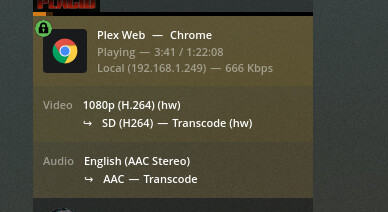
For those curious, still doesn’t seem to work with HDR tone mapping (having it enabled in settings will force a software transcode, disabling it makes the colours washed out).
Tested by applying the patch manually to latest Plex pass version, 1.22.1.4228. This is the first time I’ve been able to get the patch to work at all on my RX580 though, so I am excited about that.
Thanks for the docker container, it seems to work really well. I was quite scared about making the leap to docker and it was actually really slick.
I did however run into a slight problem, my PC went completely unresponsive, and required restart when certain files were HW transcoded. I suspect my GPU can’t handle the codec of the file. Is there perhaps a way to blacklist certain codecs, forcing them to CPU for transcoding?
Seems the recent versions of docker work again with my original patch and customized version of the linuxserver.io container. I’ll be pushing updates to the container whenever I can verify that a new version of Plex works with my Ryzen 4700U setup.
Ran into a weird thing where transcoding stopped working suddenly, and now doesn’t work at all despite restarting the host or the Docker image (HP T640 with the Ryzen R1505g running OMV). Ran apt update and it worked for ~30 seconds then stopped again.
I get an s3016 (Media) error which is very quickly replaced by a s3015 (Media) error.
I’ve isolated down the failure scenario:
Hardware transcoding works perfectly fine when using the native Plex app or the iOS client. However, when using Safari as the client app, that fails every single time (unless I’m playing Original Quality).
Disabling hardware encoding, thereby using hardware decoding only, seems to fix the videos not playing in Safari error for me.
I finally made this work following your instructions. Thanks a lot [mauimauer]! I have been wanting to get HW transcoding working on my 3200g for ages, but people kept saying it could not be done. However as others have said, it won’t work with HDR tonemapping enabled. Has anyone found a fix for this or do we have to wait?
This is my vainfo:
error: XDG_RUNTIME_DIR not set in the environment.
error: can't connect to X server!
libva info: VA-API version 1.7.0
libva info: Trying to open /usr/lib/x86_64-linux-gnu/dri/radeonsi_drv_video.so
libva info: Found init function __vaDriverInit_1_7
libva info: va_openDriver() returns 0
vainfo: VA-API version: 1.7 (libva 2.6.0)
vainfo: Driver version: Mesa Gallium driver 21.2.0-devel for AMD Radeon(TM) Vega 8 Graphics (RAVEN, DRM 3.40.0, 5.10.28-Unraid, LLVM 12.0.0)
vainfo: Supported profile and entrypoints
      VAProfileMPEG2Simple            : VAEntrypointVLD
      VAProfileMPEG2Main              : VAEntrypointVLD
      VAProfileVC1Simple              : VAEntrypointVLD
      VAProfileVC1Main                : VAEntrypointVLD
      VAProfileVC1Advanced            : VAEntrypointVLD
      VAProfileH264ConstrainedBaseline: VAEntrypointVLD
      VAProfileH264ConstrainedBaseline: VAEntrypointEncSlice
      VAProfileH264Main               : VAEntrypointVLD
      VAProfileH264Main               : VAEntrypointEncSlice
      VAProfileH264High               : VAEntrypointVLD
      VAProfileH264High               : VAEntrypointEncSlice
      VAProfileHEVCMain               : VAEntrypointVLD
      VAProfileHEVCMain               : VAEntrypointEncSlice
      VAProfileHEVCMain10             : VAEntrypointVLD
      VAProfileJPEGBaseline           : VAEntrypointVLD
      VAProfileVP9Profile0            : VAEntrypointVLD
      VAProfileVP9Profile2            : VAEntrypointVLD
      VAProfileNone                   : VAEntrypointVideoProc

