This is my NUC8 (has both QSV and AMD)

1 Like
nice I see Cezanne and it is working in the web player. This is awesome! Thanks so much to you and the team for getting this working!!
1 Like
Working on my Ryzen 5 PRO 4650G as well (shows up as “Renoir” under “Hardware transcoding device”.
Although, I think there might be a bottleneck somewhere. My CPU load hovers at around 4 to 6 when playing a 4K file (about 50%, as the 4650G has 12 threads), but the playback stops and resumes every thirty seconds or so. Under Tautulli I can see the “(HW)” indicator for transcoded streams, so I think it is working, but then I don’t know why the stream is choppy. Network conditions aren’t a problem – I can play back the original 4K file just fine with way higher bitrate (80 > 20Mbps transcoded).
I wonder if it is the HDR tone map checkbox being enabled that is causing the stroppy playback. I thought that it shouldn’t run at all if the hardware doesn’t support it, or run that portion on the CPU at least. @ChuckPa if the hardware doesn’t support it, does it throw up an error message and stop playback? Or run the tonemap on the CPU?
Turn HDR OFF!!! – then retest.
There are no MESA or Vulkan drivers to do the tone mapping.
As a result, you’re getting tone mapping in software.
We will get HDR tone mapping. This is only the first release of AMD support.
This is a long time coming and, yes, there is still work to do.
2 Likes
Retested with HDR off and the stroppy playback went away. Thank you so much!
It’s actually crazy – a 4K transcode from 80 Mbps down to whatever screen size the device had always maxed out the CPU (load 12). Now I barely get any load (1.52) going from 80 Mbps down to 20.
@ChuckPa after testing this for a bit I noticed these logs on the container. I don’t know if they are indicative of a problem.
plex | /data/jenkins/conan_build/1112346209/conan/.conan/data/libdrm/2.4.115-1/plex/stable/build/42eba9224a0a19c9b983c233343e5610c7362833/meson-install/share/libdrm/amdgpu.ids: No such file or directory
I have a P2200 (Nvidia). I can transcode 187 Mbps to 19 with the same loading
Insane 
1 Like
You’re seeing the ‘work in progress’ 
Nothing to worry about at this time because this is SDR-only transcoding.
Thanks!
I don’t know how you feel but I kinda like the SDR-only AMD colors.
They aren’t as washed out as I’d expect. They seem far more life-like than a comparable Intel in SDR. (unless that’s my TV playing games)
2 Likes
I gave a try with Version 1.32.5.7210:
Jul 08, 2023 16:54:48.550 [140117973134136] INFO - [Req#ab4f/Transcode] Preparing driver rsv for GPU Cezanne [Radeon Vega Series / Radeon Vega Mobile Series]
Jul 08, 2023 16:54:48.550 [140117973134136] DEBUG - [Req#ab4f/Transcode/DriverDL/rsv] Skipping download; already exists
Jul 08, 2023 16:54:48.550 [140117973134136] DEBUG - [Req#ab4f/Transcode] TPU: hardware transcoding: final decoder: vaapi, final encoder: vaapi
Jul 08, 2023 16:54:48.550 [140118229076792] DEBUG - [Req#ab41/Transcode] Found session GUID of yk8svteiezpj3f2up04mt3t3 in session start.
Jul 08, 2023 16:54:48.550 [140118229076792] DEBUG - [Req#ab41/Transcode] Using existing transcode session.
Jul 08, 2023 16:54:48.558 [140118226901816] ERROR - [Req#ab59/Transcode/yk8svteiezpj3f2up04mt3t3/ea3d9fb2-ee68-403e-aae9-479f402dc173] [AVHWDeviceContext @ 0x7fd4c568e180] libva: /config/Library/Application Support/Plex Media Server/Cache/va-dri-linux-x86_64/radeonsi_drv_video.so has no function __vaDriverInit_1_0
Jul 08, 2023 16:54:48.559 [140117971024696] ERROR - [Req#ab5a/Transcode/yk8svteiezpj3f2up04mt3t3/ea3d9fb2-ee68-403e-aae9-479f402dc173] [AVHWDeviceContext @ 0x7fd4c568e180] Failed to initialise VAAPI connection: -1 (unknown libva error).
Jul 08, 2023 16:54:48.583 [140118198876984] ERROR - [Req#ab5b/Transcode/yk8svteiezpj3f2up04mt3t3/ea3d9fb2-ee68-403e-aae9-479f402dc173] Device creation failed: -5.
Jul 08, 2023 16:54:48.583 [140118220430136] ERROR - [Req#ab5c/Transcode/yk8svteiezpj3f2up04mt3t3/ea3d9fb2-ee68-403e-aae9-479f402dc173] Failed to set value 'vaapi=vaapi:/dev/dri/renderD128' for option 'init_hw_device': I/O error
Jul 08, 2023 16:54:48.584 [140118226901816] ERROR - [Req#ab5d/Transcode/yk8svteiezpj3f2up04mt3t3/ea3d9fb2-ee68-403e-aae9-479f402dc173] Error parsing global options: I/O error
Jul 08, 2023 16:54:48.585 [140118285409080] DEBUG - Jobs: '/usr/lib/plexmediaserver/Plex Transcoder' exit code for process 984 is 1 (failure)
Running the transcode command manually in the docker container gives this error:
/data/jenkins/conan_build/1112346209/conan/.conan/data/libdrm/2.4.115-1/plex/stable/build/42eba9224a0a19c9b983c233343e5610c7362833/meson-install/share/libdrm/amdgpu.ids: No such file or directory
The CPU here is a AMD Ryzen 9 5900HX with Radeon Graphics.
Tested with 5700G on unraid with the PMS-Plexpass tag on my iPhone and web browser & it worked flawlessly
Any estimate when the docker images will be updated?
If you use the PlexPass tag, it automatically downloads the latest beta version and installs it in the container on first run.
The PlexPass tag seems to have not been updated in 2 years, how is that the beta?
Is there a different docker container that I’m missing?
https://hub.docker.com/r/plexinc/pms-docker
I am currently using the linuxserver one and that does not have it either
https://hub.docker.com/r/linuxserver/plex
@bendaknee When you run the Docker container, a script inside downloads the latest version of Plex Media Server. While it is concerning that the base Docker image hasn’t been updated in two years, it will still give you an up-to-date PMS install for Plex Pass users.
I did now read the tags section in the pms-docker, while it does indeed fetch the latest version it only does so when restarted. Meaning that auto updates would not work in unraid as I currently have it set up.
I will hold until this gets released in the public one
I’ve been referencing the Linuxserver.io PMS docker imgage. Do I need to switch to the plexinc/pms-docker image instead?
I guess I don’t understand how this is supposed to work. I can select the Beta update channel under the General settings page (as shown) and it provides a link to a manual download, but I don’t understand how to apply this in a Docker environment? Ideally there should be a “beta” tag made available on Docker hub.
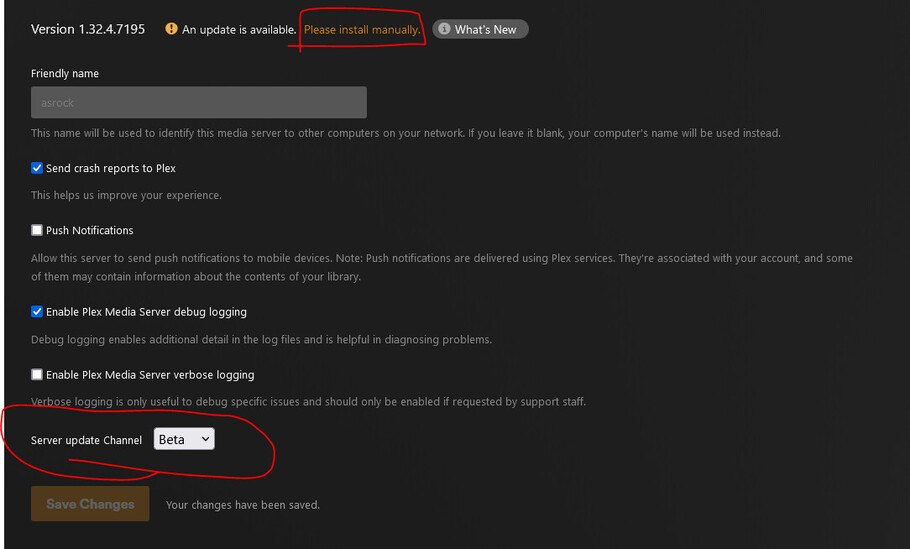
@akmoney you do not need to use the beta update channel. Switch to the official PMS Docker image, use the plexpass tag, and let it autoupdate on the first run.
Updates within the Docker container will not work as changes are removed anyway on the next run. That’s why there’s a script inside the Docker image that grabs a new copy on every launch.
