Great job @mauimauer, I can confirm it’s working on my end too (for now). It’s a bit alarming that a Plex user was able to figure this out and bring the solution to the community before the actual Plex devs. People with AMD hardware also deserve to be heard.
4 Likes
Is this a drop in replacement for the official plex Docker container? In other words, does it support permission mappings like PGID/PUID, PLEX_CLAIM and ADVERTISE_IP?
So can I just drop the image in my docker-compose and expect it to work?
It’s a close but not exact fit compared to the base container I used previously: GitHub - spritsail/plex-media-server: Worlds smallest Docker image for Plex Media Server, built on spritsail/busybox has all the environment parameters and volumes you can use.
I’m getting an error in the spritsail/plex-media-server image:
Oct 30, 2021 07:52:02.763 [0x7faf3a288b38] DEBUG - [Transcode] Codecs: hardware transcoding: testing API vaapi
Oct 30, 2021 07:52:02.763 [0x7faf3a288b38] VERBOSE - [Transcode] [FFMPEG] - Trying to use DRM render node for device 0.
Oct 30, 2021 07:52:02.763 [0x7faf3a288b38] VERBOSE - [Transcode] [FFMPEG] - libva: VA-API version 1.9.0
Oct 30, 2021 07:52:02.763 [0x7faf3a288b38] VERBOSE - [Transcode] [FFMPEG] - libva: Trying to open /usr/lib/plexmediaserver/lib/dri/radeonsi_drv_video.so
Oct 30, 2021 07:52:02.763 [0x7faf3a288b38] VERBOSE - [Transcode] [FFMPEG] - libva: va_openDriver() returns -1
Oct 30, 2021 07:52:02.763 [0x7faf3a288b38] ERROR - [Transcode] [FFMPEG] - Failed to initialise VAAPI connection: -1 (unknown libva error).
Oct 30, 2021 07:52:02.763 [0x7faf3a288b38] DEBUG - [Transcode] Codecs: hardware transcoding: opening hw device failed - probably not supported by this system, error: I/O error
I wonder if it’s anything to do with the VA-API version mismatch?
libva info: VA-API version 1.10.0
libva info: Trying to open /usr/lib/x86_64-linux-gnu/dri/radeonsi_drv_video.so
libva info: Found init function __vaDriverInit_1_10
libva info: va_openDriver() returns 0
vainfo: VA-API version: 1.10 (libva 2.10.0)
vainfo: Driver version: Mesa Gallium driver 20.3.5 for AMD RENOIR (DRM 3.40.0, 5.10.0-9-amd64, LLVM 11.0.1)
vainfo: Supported profile and entrypoints
      VAProfileMPEG2Simple            : VAEntrypointVLD
      VAProfileMPEG2Main              : VAEntrypointVLD
      VAProfileVC1Simple              : VAEntrypointVLD
      VAProfileVC1Main                : VAEntrypointVLD
      VAProfileVC1Advanced            : VAEntrypointVLD
      VAProfileH264ConstrainedBaseline: VAEntrypointVLD
      VAProfileH264ConstrainedBaseline: VAEntrypointEncSlice
      VAProfileH264Main               : VAEntrypointVLD
      VAProfileH264Main               : VAEntrypointEncSlice
      VAProfileH264High               : VAEntrypointVLD
      VAProfileH264High               : VAEntrypointEncSlice
      VAProfileHEVCMain               : VAEntrypointVLD
      VAProfileHEVCMain               : VAEntrypointEncSlice
      VAProfileHEVCMain10             : VAEntrypointVLD
      VAProfileHEVCMain10             : VAEntrypointEncSlice
      VAProfileJPEGBaseline           : VAEntrypointVLD
      VAProfileVP9Profile0            : VAEntrypointVLD
      VAProfileVP9Profile2            : VAEntrypointVLD
      VAProfileNone                   : VAEntrypointVideoProc
I do have /dev/dri mapped.
I believe this can happen if the hosts systems mesa drivers are way older than what’s used in the container. If you are using Ubuntu you can give the Open Graphics Drivers ppa a try, that one has bleeding edge drivers to bump the hosts VA-API version
Also note the spritsail/plex-media-server is not optimized for AMD HW transcoding, my fork (linked above) of it is.
1 Like
Thanks that was inspiration. I tried using your forked docker image directly on dockerhub, and wasn’t getting any luck, but cloning your Dockerfile + building locally worked for me:

Transcoding log is now:
Oct 30, 2021 12:10:03.154 [0x7f26662adb38] VERBOSE - [Transcode] [FFMPEG] - Trying to use DRM render node for device 0.
Oct 30, 2021 12:10:03.154 [0x7f26662adb38] VERBOSE - [Transcode] [FFMPEG] - libva: VA-API version 1.13.0
Oct 30, 2021 12:10:03.154 [0x7f26662adb38] VERBOSE - [Transcode] [FFMPEG] - libva: Trying to open /usr/lib/plexmediaserver/lib/dri/radeonsi_drv_video.so
Oct 30, 2021 12:10:03.154 [0x7f26662adb38] VERBOSE - [Transcode] [FFMPEG] - libva: Found init function __vaDriverInit_1_13
Oct 30, 2021 12:10:03.174 [0x7f26662adb38] VERBOSE - [Transcode] [FFMPEG] - libva: va_openDriver() returns 0
Oct 30, 2021 12:10:03.174 [0x7f26662adb38] VERBOSE - [Transcode] [FFMPEG] - Initialised VAAPI connection: version 1.13
Oct 30, 2021 12:10:03.174 [0x7f26662adb38] DEBUG - [Transcode] [FFMPEG] - Format 0x3231564e -> nv12.
Oct 30, 2021 12:10:03.174 [0x7f26662adb38] DEBUG - [Transcode] [FFMPEG] - Format 0x30313050 -> p010le.
Oct 30, 2021 12:10:03.174 [0x7f26662adb38] DEBUG - [Transcode] [FFMPEG] - Format 0x36313050 -> unknown.
Oct 30, 2021 12:10:03.174 [0x7f26662adb38] DEBUG - [Transcode] [FFMPEG] - Format 0x30323449 -> yuv420p.
Oct 30, 2021 12:10:03.174 [0x7f26662adb38] DEBUG - [Transcode] [FFMPEG] - Format 0x32315659 -> yuv420p.
Oct 30, 2021 12:10:03.174 [0x7f26662adb38] DEBUG - [Transcode] [FFMPEG] - Format 0x56595559 -> unknown.
Oct 30, 2021 12:10:03.174 [0x7f26662adb38] DEBUG - [Transcode] [FFMPEG] - Format 0x32595559 -> yuyv422.
Oct 30, 2021 12:10:03.174 [0x7f26662adb38] DEBUG - [Transcode] [FFMPEG] - Format 0x59565955 -> uyvy422.
Oct 30, 2021 12:10:03.174 [0x7f26662adb38] DEBUG - [Transcode] [FFMPEG] - Format 0x41524742 -> bgra.
Oct 30, 2021 12:10:03.174 [0x7f26662adb38] DEBUG - [Transcode] [FFMPEG] - Format 0x41424752 -> rgba.
Oct 30, 2021 12:10:03.174 [0x7f26662adb38] DEBUG - [Transcode] [FFMPEG] - Format 0x58524742 -> bgr0.
Oct 30, 2021 12:10:03.174 [0x7f26662adb38] DEBUG - [Transcode] [FFMPEG] - Format 0x58424752 -> rgb0.
Oct 30, 2021 12:10:03.174 [0x7f26662adb38] VERBOSE - [Transcode] [FFMPEG] - VAAPI driver: Mesa Gallium driver 21.2.5 for AMD RENOIR (DRM 3.40.0, 5.10.0-9-amd64, LLVM 12.0.1).
I switched from the official plexinc/pms-docker with ease and have HW transcoding working on a 2400G. Thanks a lot @mauimauer

Below are the docker-compose.yml files for the official image and mauimauer’s image from my system:
version: '3.7'

services:
  plexms:
    image: 'plexinc/pms-docker:plexpass'
    container_name: 'plexms'
    restart: unless-stopped
    # ports:
      # - '32400:32400/tcp' #for access to the Plex Media Server
      # - '3005:3005/tcp' #for controlling Plex Home Theater via Plex Companion
      # - '8324:8324/tcp' #for controlling Plex for Roku via Plex Companion
      # - '32469:32469/tcp' #for access to the Plex DLNA Server
      # - '1900:1900/udp' #for access to the Plex DLNA Server
      # - '32410:32410/udp' #for current GDM network discovery
      # - '32412:32412/udp' #for current GDM network discovery
      # - '32413:32413/udp' #for current GDM network discovery
      # - '32414:32414/udp' #for current GDM network discovery
    environment:
      - 'TZ=${TZ}'
      - 'PLEX_UID=${PUID}'
      - 'PLEX_GID=${PGID}'
      - 'ADVERTISE_IP=https://plex.${DOMAIN}:443'
      - 'ALLOWED_NETWORKS=10.0.0.0/8'
    volumes:
      - '${PLEXDATA}:/config'
      - '/tmp/plex:/transcode:rw'
      - '${MEDIA}:/media'
version: '3.7'

services:
  plexms:
    image: 'plex-amd-hw' # Built image locally
    container_name: 'plexms'
    restart: unless-stopped
    # ports:
      # - '32400:32400/tcp' #for access to the Plex Media Server
      # - '3005:3005/tcp' #for controlling Plex Home Theater via Plex Companion
      # - '8324:8324/tcp' #for controlling Plex for Roku via Plex Companion
      # - '32469:32469/tcp' #for access to the Plex DLNA Server
      # - '1900:1900/udp' #for access to the Plex DLNA Server
      # - '32410:32410/udp' #for current GDM network discovery
      # - '32412:32412/udp' #for current GDM network discovery
      # - '32413:32413/udp' #for current GDM network discovery
      # - '32414:32414/udp' #for current GDM network discovery
    environment:
      - 'TZ=${TZ}'
      - 'SUID=${PUID}'
      - 'SGID=${PGID}'
      - 'ADVERTISE_IP=https://plex.${DOMAIN}:443'
      - 'ALLOWED_NETWORKS=10.0.0.0/8'
    volumes:
      - '${PLEXDATA}/Library/Application Support/Plex Media Server:/config'
      - '/tmp/plex:/transcode:rw'
      - '${MEDIA}:/media'
    devices:
      - /dev/dri:/dev/dri
1 Like
So I don’t post much, but I’ve been doing my best to understand this thread. I currently run a Windows 10 Plex Server and I’m wanting to upgrade to an AMD Ryzen 5600G build and utilize the integrated GPU.
Am I correct in my understanding of the preceding posts that I can run PMS in Docker on W10 and get 4K HDR transcoding to work? HDR Tone mapping?
@nathanddrews This thread is for docker installs on Linux.
I believe that HW transcoding should work on a direct Windows install without doing any of this. I’m not sure how Docker on Windows would work.
1 Like
Thanks a lot,this dockerfile works just fine for me ! 
Spec:4750G running Ubuntu
In Windows 10 you don’t need to do anything to enable hardware transcoding. HDR tone mapping seems to be an issue in Windows at the moment, I’m not entirely sure why it isn’t working there yet.
Both Windows and Linux use AMD’s advanced media framework for encoding.
In either case you should temper your expectations with it. Compared to QuickSync or nvenc it underperforms, being only capable of 3-4 simultaneous transcodes. Where either of the other two on recent hardware can handle 3-4 times that.
Running into an odd issue
With “Use hardware-accelerated video encoding” and “Use hardware acceleration” both on, if I’m on a local network, or on a Wi-Fi network, it works fine (albeit takes a tiny bit longer, a few seconds) to scrub through/buffer. With mobile data though these same videos that work fine, do not seem to work on it (mobile data).
If I switch “Use hardware-accelerated video encoding” off, it uses part of my GPU, and part of my CPU, and works fine (mobile data plays it back nicely and local network/Wi-Fi seem to work a bit better), if I turn “Use hardware acceleration” off, even if “Use hardware-accelerated video encoding” is on, it’ll use my CPU for rendering but it plays back fine. Same goes if both are off.
I’m not sure what’s going on, I saw a few times
Nov 15, 2021 02:21:41.198 [0x7fee865ffb38] DEBUG - [Transcode] MDE: E1 - Magic Man: no direct play video profile exists for http/mkv/h264
Nov 15, 2021 02:21:41.198 [0x7fee865ffb38] DEBUG - [Transcode] MDE: E1 - Magic Man: no direct play video profile exists for http/mkv/h264/eac3
Nov 15, 2021 02:21:52.349 [0x7fee865ffb38] DEBUG - [Transcode] MDE: E1 - Magic Man: no direct play video profile exists for http/mkv/h264
Nov 15, 2021 02:21:52.349 [0x7fee865ffb38] DEBUG - [Transcode] MDE: E1 - Magic Man: no direct play video profile exists for http/mkv/h264/eac3
Nov 15, 2021 02:21:52.595 [0x7fee865ffb38] DEBUG - [Transcode] MDE: E1 - Magic Man: no direct play video profile exists for http/mkv/h264
Nov 15, 2021 02:21:52.595 [0x7fee865ffb38] DEBUG - [Transcode] MDE: E1 - Magic Man: no direct play video profile exists for http/mkv/h264/eac3
Nov 15, 2021 02:22:00.748 [0x7fee86ce5b38] DEBUG - [Transcode] MDE: E1 - Magic Man: no direct play video profile exists for http/mkv/h264
Nov 15, 2021 02:22:00.748 [0x7fee86ce5b38] DEBUG - [Transcode] MDE: E1 - Magic Man: no direct play video profile exists for http/mkv/h264/eac3
and
Nov 15, 2021 02:18:00.771 [0x7fee883c2b38] DEBUG - [Transcode] [FFMPEG] - Direct mapping disabled: deriving image does not work: 1 (operation failed).
Nov 15, 2021 02:18:37.610 [0x7fee883e5b38] DEBUG - [Transcode/b0d910c8498eaf4b-com-plexapp-android] [FFMPEG] - Direct mapping disabled: deriving image does not work: 1 (operation failed).
Nov 15, 2021 02:18:43.969 [0x7fee865ffb38] DEBUG - [Transcode/b0d910c8498eaf4b-com-plexapp-android] [FFMPEG] - Direct mapping disabled: deriving image does not work: 1 (operation failed).
Nov 15, 2021 02:19:03.797 [0x7fee883e5b38] DEBUG - [Transcode/b0d910c8498eaf4b-com-plexapp-android] [FFMPEG] - Direct mapping disabled: deriving image does not work: 1 (operation failed).
Nov 15, 2021 02:21:31.775 [0x7fee883c2b38] DEBUG - [Transcode/b0d910c8498eaf4b-com-plexapp-android] [FFMPEG] - Direct mapping disabled: deriving image does not work: 1 (operation failed).
Nov 15, 2021 02:21:42.605 [0x7fee88798b38] DEBUG - [Transcode/b0d910c8498eaf4b-com-plexapp-android] [FFMPEG] - Direct mapping disabled: deriving image does not work: 1 (operation failed).
Nov 15, 2021 02:21:54.283 [0x7fee88411b38] DEBUG - [Transcode/b0d910c8498eaf4b-com-plexapp-android] [FFMPEG] - Direct mapping disabled: deriving image does not work: 1 (operation failed).
So yeah, I’m not sure what to do to fix this.
The log statements you copied don’t generally indicate a HW transcoding failure. So I am not sure the issues you are seeing are related to GPU encoding usage.
confirmed HW transcoding working on a 5600g with your dockerfile on unraid. Thank you so much for your dedication. Hopefully the plex team can recognise your hard work and implement this considering Ryzen APUs are becoming much more popular
also using unraid here and having some trouble, could you show me how you filled out your docker template please? thank you!
Here below my template xml:
<?xml version="1.0"?>
<Container version="2">
<Name>PlexMediaServer</Name>
<Repository>mauimauer/spritsail-plex:latest</Repository>
<Registry>https://hub.docker.com/r/plexinc/pms-docker/</Registry>
<Network>t2_proxy</Network>
<MyIP/>
<Shell>sh</Shell>
<Privileged>false</Privileged>
<Support>https://forums.plex.tv/categories/docker</Support>
<Project>https://plex.tv/</Project>
<Overview>Plex Media Server

Enjoy your media on all your devices.
All your movie, TV Show, music, and photo collections at your fingertips, anywhere you go on all the devices you love.</Overview>
<Category>MediaServer:Video MediaServer:Music MediaServer:Photos</Category>
<WebUI>http://[IP]:[PORT:32400]/web</WebUI>
<TemplateURL>https://raw.githubusercontent.com/plexinc/pms-docker/master/plex-unRAID.xml</TemplateURL>
<Icon>https://raw.githubusercontent.com/plexinc/pms-docker/master/img/plex-server.png</Icon>
<ExtraParams>-h JimmyPlex --device=/dev/dri</ExtraParams>
<PostArgs/>
<CPUset/>
<DateInstalled>1636971202</DateInstalled>
<DonateText/>
<DonateLink/>
<Description>Plex Media Server

Enjoy your media on all your devices.
All your movie, TV Show, music, and photo collections at your fingertips, anywhere you go on all the devices you love.</Description>
<Networking>
<Mode>t2_proxy</Mode>
<Publish>
<Port>
<HostPort>32400</HostPort>
<ContainerPort>32400</ContainerPort>
<Protocol>tcp</Protocol>
</Port>
<Port>
<HostPort>3005</HostPort>
<ContainerPort>3005</ContainerPort>
<Protocol>tcp</Protocol>
</Port>
<Port>
<HostPort>8324</HostPort>
<ContainerPort>8324</ContainerPort>
<Protocol>tcp</Protocol>
</Port>
<Port>
<HostPort>32469</HostPort>
<ContainerPort>32469</ContainerPort>
<Protocol>tcp</Protocol>
</Port>
<Port>
<HostPort>1900</HostPort>
<ContainerPort>1900</ContainerPort>
<Protocol>udp</Protocol>
</Port>
<Port>
<HostPort>32410</HostPort>
<ContainerPort>32410</ContainerPort>
<Protocol>udp</Protocol>
</Port>
<Port>
<HostPort>32412</HostPort>
<ContainerPort>32412</ContainerPort>
<Protocol>udp</Protocol>
</Port>
<Port>
<HostPort>32413</HostPort>
<ContainerPort>32413</ContainerPort>
<Protocol>udp</Protocol>
</Port>
<Port>
<HostPort>32414</HostPort>
<ContainerPort>32414</ContainerPort>
<Protocol>udp</Protocol>
</Port>
<Port>
<HostPort>33400</HostPort>
<ContainerPort>33400</ContainerPort>
<Protocol>tcp</Protocol>
</Port>
</Publish>
</Networking>
<Data>
<Volume>
<HostDir>/mnt/user/temp/</HostDir>
<ContainerDir>/transcode</ContainerDir>
<Mode>rw</Mode>
</Volume>
<Volume>
<HostDir>/mnt/user/media/</HostDir>
<ContainerDir>/data</ContainerDir>
<Mode>rw</Mode>
</Volume>
<Volume>
<HostDir>/mnt/user/personal/</HostDir>
<ContainerDir>/private</ContainerDir>
<Mode>rw</Mode>
</Volume>
<Volume>
<HostDir>/mnt/user/appdata/PlexMediaServer</HostDir>
<ContainerDir>/config</ContainerDir>
<Mode>rw</Mode>
</Volume>
</Data>
<Environment>
<Variable>
<Value>xxxxxxxxxxxxxxxxxx</Value>
<Name>PLEX_CLAIM</Name>
<Mode/>
</Variable>
<Variable>
<Value>99</Value>
<Name>PLEX_UID</Name>
<Mode/>
</Variable>
<Variable>
<Value>100</Value>
<Name>PLEX_GID</Name>
<Mode/>
</Variable>
<Variable>
<Value>latest</Value>
<Name>VERSION</Name>
<Mode/>
</Variable>
<Variable>
<Value>xxxxxxxxxxxxxxxxx</Value>
<Name>ADVERTISE_IP</Name>
<Mode/>
</Variable>
</Environment>
thank you! i will compare and see if I missed anything!
I am trying to use an r9 290x for HW transcoding, would that be any different setup than an APU?
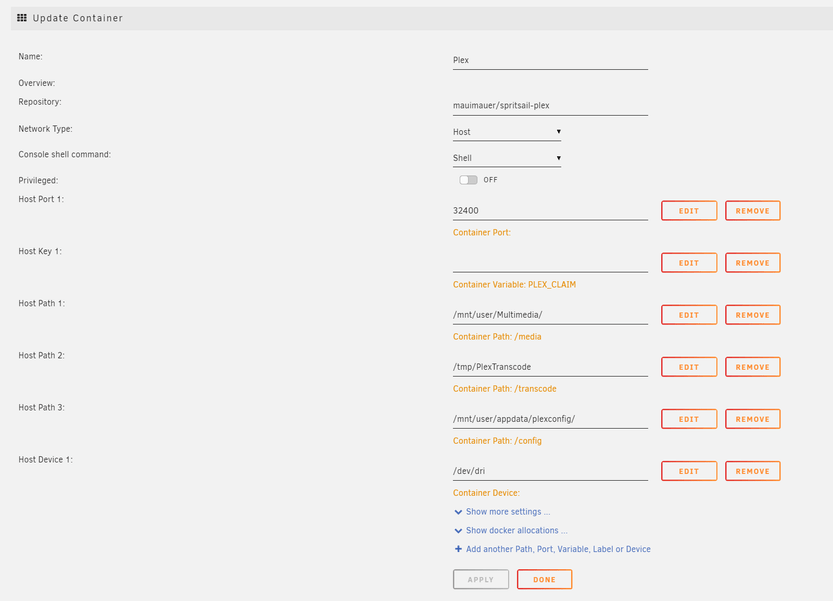
This is my current setup for the docker container.
I also followed this tutorial to enable the AMD driver, just replace “i915” with amdgpu
1 Like
How do Plex updates work with this container? Is a new version compiled automatically, or is it a manual process? Will be converting to AMD shortly and just wanting to check the long term viability of this setup. Thanks for all your hard work getting this far though, very impressive stuff
2 Likes
Also keen to understand answer to this question about how updates will be deployed.
Ps - love this container, was quick and simple and have HW transcoding working on my Ryzen 5600G in Unraid!
1 Like
