Am I expecting too much for the encoded HB file to look like the DVD during playback. I mean I not expecting it to be HD obviously, but it certainly bugs me that the DVD looks better, and I mean a fair bit better
If you turn on Lapsharp/Medium/Film (or Animation)
your DVD encodes will look BETTER than the source!
If you can just stop with the experimenting and use my settings!
(with a little more bit rate - if you must)
A pass through HB is going to knock some bark off the original. Nature of the beast - if you have to de-interlace, more bark gets knocked off - more beastly nature - Lapsharp returns some, or all of the bark and then some depending on the source and how much bark you’re taking off.
If you don’t have to de-interlace… it really is possible to make better DVD encodes than the source.
Got G-Drive?
(I mean 15G is free - in the US)
I wonder if I can encode 576?
Let’s find out.
Send the entire MakeMKV rip.
PM me the shareable link.
(from where-ever you have to put it)
The thing is I don’t think I have been messing around with the settings you gave me. I’ll post them below in case I did manage to change anything. The only thing I thought I had changed was encoder preset bar to slow or slower because I was under the impression I was I was trading time for quality which I was quite happy to do.
The preview I just did under ‘fast’ didn’t look really different to the ‘slow’ and ‘slower’… I know you probably aren’t surprised. So here are the settings I am using, please correct me if I have made a mistake.
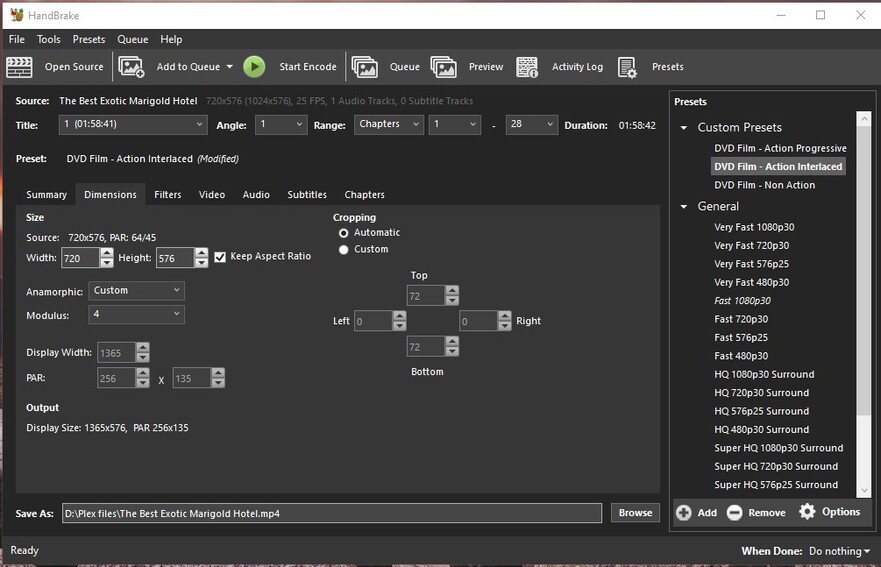


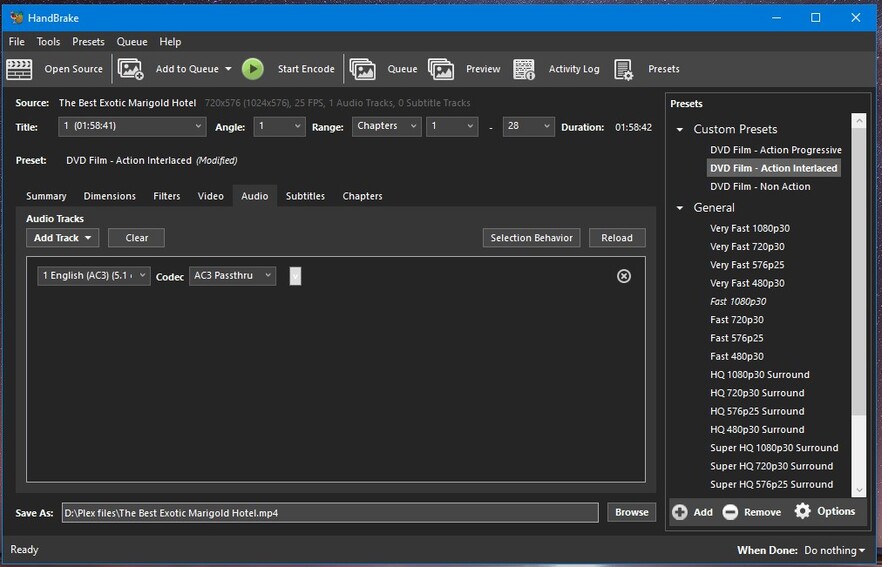
The only difference for progressive files is this

Am I doing anything wrong? I have tried the medium setting on the Lapsharp and found no difference to light setting.
I’m just uploading the mkv to G Drive. I’ll send you the share link in a few minutes
That looks fine… you won’t see exactly what Lapsharp is doing - you’ll only see it’s doing ‘something’… for the better - exactly as it should.
I don’t know what you’re comparing - the source is so bad it’s criminal (it looks like VHS to DVD)… if you actually had to pay money for it, but the fact is the ‘Preview’ I made - and sent back to you (PM) looks better (if you can call it that) than the source.
Me?
I would have turned that DVD into a Coaster or Kiddie Mobile and gotten a good version of that fine movie somewhere else - you’ll find one of those waiting for you as well…lol
Can’t turn a Sow’s Ear into a Silk Purse, but you can wipe a bit of the pig crap off it… (I can encode 576 - if I have a file - so it seems - I used those exact settings above - 1450Kbps, 'cause I forgot to change it)

Note:
‘Top Field First’ interlacing, you may only notice when the credits roll and maybe not even then. You might be able to skip de-interlacing, but ur gonna have to make some previews at various points, including the credits, to find out.
Note 2:
I also pulled the embedded Title Field out of that file - 'cause you didn’t do it in MakeMKV before you ripped it.
OK well firstly I’m glad it’s not just me.
Is there anything I am or could be doing in makemkv to screw up the original rip? Or is it just the DVD itself is just crap?
And thanks for the better version! 
Nope - a DVD rip is what is on the disc.
In this case - total crap.
But seriously - you bought that in a particularly dark and ‘uriney’ scented corner of a Manchester Underground, from a Bloke named ‘Ken Shabby’… didn’t you?
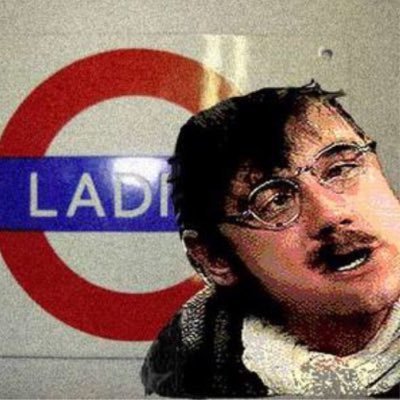
“Right, Squire - you want a kidney pie with that?”

I work in an op shop and see those crappy Indonesian copies every day, the only place for them are in the dumpster. Good riddance, never to appear again.
Shabby doesn’t look Indonesian, but his uriney aura does have Southern Pacific notes that can’t be mistaken…
Yes, a dodgy dude at best, with ink stained hands from printing labels and covers.
I think it was called Amazon… maybe the same thing
I believe that too.
I’m the proud owner of Amazon’s Fox/Shabby Family Guy S01-S05 DVDs. Awful.
Hi all
I was wondering if I could follow up to all this with a problem with aspect ratios. I’ve been using the settings as discussed above and for the most part everything has been just fine. I’ve run into a couple of DVDs that the back of the box says 1.85 Widescreen or 16:9 or 1.77.
When I rip the dvd using Makemkv it seems to put it in a 4:3 / 1.33 aspect ratio. So far as I’ve read that is a thing and handbrake can fix it. Execpt that my handbrake settings above just seems to take the 4:3 mkv file and keep that aspect ratio. (Yes I can see the ‘keep aspect ratio’ tickbox ticked)
So my question is what do I change to get it back to 16:9 or 1.85?
Do I just change the display width? Do I need to change the Modulus setting?
The DVDs do seem to play in widescreen when played directly via PS4 on to the TV
Please can you tell me what settings i should use for detelecine and deinterlace for stargate sg-1 ntsc ? Thank you.
General
Unique ID : 109903508741989980439349155808739619638 (0x52AEA5564A6E4DD416F2D4277D2C7336)
Complete name : D:\odc\01x01-02 Children of the Gods {NTSC} {DVD}.mkv
Format : Matroska
Format version : Version 4
File size : 3.58 GiB
Duration : 1 h 36 min
Overall bit rate mode : Variable
Overall bit rate : 5 288 kb/s
Encoded date : UTC 2020-11-05 21:33:43
Writing application : mkvmerge v43.0.0 (‘The Quartermaster’) 64-bit
Writing library : libebml v1.3.10 + libmatroska v1.5.2
Video
ID : 1
Format : MPEG Video
Format version : Version 2
Format profile : Main@Main
Format settings : CustomMatrix / BVOP
Format settings, BVOP : Yes
Format settings, Matrix : Custom
Format settings, GOP : M=3, N=12
Codec ID : V_MPEG2
Codec ID/Info : MPEG 1 or 2 Video
Duration : 1 h 36 min
Bit rate mode : Variable
Bit rate : 5 092 kb/s
Maximum bit rate : 9 802 kb/s
Width : 720 pixels
Height : 480 pixels
Display aspect ratio : 16:9
Frame rate mode : Variable
Frame rate : 24.139 FPS
Original frame rate : 29.970 (30000/1001) FPS
Color space : YUV
Chroma subsampling : 4:2:0
Bit depth : 8 bits
Compression mode : Lossy
Bits/(Pixel*Frame) : 0.610
Stream size : 3.45 GiB (96%)
Default : Yes
Forced : No
Audio
ID : 2
Format : AC-3
Format/Info : Audio Coding 3
Commercial name : Dolby Digital
Codec ID : A_AC3
Duration : 1 h 36 min
Bit rate mode : Constant
Bit rate : 192 kb/s
Channel(s) : 2 channels
Channel layout : L R
Sampling rate : 48.0 kHz
Frame rate : 31.250 FPS (1536 SPF)
Compression mode : Lossy
Stream size : 133 MiB (4%)
Title : English
Language : English
Service kind : Complete Main
Default : No
Forced : No
I’m out of the Users Helping Plex Bidness.
Good Luck to ya.
