Hardware Transcoding - Plex Media Server running in Docker Container on Ubuntu 22.04 LTS, Intel NUC Celeron N5105

Server Version#: Version 1.27.2.5929
Hi All,
I am running Plex Media Server in a Docker Container (image: linuxserver/plex.
Underlying OS is Ubuntu 22.04 LTS.
As instructed, I have passed on my /dev/dri/ directory to the docker container.
My hardware is an Intel NUC running the Celeron N5105 processor, which does have support for Intel Quick Sync Video.

I have tried following the guides in this forum post but have had no luck. Any guides for me?

I am not even sure if my /dev/dri directory contains the correct quick sync video drivers.

Here is my console log output:

Thank you!

/dev/dri contains the inodes which provide access directly to the QSV hardware.

Your logs showing I/O error and Unknown error implies the GID of /dev/dri/renderD128 is not the same GID used in your container . Verify this please.

Once they match, JasperLake will need Intel Compute Runtime libraries
You specifically want Intel Compute 21.49.21786

I’m going to need a little help, to be honest…novice here. Firstly, when I do an ls -l in /dev/dri, I see:

So I think the UID and GID associated with renderD128 is 1000 and 110, respectively.

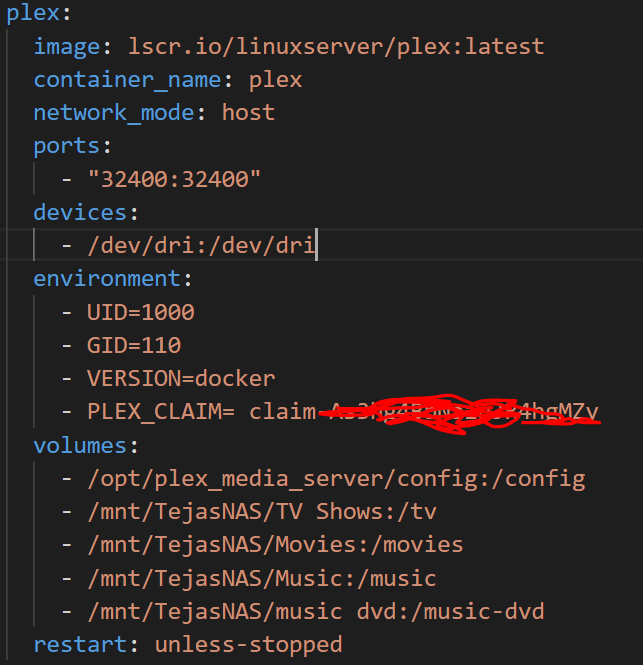
So my docker compose file for my plex server is:
image

And to your final point, I have followed the instructions on this page to update my GPU software packages…anything more I need to do? I still get the same errors btw.

Did you chown /dev/dri contents?

UID 1000 is the starting User ID

This is how it should be… A system UID

[chuck@lizum compute-runtime.2066]$ ls -lan /dev/dri
total 0
drwxr-xr-x   3 0   0      140 Jul 24 10:17 ./
drwxr-xr-x  21 0   0     5100 Jul 27 15:27 ../
drwxr-xr-x   2 0   0      120 Jul 24 10:17 by-path/
crw-rw----+  1 0  44 226,   0 Jul 24 17:53 card0
crw-rw----+  1 0  44 226,   1 Jul 27 09:41 card1
crw-rw----+  1 0 109 226, 128 Jul 24 17:53 renderD128
crw-rw----+  1 0 109 226, 129 Jul 24 17:53 renderD129
[chuck@lizum compute-runtime.2067]$

Yeah I may have done! My bad, I’ve been following instructions on some forums to try to get this working but I guess it isn’t a good idea. Anyway I have reverted ownership to root now:
root@tejas-ubuntu:/dev/dri# ls -lan
total 0
drwxr-xr-x 3 0 0 100 jul 25 19:46 .
drwxr-xr-x 20 0 0 4500 jul 25 19:52 …
drwxr-xr-x 2 0 0 80 jul 25 19:46 by-path
crw-rw----+ 1 0 44 226, 0 jul 25 19:46 card0
crw-rw----+ 1 0 110 226, 128 jul 25 19:46 renderD128

I did some more research on this since our last.

The N5105 is, AFAICT, a CometLake (desktop) family machine in mobile/embedded form.

That’s what’s causing the problem you see, which your logs are also confirming.

The choices are: (neither is very appealing)

  1. Install Intel Compute Runtime in the container yourself
  2. Install Intel Compute Runtime on the host and use the native app. ( I have a packaging update coming in 1.28.1 which will help keep this sane and working … Ubuntu 22 changed a lot of things )

Either way, because this CPU is the -10xxx and higher equivalent, you can’t use Plex’s docker. It only supports up to the -9xxx CPUs (what I just found out from a lot of digging & reading)

The packages you want are here: 21.49.21786

The way to install this (from the command line in the container)

mkdir neo

cd neo
wget https://github.com/intel/compute-runtime/releases/download/21.49.21786/intel-gmmlib_21.3.3_amd64.deb
wget https://github.com/intel/intel-graphics-compiler/releases/download/igc-1.0.9441/intel-igc-core_1.0.9441_amd64.deb
wget https://github.com/intel/intel-graphics-compiler/releases/download/igc-1.0.9441/intel-igc-opencl_1.0.9441_amd64.deb
wget https://github.com/intel/compute-runtime/releases/download/21.49.21786/intel-opencl-icd_21.49.21786_amd64.deb
wget https://github.com/intel/compute-runtime/releases/download/21.49.21786/intel-level-zero-gpu_1.2.21786_amd64.deb

dpkg -i *.deb

Now restart the container.

Hi, thanks for digging into this! Disappointing.
The N5105 is in fact in the Jasper Lake family according to this link?

And could you please explain a bit more your comment about the -10 generation of CPUs please? I guess the only thing that doesnt work yet for these is hardware transcoding in Plex’s docker? the container itself works fine?

I can try to run the commands you say in the docker container now. Lets see what i get.

Yes, It’s JasperLake.

Just like ApolloLake was the mobile/embedded version of KabyLake,
JasperLake is the same to CometLake.

The QSV ASIC is the same.

Intel has some strange naming conventions and no real map.

Ran the commands in the container, restarted. Hasn’t helped…and my knowledge of containers isnt good enough to investigate further unfortunately. Guess we tried!

Here’s how I create a Plex container. I don’t know Docker too wel

I don’t know if Compose vs Run has any differences.

[chuck@lizum docker.2000]$ cat dockerplex
sudo docker stop plex
sudo docker rm plex

# Remove old image if exists
Image="$(sudo docker images | grep -i plex | awk '{print $3}')"

if [ "$Image" != "" ]; then

  sudo docker stop plex
  sudo docker stop plex
  sudo docker rm plex
  sudo docker rmi -f $Image
fi


sudo docker run \
-d \
--name plex \
--network=host \
-e PLEX_CLAIM="claim-2rZSB3JW2t56cJngN9kt" \
-e TZ="EST" \
-e LANG="en_US.UTF-8" \
-e PLEX_UID=1000 \
-e PLEX_GID=1000 \
-e PUID=1000 \
-e PGID=1000 \
-h dockerplex \
-v /sata/dockerplex:/config \
-v /sata/dockerplex/tmp:/tmp \
-v /sata/dockerplex/transcode:/transcode \
-v /vie:/data \
--device=/dev/dri:/dev/dri \
plexinc/pms-docker:plexpass

#docker start plex
#docker update --restart=unless-stopped plex
[chuck@lizum docker.2001]$ 

You might just need to install on the main host and be done with it.
If you want to try it, I have a package for you to use.
It will be Production status with the next PMS release.

I just got word back from our team.

Intel Compute Runtime and Beignet both are prepackaged in the docker container.

If it’s not working then it must be the CPU or container definition.

Except it is older than what you said he needed. pms-docker/Dockerfile at 766870b75cf72916e0930856d5a15e7f579bbe88 · plexinc/pms-docker · GitHub

This topic was automatically closed 90 days after the last reply. New replies are no longer allowed.