Edit1
Regarding Windows 11 24H2…
With Windows 11 24H2 there is a new feature introduced. It’s called “Automatic color management” or short “ACM” - it should allow the app to take control over color management (would explain the metadata behavior in window mode as described below) and on SDR displays it pretends HDR is enabled. This causes apps like Plex HTPC to get confused, as they think they are already in HDR mode. Turning this feature off fixes the problem of “not switching to HDR” and everything works as in older Windows versions.
Knowing about this feature and the easy fix and the other fix to the overlay makes Windows 11 24H2 a great upgrade!
The first post now has a note about this!
Caution: Windows 11 24H2 has a regression!
HDR switching is broken! => HDR switching broken in Windows 11 24H2?
Windows 11 24H2 also behaves differently regarding “forwarding” metadata.
When watching an HDR file and Windows is (manually) set to HDR some portions of the metadata are even forwarded in window mode. (min/max Lum and Colorspace/Whitepoint). Tested with mpv cli and Plex HTPC. This however is very buggy, sometimes it works, sometimes it does not, and sometimes all values (incl. maxCLL/maxFALL) are forwarded. Not very reliable. With Plex HTPC “experimental” HDR metadata passthrough, however, it works fine in any case - like on “older” Windows versions (so no regression there)
Windows 24H2 however does improve things…
The overlay bug I described here =>
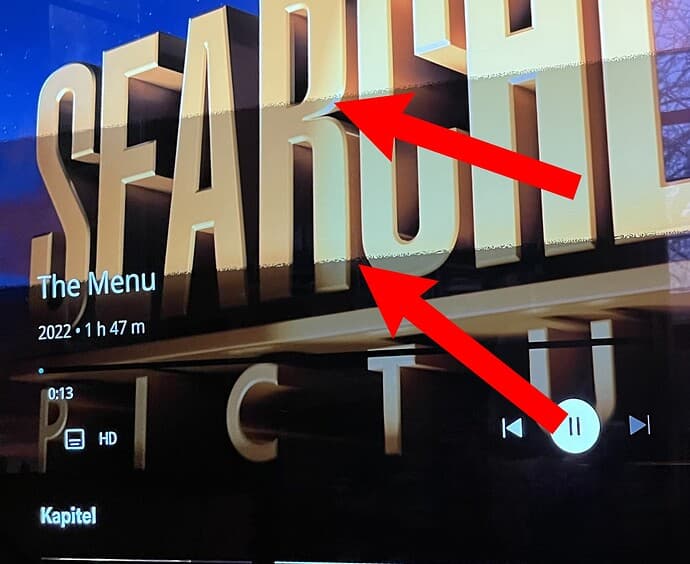
It’s fixed with Windows 11 24H2 and the latest Nvidia driver. It is also fixed in Chromium-based browsers.
I also found a “fix” on older Windows versions (10 22H2 / 11 23H2). It’s fixed by adding --disable_direct_composition or --disable_direct_composition_video_overlays=1 (either of those does the trick) to the Chrome shortcut or the chrome.exe. (Can be checked under chrome://gpu and the “Command Line”)
Unfortunately, I have not found a way to set Chromium flags for Plex HTPC. The
“QTWEBENGINE_CHROMIUM_FLAGS” does not work with Plex HTPC in this regard.
Is it possible to “force” that flag or hardcode it into Plex HTPC and release it in a future update? (Or just upgrade to 24H2)
