Server Version#: 1.41.3.9314
Player Version#: 1.69.0.264-8ae11259
Windows Version#: Windows 11 Pro 24H2 build 26100.2605
In Plex HTPC, I have enabled HDR Switching and HDR Metadata Passthrough. In Windows, HDR is disabled. This used to work fine (depending on the video, Plex HTPC would select HDR or SDR mode. I recently noticed that this doesn’t work anymore (maybe it has to do with the latest Windows update).
Just as a test, I enabled HDR in the Windows settings (and I confirmed on the display that HDR is really on). Then I started Plex HTPC and did the following:
Play HDR video: OK (stays in HDR mode)
Play SDR video: OK (switches to SDR mode)
Play HDR video: NOT OK (stays in SDR mode)
Did anyone else notice this problem? Are there any log files that would help identify / solve the problem? Your help would be appreciated.
Thanks
EDIT: Note: “Auto HDR” is switched off in Windows settings.
I also just noticed this problem. I did some testing with Windows 11.
With 23H2 it worked fine (like on Windows 10 22H2) but after the upgrade to Windows 11 24H2 it does not work anymore.
When in HDR mode (via Windows settings) and an HDR file is viewed, metadata is still correctly forwarded…
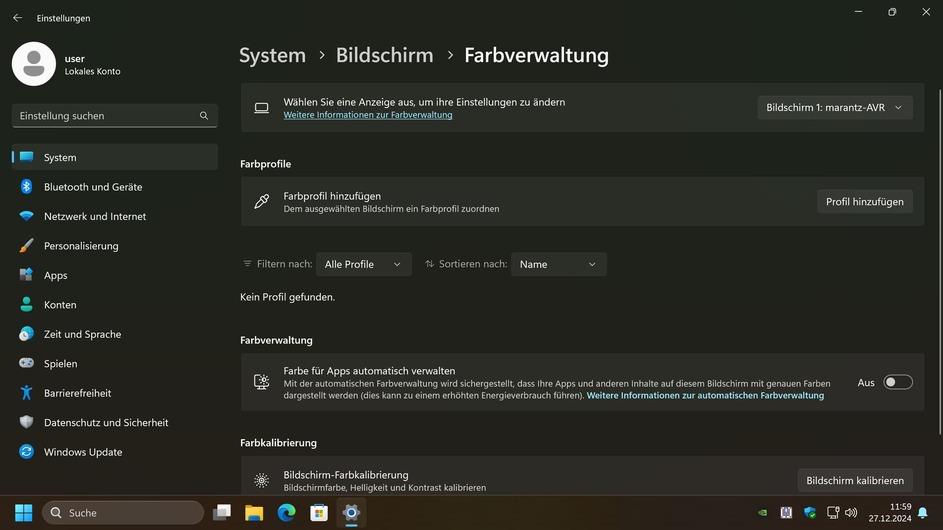
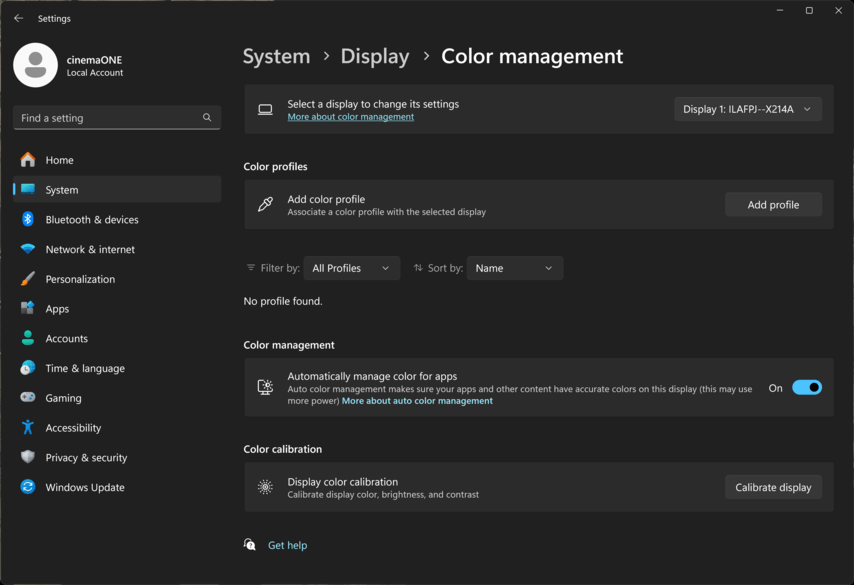
In the linked GitHub post it says that the setting “Automatically manage color for apps” causes the issue to arise. Can you try and disable it on your side and test again? I will also try it on my end…
Where is this setting? I cannot find it under advanced display settings, am running 24H2, and don’t seem to be experiencing the issue. At least it is switching correctly.
Edition Windows 11 Home
Version 24H2
Installed on 10/21/2024
OS build 26100.2605
Experience|Windows Feature Experience Pack 1000.26100.36.0
Thank you. Confirmed mine was turned off which explains why I did not see the issue. I don’t remember turning it off but did use the Windows HDR calibration app recently.
Thanks a lot @Mitzsch for your expert help. I can confirm that “Automatically manage color for apps” was enabled on my system (see screenshot). I don’t remeber switching this ON myself. But anyway, I switched it OFF now, and the problem is gone.