It’s very much like the promises of H.265 reducing H.264 by 50% – NEVER HAPPENED.
I benchmarked this with dedicated code.
Single channel vs dual channel yields 15-16% observed performance increase in memory intensive operations. You’ll see that 15-16% at the application level.
What dual channel provides us is the “striping” effect in the RAM. We’re still limited by the bus / memory controller limits but hard “wait” states while RAM cycles is greatly reduced.
you said red hat does not have native support.
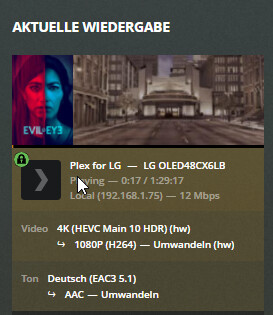
My PMS is running on Centos 8 and it looks like hw accelerated hdr tone mapping is working (cpu load around 50 -60%) and this without installing OpenCL libs. If i install opencl cpu load is around 80 -90% so even worse then without OpenCL. How can that be?
Ah ok, I updated my Plex app on my Synology NAS (1019) and I have the option for Tone Mapping within settings, however it stutters every couple of seconds. Are you saying eventually it will support it and play back smoother once you guys get round to updating all the required dependencies? I can be patient
Sorry to be a pain here, is there a simple guide on how to piggy back the docker as you suggested?
I have got the native app working perfectly on my Synology 1019 and don’t want to mess it all up. If I can piggy back it to use short term until native app is updated to support tone mapping then great.
map /config to /volumeX/Plex/Library/Application Support
map /dev/dri to /dev/dri
map /volume1 to /volume1 (so Plex finds the media on /volume1)
map other volumes as needed.
(here’s the tricky part)
a. SSH into the Syno and grep plex /etc/passwd
b. Get the User id (900-something or 1000-something) and the Group ID (100)
c. Set PUID=<UserID> and PGID=100
I suspect thumbnails will be resolved automatically when we have support in the native apps. It makes sense to be. Right now, things are a bit ‘duct tape’ held together in this “basic feature launch”.
We’re doing some internal toolchain work to make all of this better. I have no info about it beyond “working on it” and “native tonemapping when the libraries are built natively for all the hosts” (which implies completion of that work as well).
DSM 7 beta is closed at this point. The testers see it and we see it.
I can only tell you:
You’ll have no trouble navigating around the familiar DSM.
Apps have completely changed in how they are implemented.
Apps no longer have free reign in the box. Everything we used to do broke with DSM 7.
The DSM 7 SPK file and the DSM 6 SPK file are not cross-version compatible. To us, this is equivalent to developing support for a new vendor.
I’ve changed how PMS is installed and managed in DSM 7.
a. I am now using the Synology UI wizard you see some other apps use
b. I’ve managed to make a lot of the transition to DSM 7 seamless with ONE exception and there is no easy way around it.
c. I will present everything in the Forum Preview thread I’ll be opening after we get word back from Synology on our latest SPK updates to them / DSM 7 becomes “Public Beta” status.
hw accelerated hdr tone mapping is not working on an intel i7-8565U on centos 8.
Does anybody know which packages for centos are requiered to get opencl running correctly and hw accelerated hdr tone mapping working? Installing ocl-icd made it even worse.
Where can i find beignet-opencl-icd rpm? I was not able to find it anywhere. Found a lot of articles saying beignet was deprecated and replaced by intel neo opencl
Hi! I am seeing a 55-60% CPU usage. Is there any limitation that it can’t go higher? I was testing in my VM with 2 cores and 4 cores an it load each core exactly between 50-60%. I have hw accel working, but 4k HDR->1080pSDR@8Mbit is already struggling in my i5 8400.
Because it’s deprecated (in conjunction with the Fedora team not having passed a build in a long time ), the transcoder team is taking everything to the new Intel Compute-Runtime libraries now.
Worse case scenario is you download, build, and install