Server Version#: 1.32.8.7639
Player Version#: Web player (Firefox on Windows)
Hello, I’m trying to get hardware transcoding work so I can transcode 4k movies to play on other devices that aren’t 4k like my computer. I’ve read the help article on this and I think things should be working, so I am looking for some help. Here are the details:
I am a Plex Pass member
Server process is an Intel i5-3570K. This supports quick sync.
The machine also has an AMD Radeon HD 7800 GPU.
“Use Hardware-accelerated video encoding” is enabled in the server settings.
Your hardware might not be capable of dealing with hardware accelerated transcoding.
From what I can find, the iGPU might support Intel Quick Sync… but at a very limited level (actual HEVC support only started with Kaby Lake; that’s several HW versions later).
According to Wikipedia, the Radeon HD 7800 supports HW encoding for h264 full HD content – but 4K support in h264 was only added later (h265 even later).
Thanks everyone. Sounds like it is time to put the old hardware to bed.
Is there a preference between using a GPU or CPU for transcoding? It would be easier to upgrade the GPU since whatever I get will be compatible with my old motherboard, but if I want to rely on the CPU I’ll need to upgrade both the CPU and the motherboard.
Got the card, installed it, and hw transcoding is now working (yay!).
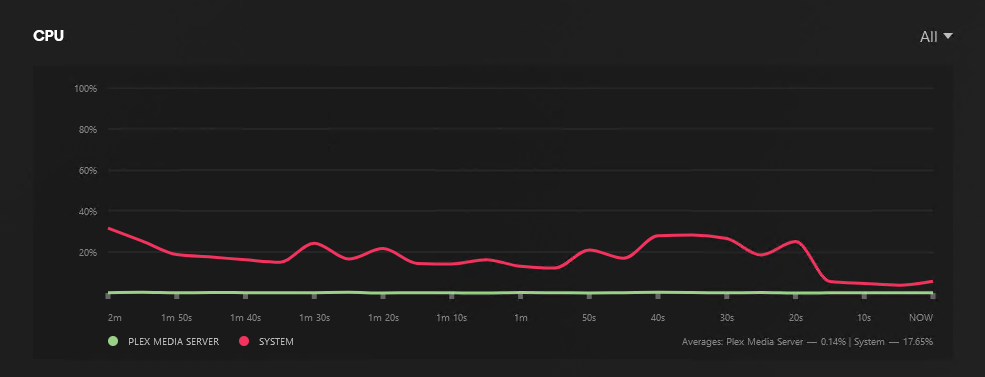
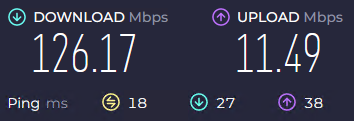
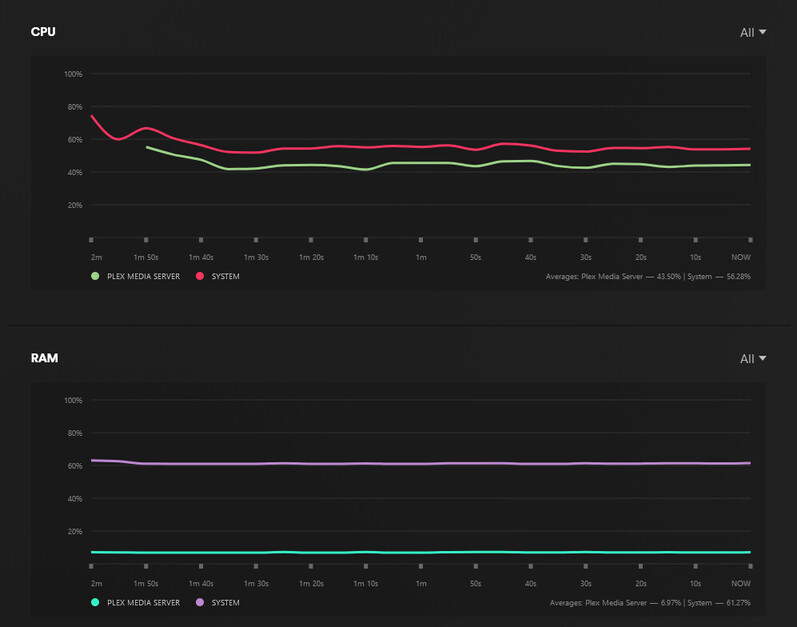
However, I am still getting buffering/stuttering for high quality media. The Plex dashboard and Task Manager don’t show any system resources maxing out, and in fact it seems to not be using any resources after sitting for a minute. Any ideas why it would be hanging? The server and client are on the same network and have ethernet connections.
Can RAM be a bottleneck? When I’ve read about transcoding it’s not usually an issue, but when I was trying this from my iPad that was the system resource that was hitting 100%. The server has 8GB of RAM.
Make sure you are running the 64-bit version of Plex Media Server. It is required for hardware accelerated tone mapping to work.
Pull the server log files via Settings → Troubleshooting. Unzip. Look at the first line in Plex Media Server.log. You want to see windows-x86_64 windows.
Example: Dec 22, 2023 11:59:38.475 [10100] INFO - Plex Media Server v1.40.0.7775-456fbaf97 - Microsoft PC x64-x64 - build: windows-x86_64 windows - GMT 01:00
In Settings → Transcoder:
Set Hardware Transcoding Device to the Nvidia GPU (versus Auto)
Set Transcoder Quality = Auto
Have you tried other devices / Plex clients? Just to rule out it is specific to the PC & Firefox you were testing with earlier.
What is the target bitrate/resolution for the transcode?
If you lower the bitrate to something like 720p/4Mbps, does it buffer less?
Dec 22, 2023 04:30:03.305 [2620] INFO - Plex Media Server v1.32.8.7639-fb6452ebf - Microsoft PC x64 - build: windows-x86 windows - GMT -06:00
Looks like I may not be using the 64 bit version? I will upgrade.
Transcoder quality is set to Auto and the Nvidia GPU is specified as the transcoding device.
Yes, I’ve tried the desktop app, the iPad app, streaming to a Chromecast. Target resolution is 1080p. Setting to a lower resolution doesn’t help much. Hard to tell if it is helping at all.