Server Version#:1.41.0.8994
Operating System: Microsoft Windows 10 Home (64 bit)
Processor: Intel® Core™ i5-4210U CPU @ 1.70GHz
Graphics : Intel HD graphics 4400, NVIDIA GE 820M (Disabled in BIOS)
Hi everyone,
I am seeking assistance regarding an issue I’ve encountered with hardware transcoding in Plex Media Server. After enabling the hardware acceleration feature, I have been unable to successfully utilise it for transcoding tasks. Below are the details of my setup and the challenges I am facing: Please help me to get the hardware transcoding working.
Has anyone experienced a similar issue with hardware transcoding in Plex after enabling it?
What troubleshooting steps would you recommend to get hardware transcoding working effectively?
Are there any specific settings or configurations within Plex or my system that might help resolve this issue?
I would greatly appreciate any guidance or advice that can assist me in resolving this problem.
Steps Taken to Resolve
I have ensured that my Intel GPU drivers are up to date.
I have verified that my hardware supports Intel Quick Sync Video.
I have double-checked the transcoder settings in Plex and confirmed that hardware acceleration is enabled.
I have disabled the Nvidia GeForce 820M in the BIOS to ensure that the Intel GPU is being utilised for transcoding.
I have tested various video files, but the issue persists.
I have monitored system resources during transcoding attempts.
Core error:
Oct 09, 2024 15:26:23.622 [7208] ERROR - [Req#88d/Transcode/a5z6hs7lc9crynvs2k6lbymf/5f6f3c5b-bc2f-453f-be22-5f1b304eeff9] [AVHWDeviceContext @ 026edf00] Error creating a MFX session: -9.

Oct 09, 2024 15:26:23.623 [7208] ERROR - [Req#88e/Transcode/a5z6hs7lc9crynvs2k6lbymf/5f6f3c5b-bc2f-453f-be22-5f1b304eeff9] Device creation failed: -1313558101.

Oct 09, 2024 15:26:23.623 [7208] ERROR - [Req#88f/Transcode/a5z6hs7lc9crynvs2k6lbymf/5f6f3c5b-bc2f-453f-be22-5f1b304eeff9] Failed to set value 'qsv=qsv@d3d11va' for option 'init_hw_device': Unknown error occurred

Oct 09, 2024 15:26:23.623 [7208] ERROR - [Req#890/Transcode/a5z6hs7lc9crynvs2k6lbymf/5f6f3c5b-bc2f-453f-be22-5f1b304eeff9] Error parsing global options: Unknown error occurred

Oct 09, 2024 15:26:23.633 [8048] DEBUG - Jobs: 'C:\Program Files (x86)\Plex\Plex Media Server\Plex Transcoder.exe' exit code for process 9736 is 1 (failure)
Intel® HD Graphics Family
Driver Details
Provider Intel Corporation
Version 20.19.15.4642
Date 2017-03-28
Device Details
Adapter Compatibility Intel Corporation
Video Processor Intel® HD Graphics Family
Resolution 1920 x 1080
Bits Per Pixel 32
Number of Colors 4294967296
Refresh Rate - Current 60 Hz
Refresh Rate - Maximum 60 Hz
Refresh Rate - Minimum 60 Hz
Adapter DAC Type Internal
Availability Running at full power
Status This device is working properly.
Location PCI bus 0, device 2, function 0
Device Id PCI\VEN_8086&DEV_0A16&SUBSYS_397817AA&REV_0B\3&11583659&0&10
NVIDIA GeForce 820M
Driver Details
Provider NVIDIA
Version 21.21.13.7667
Date 2017-01-15
Device Details
Adapter Compatibility NVIDIA
Video Processor GeForce 820M
Adapter DAC Type Integrated RAMDAC
Availability Offline
Status This device is working properly.
Location PCI bus 4, device 0, function 0
Device Id PCI\VEN_10DE&DEV_1140&SUBSYS_381717AA&REV_A1\4&3420519A&0&00E4
The abilities of the Quicksync unit in Haswell chips are very basic. It supports only AVC 8-bit and MPEG2 video.
Your log shows that you were testing with a source video with HEVC video codec. The HEVC codec (H.265) is more modern than AVC (H.264) and is not supported by your old chip.
Thanks, @OttoKerner , much appreciated for your detailed explanation. I now understand that my CPU’s GPU isn’t capable of handling HEVC due to its limitations.
My primary use case is for Plex to serve content on my local network at home, where I use two TVs:
LG Smart TV (non-Android) with Chromecast
Android TV
I don’t face issues with low-resolution movies (480p), as they play via DirectPlay/Direct Stream. However, any movies in 720p or 1080p—even if they are encoded in H.264—trigger the transcoder, leading to high CPU usage and significant playback stuttering.
Are there any steps I can take to improve the playback experience and eliminate the stutter? I’ve also tried using my NVIDIA GeForce 820M as the primary GPU, but there’s still no improvement. Based on what I’ve gathered, this GPU does not support hardware transcoding. Could you confirm if my understanding is correct?
What would you recommend to optimise smooth playback without transcoding issues?
Resolution and video codec are not the only things to investigate.
Equally as important are informations about
the bitrate of the video stream
number of audio streams. If there are several of these, which has been selected for playback? What is the number of audio channels and the audio codec of the selected audio stream?
Presence of subtitles. If they are present, have they been selected for display? And if so, which subtitle format are they using?
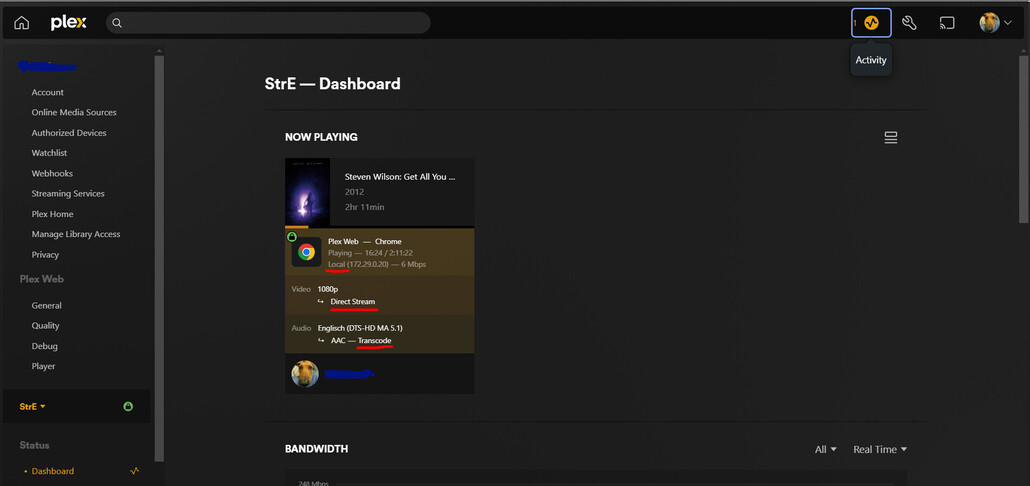
Is the TV “seeing” the server as being on the same local network? Check the Plex Dashboard during playback. It is one of the most significant tools for investigating issues like this.
Notice the first mark I made. In my screen shot it says “Local”, which is how it should be when server and player are within the same local network.
If this is not the case for you, it can mean that the available bandwidth between server and TV is severely limited.
The second mark is indicating whether the video stream is played as-is, or whether it is transcoded. This is also important to know, because if the CPU in your server is not up to the task, it cannot transcode the video stream fast enough – resulting in frequent pauses during playback.
The third mark is indicating the same for the audio stream.
Below all of these, you may find information about subtitles, if they are present and selected for display.
Once again, it is showing that your source file is using the HEVC video codec, which needs transcoding in order to be played on your TV.
That is a task that the CPU in your server cannot do fast enough.