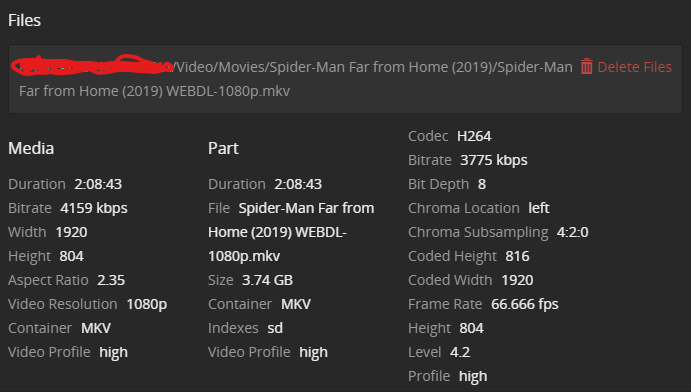
The file is “bitrate-starved”. An average video bitrate of just 3.7mbps for a 1080p/H.264 stream is very low quality to begin with. It should never be transcoded again.
When you feed files such as this into a hardware transcoder, the results regularly look atrociously.
These were also called generation “Haswell Refresh”, which sported only very minor improvements over the original Haswell architecture. The Quicksync chip is the same and has very limited capabilities: Intel Quick Sync Video - Wikipedia
If I had to guess: it doesn’t handle 10-bit color very well, which is used to achieve such a low bitrate in your file.
I have now tried with the same movie, same scene but different source, this time it was a 29 GB 4K , and the quality is now perfect , as I wanted it.
Obviously I cannot / will not use 4K source files, since I get other issues with them, so I suppose I am going to try once again with a bigger 1080p file and report back
Cheapest option would be to get a decent GeForce (like a 1060 Ti) and run it with the “improved” drivers so you don’t have that session limit that nvidia artificially puts upon the GeForce cards.
Dunno if the 1060 Ti is the best for the job, I just wanted to give an example.
The P400 is rightly limited to 2 encode streams, decoding/encoding(transcoding) uses a fair amount of memory bandwidth which the P400 doesn’t have a lot of.
So I ran another test, same movie, same scene, but the source file this time was a 1080p 30gb file: absolutely perfect, without the issues I had before with 4K (buffering).
This approach however is not very practical with TV Series, since I would need to re-download again entire seasons.
So the solutions are 2:
get better source files (larger 1080p files)
additionally add a capable graphic card for HW transcoding when the source cannot be improved.